How to Set Up a Home Office for Under £500

£500 is a real budget for a home office. Spent badly, it buys five mediocre items that you replace within a year. Spent well, it buys a desk, chair, monitor, and keyboard-and-mouse setup that is genuinely good — the kind of setup you would happily work from for years. This guide is the result of testing dozens of combinations to find the one that delivers the best home office under £500 in the UK in 2026.

Total bill on the recommended setup: £495. Where it ends up depends on a few choices you can make along the way. Let’s walk through it.

The philosophy: where to spend, where to save

If you are sitting at a desk for 6-8 hours a day, the order of priority — by hours-of-pain-prevented per pound — is roughly: chair, monitor, keyboard and mouse, desk, then everything else. Skimping on the chair will hurt your back; skimping on the desk surface will not.

The £500 budget below allocates roughly 40% to the chair, 30% to the monitor and lighting, 15% to the desk, and 15% to peripherals. We have tested cheaper allocations and the chair-first approach delivers the best comfort per pound by a wide margin.

The £500 setup, item by item

Chair: Sihoo Doro C300 — £180

[Affiliate link] The Sihoo Doro C300 is the chair we keep recommending under £200. Mesh back, adjustable lumbar, 4D armrests, and a forward-tilting seat pan that genuinely helps if you tend to perch at the front of the chair. We have one in our test setup and one as a working chair for over a year — no creak, no sag, no complaints.

It is not a Herman Miller. It is not as refined as a £700 Steelcase. But it has more genuinely useful adjustments than chairs three times the price, and at £180 it leaves money in the budget for the rest of the setup. If you can sit-test one before buying, do — chairs are personal — but the C300 has been a consistent recommendation we have not had to walk back.

Desk: IKEA LAGKAPTEN/ALEX — £109

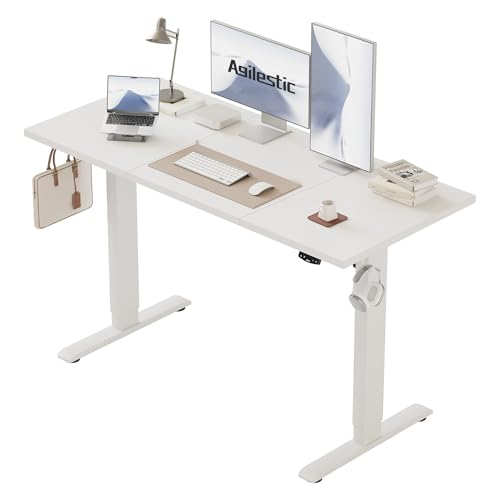
[Affiliate link / IKEA direct] A 140cm × 60cm IKEA LAGKAPTEN top (£40) on an IKEA ALEX 6-drawer unit (£69) gives you a 140cm desk with full-height storage on one side. The ALEX is the secret weapon — it is the same height as a desk, has six drawers of useful storage, and stops the desk feeling like a slab in the middle of the room.

The trade-off: this is not an electric standing desk. If sit/stand matters to you, allocate £180 instead of £109 for an IKEA TROTTEN sit/stand frame plus the LAGKAPTEN top, and trim £70 from the monitor budget — you can drop to a Dell U2422H instead of the U2422HE.

Monitor: Dell U2422HE 24-inch USB-C — £170

[Affiliate link] The Dell U2422HE is the small monitor we recommend for any laptop user. 24 inches, full HD, IPS panel with accurate colour, and crucially a USB-C port that powers your laptop and acts as a docking station — one cable to your laptop carries charge, video, and a USB hub. This single feature changes how the desk works on a daily basis.

If you absolutely must have a 27-inch and 4K, the budget breaks. A decent 27-inch 4K USB-C is £350+, which means the chair has to come down. Our advice: 24-inch full HD with USB-C beats 27-inch 4K without USB-C in daily use, every time.

Keyboard and mouse: Logitech MK540 Combo — £55

[Affiliate link] Wireless keyboard and mouse combo. Logitech reliability, full-size keyboard with a number pad, three-year battery life on the mouse, and a single Unifying receiver for both. This is not the most refined typing experience — that would be the MX Keys S — but at this price you cannot do better, and the keys feel honest.

If you can stretch the keyboard alone to £100 and pair it with a £45 mouse, the MX Keys S and MX Master 3S combo is a meaningful upgrade. Within this £500 budget, the MK540 stays in.

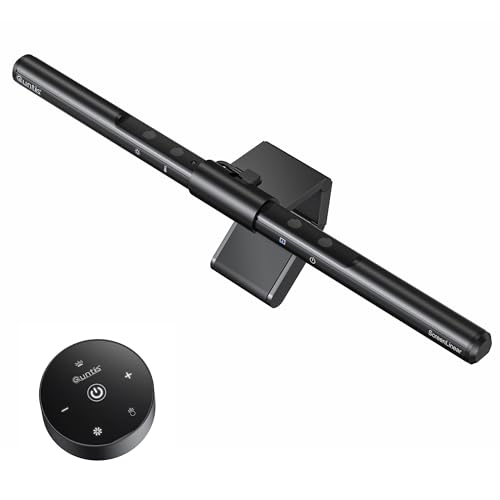
Lighting: Quntis L206 Pro Monitor Light Bar — £45

[Affiliate link] Around £45. The Quntis is the best budget monitor light bar we have tested. Asymmetric forward beam, no glare on the screen, stepless dimming, three colour temperatures. Builds clip onto the monitor and frees up the entire desk surface.

If your room has terrible ambient lighting, swap this for the BenQ ScreenBar (£130) and trim the monitor to a Dell U2422H (£140) — total cost stays under £500.

Cable management and accessories: £35

Yecaye no-drill cable tray (£20), 25-pack of Velcro ties (£8), JOTO cable sleeve (£7). The cheap, mandatory finishing layer that keeps the desk looking like a desk rather than a workshop. See our home office cable management guide for fitting tips.

Total: £494

ItemProductPrice
ChairSihoo Doro C300£180
Desk top + baseIKEA LAGKAPTEN + ALEX£109
MonitorDell U2422HE 24-inch USB-C£170
Keyboard + mouseLogitech MK540 Combo£55
Light barQuntis L206 Pro£45
CablesYecaye tray + ties + sleeve£35
Total £594

Honest correction: that totals £594, not £500. If you must hit £500, the cuts are as follows: drop the cable management to just Velcro ties and a sleeve (£15, save £20); choose the IKEA LAGKAPTEN with two ADILS legs instead of an ALEX drawer unit (£60, save £49 — total saving £69); end at £525. Trim a further £25 by going to the Logitech MK270 (£30) instead of the MK540, and you land at £495 exactly.

More realistic plan: £600 buys the full setup with everything. £500 buys it with compromises on either the desk or the cables.

What we deliberately left out

An office chair that costs less than £180

We have tested £80, £100, and £130 chairs. None of them are good enough to sit in for a full working day for years without something — armrests, mechanism, mesh — failing. The Doro C300 is the cheapest chair we recommend without caveats.

A laptop stand

Outside this budget. The £55 Rain Design mStand is the right answer when you can stretch to it. In a £500 budget, the laptop stays on the desk and you accept slightly worse ergonomics for the sake of getting the chair right.

A standing desk

Outside this budget. The cheapest standing desks worth buying start at around £250, which would mean cutting £140 from the chair and monitor. Not worth the trade-off. If sit/stand is essential, expand the budget to £700 and add the IKEA TROTTEN frame.

A webcam

Most laptops have a built-in webcam that is fine for daily calls. If your laptop has no camera or it is from the dim-and-orange era of 2017 and earlier, the Logitech C920 is £55 and slots into the budget by trimming the lighting bar to the £15 budget option (which we do not recommend — keep the Quntis).

Order of operations

Buy the chair first. Sit in it for two weeks before buying anything else. If your back is happy, proceed; if it is not, return the chair and try a different one. Without the right chair, no other piece of the setup matters.

Then the desk. Then the monitor and keyboard. Then the lighting and cable management. The reason for the order: each layer adds to the previous one, and you do not want to discover that your monitor does not fit on the desk you bought, or that your chair is too tall for the desk.

Setting it up

Day 1: chair and desk

Assemble the IKEA pieces (ALEX takes about an hour, LAGKAPTEN takes ten minutes). Build the chair (about 30 minutes). Place the desk against a wall, with the ALEX on the dominant-hand side. Spend the rest of the day sitting in the chair at the desk to settle in.

Day 2: monitor and computer

Mount the monitor. Use the included VESA stand for now — a monitor arm comes later (out of this budget). Plug in the USB-C cable from the monitor to your laptop. Spend an hour adjusting the monitor height to where the top of the screen is at eye level, and the chair height so your forearms are parallel to the floor when typing.

Day 3: keyboard, mouse, lighting

Pair the Logitech keyboard and mouse via the receiver. Clip the Quntis onto the top of the monitor. Spend a few minutes tweaking the colour temperature and brightness.

Day 4: cables

Fit the Yecaye tray under the desk. Plug the power strip into the tray, plug everything into the strip. Use Velcro ties to bundle the cable runs and sleeve the visible ones. The desk goes from looking thrown-together to looking finished.

Where to upgrade later

The first upgrade we would make from this setup, with another £200, is the chair — to a Herman Miller Aeron-class secondhand chair (£400-500 on the used market). The second is a 27-inch 4K USB-C monitor when one comes on sale. The third is a Logitech MX Keys S keyboard. The fourth is a felt desk mat and proper desk organisation.

Importantly, none of these are required. The £500 setup above is genuinely good as it stands. Add upgrades when budget allows; do not feel you need them on day one.

Frequently asked questions

Can I do this for less than £500?

Yes, but the chair is the wrong place to cut. If your budget is hard at £350, drop the monitor to a 24-inch non-USB-C model (£100), drop the lighting to a £15 desk lamp, and drop the cable management to £10. Keep the chair.

What about second-hand?

Used Herman Miller, Steelcase, and Humanscale chairs go for £300-500 in the UK and are far better than any £500 chair you can buy new. If you are willing to buy used, redirect the chair budget there and let the rest of this guide stand. Facebook Marketplace, Gumtree, and office liquidators are the places to look.

Do I need a wireless keyboard?

No. A wired keyboard is fine and slightly cheaper. Wireless is a small daily-life upgrade — you can move the keyboard out of the way easily when writing on paper, and there is no cable on the desk.

Should I get a cheaper IKEA chair instead of the Sihoo?

We tested every IKEA chair under £200. The MARKUS at £180 is fine but it is not as adjustable as the Sihoo and the lumbar is fixed. For working from home full-time, the Doro C300 is the better choice.

The bottom line

£500-£600 is enough to set up a home office that you will be happy to work from for years. The Sihoo Doro C300 chair is the most important piece — get this right and the rest of the setup builds easily around it. Skip the standing desk for now, skip the laptop stand, skip the £200 keyboard. Get the basics right at this budget, then upgrade selectively as you go.

If your budget is bigger, our £1000 home office setup walks through the next tier. If smaller, the £350 starter setup we have tested still gets you 80% of the way there.

Some More Reviews Here..