If you spend any meaningful time working from a laptop, a stand is the cheapest ergonomic upgrade you will ever make. Lifting the screen to roughly eye level, and pairing the laptop with a separate keyboard and mouse, is the difference between a neck that feels fine at 6pm and one that does not. These are the six stands we keep recommending in 2026, all listed on Amazon UK (prices checked September 2026), organised by the kind of laptop, desk and routine you have.
Why you actually need a laptop stand
A laptop on a desk puts the screen 20–30cm below where your eyes naturally look, so your neck bends forward. Hold that for a working year and you can end up with neck and shoulder problems. A stand brings the screen up to eye level; the laptop keyboard then becomes too high to use, so you plug in an external keyboard and mouse and your shoulders relax. There are three types worth considering: fixed-height stands for desks, adjustable stands for varied use, and travel stands that fold flat.
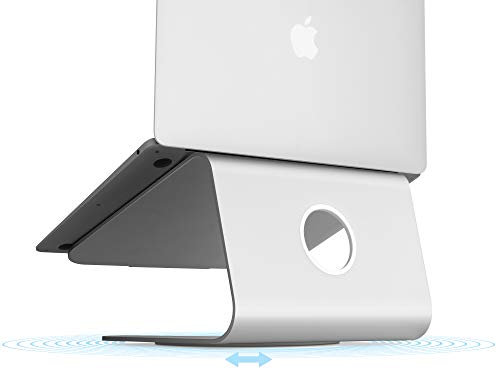
1. Rain Design mStand: best fixed-height stand
If your laptop lives on the same desk every day, the mStand is the answer. Single-piece curved aluminium, a lift of about 15cm and a cable gap at the back. £39.90 on Amazon UK, rated 4.7 stars from nearly 11,000 ratings (currently listed as usually dispatched a little later). It looks like an Apple product and works with any 13- to 16-inch laptop. See our mStand review for the long-term verdict.

2. Nexstand K2: best budget travel stand
A lightweight, foldable stand that fits in a laptop bag and lifts the laptop to several height positions. £24.99, rated 4.6 stars from more than 3,000 ratings. If you travel occasionally, it does the job; if you are on the road every week, a sturdier premium travel stand is worth the extra.

3. BoYata multi-angle laptop stand: best adjustable stand
For people who vary their setup: a multi-angle adjustable riser with a heat-vented design. Sometimes you use the laptop keyboard, sometimes a monitor, sometimes the sofa, and this adapts to all three. £28.99, rated 4.8 stars from nearly 6,000 ratings. It never looks quite as elegant as a single-piece stand.

4. Soundance aluminium laptop stand: best for ventilation and heavy workloads
If you push your laptop hard, heat is your enemy. The Soundance is a ventilated aluminium riser that lets air flow under the laptop. £19.99, rated 4.7 stars from more than 47,000 ratings. The listing covers 10–15.6 inch laptops; larger versions are sold separately.
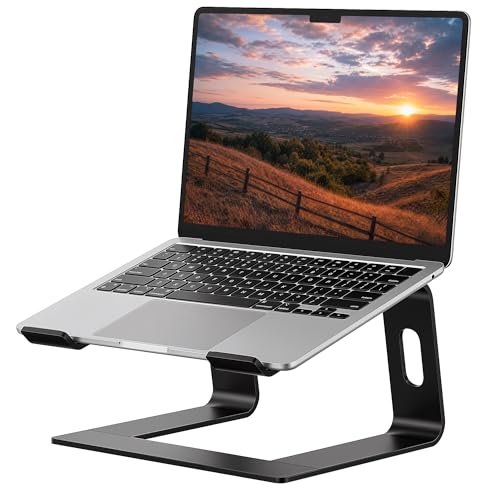
5. Babacom foldable adjustable laptop stand: best budget adjustable stand
A foldable, height-adjustable stand that packs flat for a bag. £19.99, rated 4.6 stars from nearly 9,000 ratings. A good all-rounder if you want adjustability without paying for a premium brand.

6. tounee telescopic laptop stand: best sit-to-stand stand
A telescopic stand with a 360° swivel base that lets you raise the laptop for on-demand standing work, for laptops from 10 to 17 inches. £48.99, rated 4.6 stars from more than 4,000 ratings. The right pick if you want to alternate sitting and standing without a standing desk.

Quick comparison
Stand | Style | Adjustable? | Price (Amazon UK, Sept 2026) |
Rain Design mStand | Fixed | No | £39.90 |
Nexstand K2 | Travel / folding | Yes | £24.99 |
BoYata | Adjustable, vented | Yes | £28.99 |
Soundance | Ventilated riser | Yes | £19.99 |
Babacom | Foldable adjustable | Yes | £19.99 |
tounee | Telescopic sit-to-stand | Yes | £48.99 |
How to choose the right laptop stand
- Match the stand to your laptop weight and size; check the listing for the supported range.
- Decide if you need it to fold. Fixed stands are sturdier and more elegant, but folding stands suit travel.
- Plan your keyboard and mouse: a stand is useless without them, so budget roughly £80–£150 for a keyboard and mouse.
- Check your dock or USB-C cable reach after lifting the laptop 15cm.
Frequently asked questions
Is a laptop stand worth it if I already have an external monitor?
Yes, with a caveat. If you only look at the external monitor, a low stand for cooling is enough. If you use the laptop as a second display, lift it to about the same height as the external one.
Will a stand damage my laptop?
Reputable stands use rubber or silicone pads where they touch the laptop and should not mark the chassis.
Do I need to think about heat?
Any stand that lifts the laptop off the desk improves airflow. The ventilated Soundance helps most for sustained heavy workloads.
Which one should you buy?
For a laptop that lives on a desk, the mStand. For occasional travel, the Nexstand K2. For varied use, the BoYata. For heavy workloads, the Soundance. For sit-to-stand flexibility, the tounee. Whichever you pick, do it this week: the compounding ergonomic benefit of getting your screen to eye level is enormous over a working year.