If you asked us to name the single headset most home workers should buy, this would be the answer. This review is the product of months of daily Teams and Zoom calls from our home office, and the short version is that it does the boring things (sounding clear, staying comfortable and connecting reliably) better than almost anything else at the price.
Verdict: the Jabra Evolve2 65 is the benchmark work-from-home headset. A strong boom mic, all-day on-ear comfort, a rock-solid USB dongle and a genuinely useful busylight make it the most dependable calls experience around £150. On Amazon UK the stereo, USB-C, Microsoft Teams version is £149.96 (September 2026), rated 4.2 stars from 1,399 ratings and in stock; the USB-A version is £147 with 4.3 stars from 3,650 ratings. Its only real limits are passive (not active) noise cancellation and a slightly business-like look.
Jabra Evolve2 65 review: what you are buying
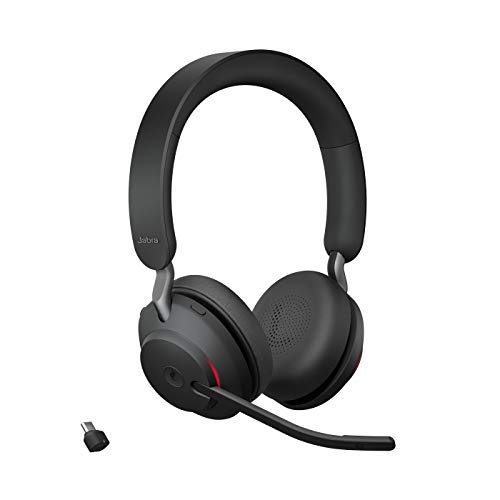
The Evolve2 65 is a wireless on-ear business headset built around calls first and music second. It connects to your laptop through Jabra’s Link 380 USB dongle, the key to its reliability, and to your phone over Bluetooth at the same time, so you can take a mobile call without unpairing from the computer. There is a flip-boom microphone, a busylight on the boom and earcup, and physical call-control buttons you can find without looking.
Type | Wireless on-ear business headset (stereo or mono) |
Connectivity | Jabra Link 380 USB dongle (USB-A or USB-C) plus Bluetooth multipoint to a phone |
Microphone | Flip-boom mic with noise-isolating processing; flip-to-mute |
Battery life | Up to ~37 hours; USB-C charging |
Weight | Approx. 100g |
Extras | Busylight, physical call-control buttons |
Typical UK price | ~£147–£150 on Amazon UK (Sept 2026) |
Microphone quality: where it earns its keep
The flip-down boom puts the mic close to your mouth, and Jabra’s noise-isolating processing keeps the rest of the room out of the call. Typing, a distant washing machine and general household hum are simply not heard, and your voice comes through full and natural. Flipping the boom up mutes the mic automatically, which removes the classic “you are on mute” fumble. Compared with a laptop’s built-in mic, which wandered in volume and picked up keyboard clatter, the boom stayed level and clean throughout.
Comfort across a full day
On-ear cushions run cooler than sealed over-ear headsets and stay comfortable across a full working day, with a light clamp that holds securely without pinching. If you wear glasses, the soft foam seals around the arms without creating a hotspot. At around 100 grams it is light enough to forget you are wearing it, though passive isolation is moderate.
No active noise cancellation: does it matter?
The Evolve2 65 has passive noise cancellation only; its pricier sibling, the Evolve2 85, has active noise cancellation (ANC). For a typical home office this is rarely a problem, because the boom mic keeps you sounding clear regardless. ANC quietens noise for the wearer; it does not change how you sound to people on your call. If you work somewhere genuinely loud, look at the Evolve2 85 or the Poly Voyager Focus 2 instead.
Setup and software
Getting started is plug-and-play: insert the Link 380 dongle and the headset connects. Ten minutes in Jabra Direct on day one still pays off: update the firmware for better connection stability and mic clarity, leave sidetone on so you do not shout, choose an equaliser preset, and set busylight and button behaviour. The app also manages the Bluetooth multipoint connection to your phone.
Battery and connection
Jabra quotes up to around 37 hours of battery, which in practice means charging roughly once a week, with USB-C charging and a fast top-up. The Link 380 dongle is the unsung hero: unlike pairing a consumer headset straight to a laptop over Bluetooth, it just works, meeting after meeting, with decent range around the home office.
Busylight: the household peace-keeper
The busylight glows red when you are on a call, on both the boom and the earcup. In a shared home, family or housemates can see at a glance that you are mid-meeting, and it becomes an unspoken do-not-disturb sign the whole household learns to read.
How it compares
Versus the Jabra Evolve2 85: the 85 adds active noise cancellation, larger over-ear cushions and a slightly better mic array, for noticeably more money and more weight. If you work somewhere loud it is the upgrade; for a quiet spare room the 65 gives you most of the call quality for meaningfully less.
Versus the Poly Voyager Focus 2: Poly adds ANC and an optional charging stand that turns the headset into a tidy desk fixture. The Jabra pulls ahead on the busylight and the dependability of the Link 380 dongle. Choose the Poly if the stand and ANC matter more to you.
Which variant should you buy?
- USB-A vs USB-C dongle: match the Link 380 dongle to the port on the machine you use most; Amazon UK lists both.
- Teams vs UC: the Teams variant has a dedicated Microsoft Teams button and certification; the UC variant is tuned for general use. Both work with Zoom, Meet and Webex.
- Mono vs stereo: mono keeps one ear open to hear the room; stereo is better for focus and music, and suits most home workers.
Our default recommendation is the stereo, USB-C, Microsoft Teams version, which is the one linked above.
Pros | Cons |
Excellent boom mic that isolates your voice | No active noise cancellation |
Comfortable on-ear fit for full days | Business look won’t suit everyone |
Reliable Link 380 USB dongle | Variant choice can confuse |
~37-hour battery, weekly charging | Music performance is good, not audiophile |
Busylight and flip-to-mute boom | Around £150 is still a real investment |
Who should buy the Jabra Evolve2 65?
Buy it if you spend hours on calls and want one headset that quietly gets everything right: clear voice, all-day comfort and a dependable connection. Skip it and choose the Evolve2 85 or Poly Voyager Focus 2 if you specifically need active noise cancellation, or a wired USB headset if you want to spend far less and never leave your desk. If you barely take calls and mostly want great music, a consumer pair like the Sony WH-1000XM5 will sound richer.
Verdict
The Jabra Evolve2 65 sets the benchmark for work-from-home headsets because it prioritises what matters on a call over what looks good on a spec sheet. It is not the flashiest headset you can buy, but months in it remains the one we reach for every morning.
Frequently asked questions
Is the Jabra Evolve2 65 good for music too?
Yes for music and podcasts between meetings, though it is tuned for voice. The equaliser in Jabra Direct lets you warm it up a little.
What is the difference between the Evolve2 65 and Evolve2 85?
Active noise cancellation and cup design: the 85 adds ANC and larger over-ear cushions; the 65 uses on-ear cushions with passive isolation.
How does it compare with the Poly Voyager Focus 2?
The Poly adds ANC and an optional charging stand; the Jabra counters with the busylight and the dependable Link 380 dongle.
Does it work with a Mac?
Yes. It works with macOS, Windows, Chromebooks and most devices via the USB dongle, and with phones over Bluetooth. Jabra Direct is available for Mac and Windows.
Related reading
- Jabra Speak2 55 Review: Best Speakerphone for Group Calls
- Best Headsets for Video Calls Working From Home 2026 UK
- Best Wireless Earbuds for Work Calls in 2026 UK
- Best Noise-Cancelling Headphones for Working From Home 2026 UK
- Best Budget Headsets for Teams and Zoom Under £50 UK
- Open-Ear vs Over-Ear Headphones for All-Day Working