A home office setup 500 budget UK buyers can actually live with is the question we get asked more than any other. £500 is the awkward number that sits between sitting on a dining chair for a year and spending £1,800 on a Herman Miller Aeron and an Uplift V2. It is enough to build a setup that does not hurt your back, looks reasonable on a Teams call, and lasts longer than the lockdown years of plywood and webcam shame. It is not enough to spec the room of your dreams — and that is the entire point of this guide.
This is the £500 home office setup we would actually buy in 2026 if we were starting again from scratch. Prices are full UK retail at the time of writing and we have favoured Amazon UK availability so the kit can land on your desk in two days rather than be backordered out of a warehouse for six weeks.
Short version: a sit-stand desk you can grow into, a chair that is not a dining chair, a single 27-inch monitor that is sharp enough for spreadsheets, a webcam and speakerphone your team will not complain about, and a quiet keyboard-and-mouse pair. Total comes to £495, comfortably inside the £500 line. Below is where every pound is spent — and which pieces are worth upgrading first when the budget loosens.
The £500 Home Office Setup at a Glance
Here is the entire kit in one table. Everything below is widely available on Amazon UK or in IKEA stores at the time of writing.
| Category | Pick | Why it makes the list | Price |
|---|---|---|---|
| Desk | FlexiSpot CylineE frame + IKEA LAGKAPTEN 140 cm top | Quiet sub-£160 sit-stand combo; grows with you | £160 |
| Chair | SONGMICS mesh task chair | Adjustable lumbar, armrests, and tilt under £70 | £68 |
| Monitor | AOC 27B3HA2 27-inch 1080p IPS | Sharp enough for spreadsheets; current successor to the 27B2H | £75 |
| Webcam | Logitech C922 Pro Stream | 1080p, autofocus, no faff with drivers | £57 |
| Mic / speaker | Anker PowerConf S330 speakerphone | Doubles as mic and speaker; no headset needed | £47 |
| Keyboard | Logitech Pebble Keys 2 K380s | Compact, quiet, pairs with laptop and tablet | £30 |
| Mouse | Logitech M720 Triathlon | Programmable, multi-device, two-year battery | £34 |
| USB hub | UGREEN powered 7-port USB 3.0 hub | Keeps the underside of the desk navigable | £24 |
| Total | £495 |
That lands £5 under the £500 line, which leaves just enough slack for a pack of Velcro ties if your desk ends up with more cable slack than expected. If your room cannot take a 140 cm surface, drop to the smaller 120 cm LAGKAPTEN top (£35, saving £15 overall).
The Desk: £160
The single piece of kit that determines whether a £500 home office setup feels grown-up or temporary is the desk. We will not pretend a £160 budget buys a Jarvis or an Uplift V2 — it does not. What it does buy, if you assemble it yourself, is a quietly capable sit-stand combo.
Our pick: FlexiSpot CylineE frame + IKEA LAGKAPTEN 140 cm top
FlexiSpot has retired the entry-level EF1 single-motor frame we used to recommend here; the CylineE is its current direct successor on Amazon UK, at a similar price and spec — a single-motor electric frame that raises and lowers smoothly across the height range most adults need, with a lower weight limit than FlexiSpot’s dual-motor desks but plenty for a monitor, laptop and desk lamp.

- 【Ideal Adjustable Range】 The FlexiSpot standing desk frame offers one of the widest adjustment ranges on the market, with a height range of 71.5–116 cm and a width range of 91–146 cm. It supports desktops 50–80 cm wide and 100–160 cm long, providing maximum flexibility for DIY desk setups
- 【Multifunctional Control Panel】The FlexiSpot desk features a control panel with four memory presets and an LED display for real-time height tracking, allowing effortless adjustments at the touch of a button
- 【Powerful and Quiet Motor】 With a load capacity of 80 kg (movable) / 100 kg (fixed), the desk offers strong, stable support. Its motor operates under 50 dB for a quiet workspace, with a speed of 25 mm/s for smooth adjustments
- 【Anti-Collision Technology】To prevent bumps and scratches, the built-in sensor can be adjusted to detect solid objects when the lifting column moves up or down, enhancing safety and durability
- 【High-Quality Workmanship】 The FlexiSpot height-adjustable desk is built with an industrial-grade steel frame, with each unit undergoing over 20,000 tests to ensure quality and safety. Its sturdy construction guarantees long-lasting durability.
Bolt an IKEA LAGKAPTEN 140 × 60 cm top to it (£50 in white or black-stained ash, IKEA only — not sold on Amazon) and you have a 140 cm sit-stand desk. The LAGKAPTEN is the same desktop used on the IKEA TROTTEN and BEKANT — it is melamine, not solid wood, but it survives daily use and looks fine on a Zoom background. The pre-drilled holes on most FlexiSpot frames line up with it directly.
If the room is small, drop to the 120 × 60 cm LAGKAPTEN (£35). If you cannot face assembly, the IKEA TROTTEN manual crank desk is ready to go, but you lose the electric lift.
The Chair: £68
The chair is the second item where a tight budget bites hardest. £68 will not get you near a Herman Miller or a Steelcase. It will, however, get you something measurably better than the dining-chair-with-cushion setup most people start with.
Our pick: SONGMICS mesh task chair
FlexiSpot’s own OC3B task chair is no longer sold on Amazon UK, so our current pick at this price point is the SONGMICS mesh task chair — adjustable lumbar support, armrests, and a tilt mechanism, with a mesh back that does not get sweaty in a London August. Build quality is unremarkable but acceptable for the price.
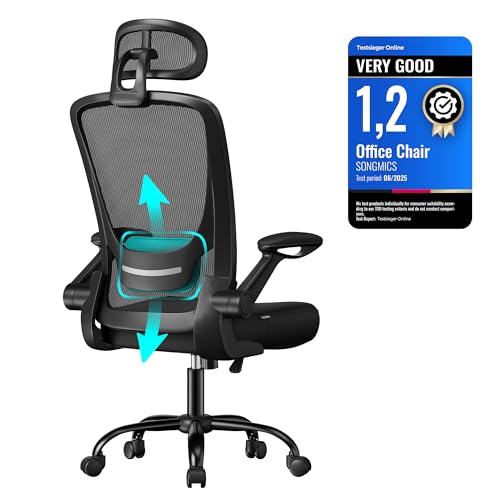
- S-Shaped Lumbar Support: Featuring an S-shaped backrest, this ergonomic office chair closely fits your spine; the adjustable headrest and lumbar pad effectively support your neck and lower back to relieve fatigue during long working hours,
- Breathable Mesh Cushion: Enjoy comfort with the 8 cm thick high-density sponge seat that resists deformation; the premium mesh fabric promotes air circulation, keeping you cool and sweat-free on this comfy office chair,
- Flip-Up Armrests: Perfect as a study chair or among desk chairs for bedroom, it features clever armrests that easily fold away; simply push it under your desk to save valuable floor space when you finish your daily tasks,
- Customisable Tilt Mechanism: Measuring 64x64x(115-130) cm, this home office chair lets you adjust the seat height to match your stature; the 90-105 degree tilt angle meets your different needs for focused working or relaxing at home,
- 120 kg Load Capacity: Built with a gas cylinder and a steel base, this SONGMICS office chair in Ink Black supports up to 120 kg; the premium materials are suitable for your daily use,

If you can stretch the budget, the IKEA HATTEFJÄLL (around £149 in store) is a noticeably better chair with a 10-year guarantee — but availability is patchy. A second-hand HATTEFJÄLL on Facebook Marketplace (typically £60–£80) is the smartest upgrade route if you come across one.
The Monitor: £75
A single 27-inch monitor is the right answer for a starter setup. Dual screens are a productivity boost, but two budget panels will look worse than one good one, and the extra cabling pushes a tidy desk over the edge.
Our pick: AOC 27B3HA2 27-inch 1080p IPS
The 27B2H we used to recommend has been succeeded by the 27B3HA2, the current cheapest 27-inch IPS panel on Amazon UK we are comfortable recommending. It is 1080p, not 1440p, which means text is slightly softer than on a sharper screen — but the colour, viewing angles, and matte coating are all genuinely good for the price.
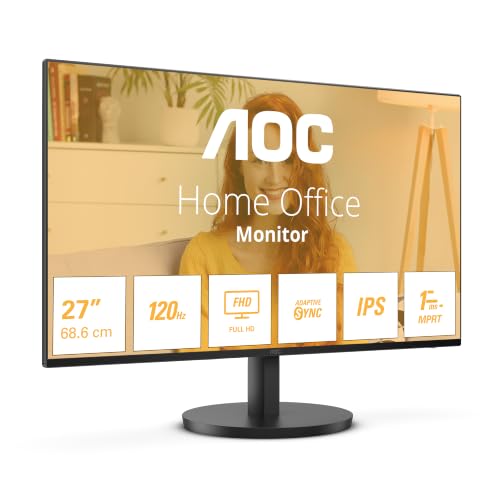
- Flicker Free and Low Blue Light technology reduce eye fatigue while increasing visual comfort; Adaptive image synchronization ensures streak-free images
- Viewing angle stable IPS panel, 2x 2 watt speakers, matt display, headphone out, slim frame, compatible with VESA mount 100x100, removable stand, cannot be raised
- Brightness/contrast: 250 cd/m² 1,300:1, connections: 1x D-Sub, 1x HDMI 1.4, 4 ms GtG response time
- Manufacturer's warranty: 3 years The warranty conditions can be found under "Further technical information". Your statutory warranty rights remain unaffected
- Box contents: AOC 27B3HA2 68.6 cm (27 inch) PC screen, power cable, HDMIAudio driver CD, warranty card
If you can find a 1440p panel on sale under £150, that is the upgrade pick — the pixel-density jump is the single biggest visual win you can buy in this price bracket, and we would prioritise it ahead of any second monitor for at least the first six months.
The Webcam, Mic and Audio: £104
These items together are what your colleagues actually judge your home office on. A clear voice and a sharp image earn you more credibility on a Teams call than any decorating choice in the room behind you.
Webcam: Logitech C922 Pro Stream — £57
The refurbished Amazon Renewed C922 we used to point people to is no longer listed, so this is the new C922 Pro Stream at full price. It is the slightly upgraded sibling of the venerable C920: 1080p at 30 fps, autofocus, dual mics (which you will not use — see below), and zero driver fuss on Windows or macOS.
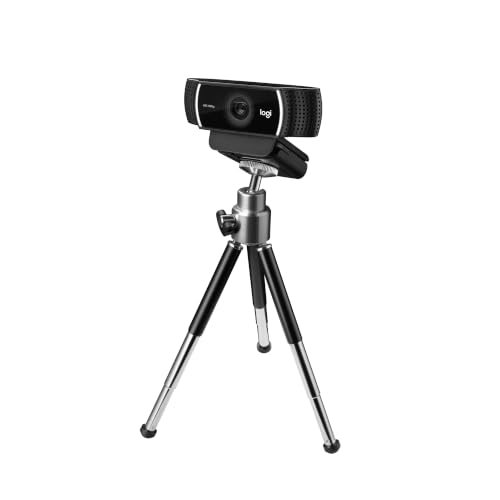
- Logitech webcam enables streaming broadcasts with no lag or distortion.
- Full adjustable tabletop tripod with a webcam stand and swivel mount. Extends to 18.5 cm
- Enjoy razor-sharp high definition with this 1080p webcam in any environment
- Premium video quality every time you broadcast with this streaming webcam
- Capture natural sound on calls and recorded videos with this webcam microphone
Mic and speaker: Anker PowerConf S330 — £47
Anker’s PowerConf S3 has been succeeded by the S330, the same idea in a small puck-shaped USB speakerphone that has quietly become our default audio device for any call where we do not want to wear a headset. It picks up voice far more cleanly than a webcam mic, and the built-in speaker is loud enough for a small spare room.
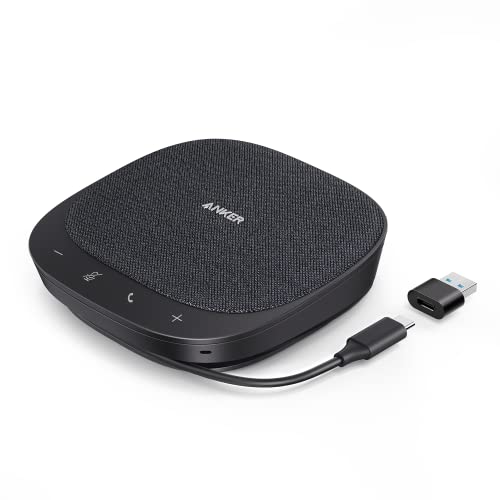
- Smart Voice Enhancement: Eliminate background noise while simultaneously enhancing voices for a professional meeting experience in any environment.
- Plug and Play: Connect via USB-C (includes standard USB adapter) and join meetings in an instant. A wired connection offers a stable and reliable USB speakerphone experience.
- 360° Voice Coverage: A USB conference speaker with 4 high-sensitivity microphones to pick up all voices within 3m in super-high clarity.
- Superior Sound: A 1.75” driver paired with 2 passive bass-radiators adds body and depth to both meeting audio and music.
- What’s In The Box: PowerConf S330 USB conference speaker, USB-C to USB-A adapter.
Skip the ring light at this budget. A north-facing window or a £15 desk lamp pointed at a white wall gives a softer, more flattering image than any cheap LED ring you can buy for £30.
Keyboard, Mouse and the Little Things: £88
Input devices age more visibly than anything else on a desk. A grubby £8 keyboard and a generic optical mouse are the first things a guest will notice.
Keyboard: Logitech Pebble Keys 2 K380s — £30
Logitech has rebranded the original K380 as the Pebble Keys 2 K380s — the same compact, quiet, multi-device Bluetooth keyboard under a new name. It pairs with up to three devices at once and switches between them with a single key press, which matters more than you think when your laptop, tablet, and a work-issued mini PC all sit on the same desk. Not mechanical, not RGB — just sensible.

- Defy Boring: With a slim design, multiple colours and smarter tech, this Bluetooth keyboard from the Pebble 2 Collection lets you express your vibe and make your statement
- Never Made Ordinary, Made to go places: the Pebble Keys 2 K380s keyboard is slim, compact, portable and made with recycled plastic (1)
- Easily Hop Across 3 Devices: Use Bluetooth to connect up to 3 wireless devices across OSs (Windows, macOS, iPadOS, ChromeOS, Googlebook), and switch between them with one click of the Easy-Switch buttons
- Save Time: Get instant access to search, screen capture, the emoji menu and more with Fn shortcut keys; personalise the 10 Fn keys with Logi Options+ app (2) so you can do things your way.
- Feel-Good Typing at Your Fingertips: The Pebble Keys 2 K380s Quiet Keyboard comes with scooped round keys and a familiar, laptop-like typing experience for effortless, comfy typing.
Mouse: Logitech M720 Triathlon — £34
The M720 is overkill at this price, in a good way, and is still sold under its original name. Eight programmable buttons, a smooth scroll wheel, multi-device pairing to match the keyboard, and a two-year battery life on a single AA.

- Long-lasting and Versatile: Designed for endurance with 24-month battery life (1), M720 is compatible with computers, laptops and tablets, Windows, macOS, Chrome OS, Linux, and iPadOS
- Comfortable Grip: Crafted for the right hand, this full-sized wireless USB mouse features a rubber body and a sculpted design for palm rest grip and comfort like never before
- Hyper-Fast Scrolling: Fly through long documents and web pages with a simple spin of the mouse wheel with the additional instant-stop feature and an option to switch to click-to-click scrolling
- Dual Connectivity: Connect the cordless mouse via Bluetooth or the wireless Logitech Unifying receiver, which lets you connect up to 6 compatible Logitech peripherals with only 1 USB receiver
- Multi-Device Wireless Mouse: Move cursor, text, and files across multiple computers with Logitech FLOW; easily switch between up to 3 computers or laptops with the touch of a button
USB hub: £24
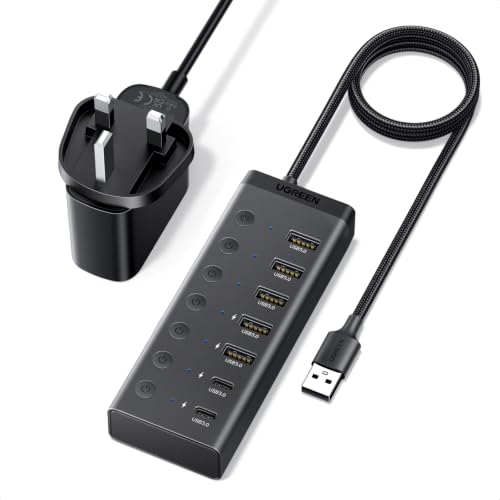
Spend the last of the budget on a UGREEN powered 7-port USB 3.0 hub so a single cable runs from your laptop to the desk, with its own power adapter so it is not starved when you plug in a webcam, a keyboard dongle and a phone charger at once. A proper steel cable tray is the first upgrade we would make later — see below.
- NOTE-1:Choose the right version: USB-A or USB-C
- NOTE-2: Connect the USB cable to a running computer first; Ports power down when the computer is switched off
- 7-in-1 Multi USB Port Hub: Expand one host port into 5x USB-A and 2x USB-C ports that support data transmission, while the 2x USB-A and 2x USB-C ports also support charging. Note: the hub charges phones , not your laptop and tablets
- 5Gbps Transfer Speed: This USB 3.0 splitter hub supports file transfer speeds of up to 5Gbps and is backwards compatible with USB 2.0, helping you move documents, photos, videos and backups faster.(Speeds may drop when several devices transfer at once)
- 24W Power Adapter Included: Connect the included 24W power adapter to keep multiple peripherals connected reliably.Each charging port can deliver up to 7.5W. With multiple devices connected, power is shared and output per port may be reduced
What You Do Not Need (Yet)
Most £500 home-office setups go over budget on accessories that look essential on Amazon and turn out not to be. The following items are all worth owning eventually, and all worth skipping for the first six months of working from home.
A second monitor. Learn one good 27-inch panel before doubling cables and clutter. A mechanical keyboard — the Pebble Keys 2 is quiet enough for shared rooms; mechanicals are a hobby, not a productivity upgrade. A standing-desk mat, useful once you stand for two hours a day — most people do not in month one. A monitor arm — the AOC stand is fine until you add a second screen or want to reclaim desk depth. A ring light — a window or desk lamp is better and free or £15. A laptop stand — the keyboard plus the monitor means you can run a closed-lid laptop setup on day one.
Where to Spend Money First When the Budget Grows
Assume £150 of upgrade budget arrives every couple of months. Here is the order we would spend it in, based on which upgrades give the biggest daily quality-of-life improvement for the price.
| Order | Upgrade | Approx. price | Why it is first |
|---|---|---|---|
| 1 | Monitor: 27-inch 1440p IPS | £150 | The single biggest visual upgrade you can buy under £200 |
| 2 | Chair: HÅG Capisco (used) or Steelcase Series 1 (new) | £250–£400 | Your back will tell you why before the year ends |
| 3 | Desk frame: FlexiSpot dual-motor | +£160 over CylineE | Quieter, faster, dual-motor stability when fully extended |
| 4 | Cable management: steel under-desk tray + raceway | £40 | The fastest way to make a setup look professional on camera — see our full guide below |
| 5 | Lighting: a proper monitor light bar | £100–£150 | Better video and lower eye strain in winter |
Final Verdict: Is £500 Enough for a Home Office in 2026?
Yes. £500 is enough to build a UK home office setup that is comfortable, looks professional on calls, and does not need to be replaced piece by piece within twelve months. It is not enough to build the setup you will eventually want — the chair, the monitor, and the desk frame are all upgrade candidates within two years if you work from home full time.
If you can stretch the budget, the single best £150 you can add is the 1440p monitor upgrade. If you cannot, the £495 kit above will see you through your first year of remote work without any of the back, eye, or audio complaints that most underspent setups produce. Build the desk, screw on the LAGKAPTEN, set the chair height, plug the speakerphone in, and start working — the rest can wait.