How to Choose an Ergonomic Office Chair The Definitive UK Guide

A good ergonomic office chair is the most important purchase in any home office, and the one most people get wrong. They focus on the wrong features, pay for things that do not matter, and skip the adjustments that actually protect their back. This guide on how to choose an ergonomic office chair in the UK strips it back to what genuinely matters: the adjustments worth paying for, how to match a chair to your own body, and the marketing language designed to separate you from your money.

We have tested dozens of chairs across every price tier, from £120 mesh task chairs to £1,400 icons. The good news is that you do not need to spend a fortune to sit well. You do need to know what you are looking for.

Why your office chair matters more than you think

If you work from home, you spend more waking hours in your office chair than in your bed. Eight, nine, ten hours a day, five days a week. A chair that subtly fails to support you does not announce itself with a dramatic injury — it shows up as a stiff lower back at 4pm, tight shoulders, a sore neck, and that restless need to keep shifting position because nothing feels right. Over months and years, poor seated posture contributes to genuine musculoskeletal problems.

An ergonomic chair is not about luxury. It is about a chair that adjusts to your body rather than forcing your body to adapt to it. That distinction is the whole game.

What ‘ergonomic’ actually means (and what it doesn’t)

The word ‘ergonomic’ is unregulated. A £60 chair with a gamer aesthetic and a fixed bucket seat can call itself ergonomic with zero consequences. Real ergonomics is about adjustability and support in the places your body needs it. A chair earns the label when it can be tuned to keep your spine in a neutral position, your feet flat, your thighs supported and your arms relaxed — for your specific body.

Things that do not make a chair ergonomic: a tall back, aggressive racing-style bolsters, a high price, a leather finish, or a brand name. Plenty of expensive executive chairs are ergonomically poor, and plenty of modest task chairs are excellent.

The adjustments that genuinely matter

Here is where to spend your attention. We have ranked these roughly in order of importance for most people.

1. Seat height

Non-negotiable, and present on virtually every chair. With your feet flat on the floor, your thighs should be roughly parallel to the ground or angled very slightly down, and your knees at about 90 degrees. If the chair cannot get low enough for your feet to rest flat, you are too high and your circulation suffers; too low and your hips drop below your knees. Most pneumatic chairs cover a useful range, but very short and very tall people need to check the specific range against their height.

2. Lumbar support (and whether it’s adjustable)

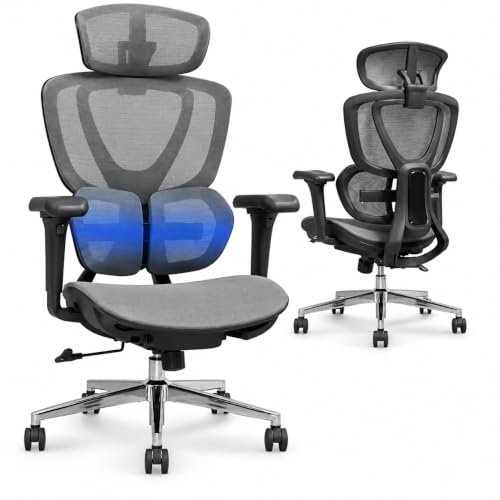
Your lower spine curves inward (lordosis). A good chair fills that curve so your back is not left to slump. The key question is not ‘does it have lumbar support’ but ‘can the lumbar support move to where MY back actually curves’. Adjustable-height lumbar support is one of the most valuable features you can buy, because the right height varies by torso length. Fixed lumbar bumps are hit-and-miss — great if they happen to align with your spine, useless if they do not.

3. Recline and tilt tension

You should not sit bolt upright all day. The healthiest seated posture involves gentle, frequent movement and periods of reclining, which transfers load off your lower spine. Look for a recline mechanism with adjustable tension, so you can set how much effort it takes to lean back, and ideally a lock at several angles. ‘Synchro-tilt’ mechanisms, where the seat and back recline together at a comfortable ratio, are the most natural feeling and worth seeking out.

4. Armrests (3D or 4D)

Armrests support your forearms so your shoulders are not doing the work of holding your arms up all day — a major cause of neck and shoulder tension. The more directions they adjust, the better the fit:

  • 2D — up/down and one other axis. Basic but acceptable.
  • 3D — height, depth (forward/back) and width (in/out). The practical sweet spot.
  • 4D — all of the above plus the pad pivots. Lovely to have, not essential.

Crucially, armrests should drop low enough to slide under your desk and rise high enough to support your elbows at typing height. Fixed armrests that collide with your desk are worse than no armrests at all.

5. Seat depth

There should be a two-to-three-finger gap between the front edge of the seat and the back of your knees. Too deep and the edge presses your calves and you cannot use the backrest; too shallow and your thighs are unsupported. Seat-depth adjustment (a sliding seat pan) is the feature that makes a single chair work for both a 5’4″ and a 6’2″ user, which is why it matters most for taller people and for chairs shared between household members.

6. Seat material and shape

Mesh seats breathe and distribute weight well but vary hugely in firmness. Foam seats are warmer and can be more cushioned but compress over time — quality of foam matters. A waterfall front edge (curving down at the front) reduces pressure on the underside of your thighs. Whatever the material, the seat should not create a single hard pressure point.

7. Headrest (optional)

A headrest is genuinely useful only if it is adjustable and you actually recline. If you sit upright at a desk all day, a headrest you never touch is just cost. If you lean back to think, read or take calls, an adjustable headrest supports your neck nicely. Treat it as a nice-to-have, not a priority.

How to measure yourself for a chair

The single most useful thing you can do before buying is take three measurements, because chair fit is about your body, not a star rating.

1. Lower-leg length (popliteal height): Sit with feet flat, measure from the floor to the back of your knee. This is your ideal seat height. Check it falls inside the chair’s seat-height range.

2. Thigh length (buttock-to-knee): Sit back fully, measure from your backrest to the back of your knee, then subtract a couple of centimetres. This is your ideal seat depth. Check the chair’s seat depth (or its adjustment range) covers it.

3. Torso/back length: From the seat to the top of your shoulder blades tells you how tall a back you need and where lumbar support should sit. Taller torsos need taller backs and higher-set lumbar support.

Match those three numbers to a chair’s spec sheet and you have eliminated 90% of the risk of buying something that simply does not fit you.

Mesh vs foam: which back and seat?

 MeshFoam/Upholstered
BreathabilityExcellentWarmer
Support feelSuspended, evenCushioned, contoured
LongevityHolds shape wellCan compress over years
Hot climates / warm roomsBest choiceCan feel sweaty
Plush comfortFirmerSofter initially

Our general advice: a mesh back is hard to beat for all-day support and temperature, while seat preference is personal — many people like a mesh back with a lightly padded or high-quality mesh seat. If you run warm or your office gets hot in summer, mesh throughout is the comfortable choice.

Price tiers: what you actually get for your money

Budget: £120-£250

At this level you can get a genuinely good mesh task chair with seat height, basic recline, and often adjustable lumbar and 2D/3D armrests. The IKEA Markus and various SIHOO and Hbada models live here. Compromises are usually in armrest adjustability, seat-depth adjustment (often absent), and long-term foam durability. For a huge number of home workers, a well-chosen chair at £150-£250 is all they ever need.

  • Buy here if: You want solid all-day support without overspending. [Affiliate link to Budget Ergonomic Chair on Amazon UK]

Mid-range: £250-£550

The sweet spot for most people who want a chair to last a decade. You get proper adjustable lumbar, 3D/4D armrests, seat-depth adjustment, better mesh and tilt mechanisms, and warranties of 5-12 years. The SIHOO Doro C300, FlexiSpot BS8 Pro and similar sit here and punch well above their price. This is the tier we steer most readers toward.

  • Buy here if: You sit all day, want full adjustability, and want it to last. [Affiliate link to Mid-Range Ergonomic Chair on Amazon UK]

Premium: £600-£1,500

Herman Miller Aeron, Steelcase Leap, Humanscale and friends. Here you pay for refined mechanisms, exceptional build, 12-year warranties, and ergonomic design backed by serious research. The difference over a good mid-range chair is real but subject to diminishing returns — you are paying for the last 15% of refinement and the longevity. Worth it if you have back issues, sit 8+ hours daily, and intend to keep the chair for 12 years.

  • Buy here if: Your back is non-negotiable and you want a buy-it-for-life chair. [Affiliate link to Premium Ergonomic Chair on Amazon UK]

Features marketed at you that you can usually ignore

  • ‘Ergonomic’ gaming chairs with racing bolsters. The bucket shape and side bolsters are designed for looks, not posture, and often force a fixed seating position. Some are fine; most are mediocre task chairs at a premium.
  • Built-in massage and heating. Gimmicks that add cost and failure points. Buy a cushion if you want heat.
  • Leather everything. Looks executive, breathes poorly, rarely the most ergonomic option.
  • Extreme weight claims and vague ‘lumbar technology’ branding. Look at the actual adjustments, not the marketing names.
  • Headrests on chairs you’ll use upright all day. Pay for it only if you recline.

How to test a chair in the first two weeks

Most UK retailers and Amazon allow returns within 14-30 days. Use that window properly:

1. Set it up for your body first — seat height, depth, lumbar height, armrests. A chair judged before adjustment is judged unfairly.

2. Sit a full working day, twice. Comfort in the showroom means nothing; hour seven is the real test.

3. Check the pressure points — no numbness in your thighs, no hard edge behind the knees, no shoulder ache from armrests set wrong.

4. Recline and move. A good chair encourages gentle movement; a bad one traps you in one position.

5. If it is not right by day ten, return it. Do not talk yourself into a chair your body is arguing with.

Quick decision framework

If you remember nothing else, use this:

  • Confirm the seat height range suits your lower-leg length.
  • Insist on adjustable lumbar support that can reach your spine’s curve.
  • Get at least 3D armrests that drop under your desk.
  • Prefer seat-depth adjustment if you are tall or sharing the chair.
  • Choose a synchro-tilt recline with tension control.
  • Favour mesh if you or your room runs warm.
  • Spend in the £250-£550 mid-range unless you have a specific reason to go higher or lower.

The verdict

Choosing an ergonomic office chair comes down to fit and adjustability, not price or prestige. Take your three measurements, insist on adjustable lumbar and proper armrests, aim for the mid-range unless your back or budget says otherwise, and use the return window to test it across real working days. Get those things right and you will buy one chair that serves you well for a decade — which is exactly what a good ergonomic chair should do.

If you want our specific tested recommendations, see our roundups of the best ergonomic chairs under £500 and the best budget chairs under £200, where we name the exact models that earn these principles.

Some More Reviews Here..