Mechanical keyboards have a reputation problem in the office. Say the words and most people picture a gamer’s desk: rainbow lighting, a clattering racket and a slab of plastic the size of a place mat. The Keychron K2 is the keyboard that quietly dismantled that stereotype, and it is the one we recommend more than any other to people who want a proper typing experience without turning their home office into an arcade.
We have used the K2 as a daily driver across full working weeks, on both macOS and Windows. This review covers what it is like to live with, including the one design quirk you need to know about before you buy.
Keychron K2 review: what you are actually buying
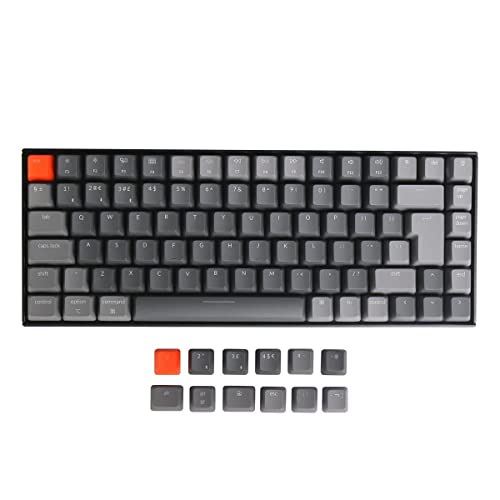
The K2 is a 75% wireless mechanical keyboard with 84 keys. It connects over Bluetooth to up to three devices or by USB-C cable, works properly with both macOS and Windows, and offers a choice of switches, backlighting and frame. The K2 has been through several revisions, so check the exact version and switch type on the listing before buying. On Amazon UK we verified the K2 Version 2 in the UK ISO layout with Gateron Brown switches and a plastic frame at £90.99 (September 2026), rated 3.9 stars from 77 ratings and in stock. Newer K2 HE and QMK variants are also listed at different prices.
Design and build quality
The 75% layout is the real selling point
A 75% layout keeps the full function row, the arrow keys and a slim column of navigation keys, but drops the number pad and squeezes everything together. The result is a keyboard about 30% narrower than a full-size board that loses almost nothing you actually use. That narrowness brings your mouse hand closer to your body, which cuts the reach that contributes to shoulder and wrist strain. If you enter numbers all day, buy a separate numeric pad and keep it on the left.
Build, and the typing angle problem
The K2 feels reassuringly solid, with real weight, no keycap rattle and minimal flex, especially on the aluminium-framed version. Now the flaw: the K2 is a tall keyboard with a steep typing angle and no low-profile option in the standard line, so your wrists end up more extended than they should be. The two flip-out feet only make it steeper. This is the most common criticism of the K2 and it is entirely fair.
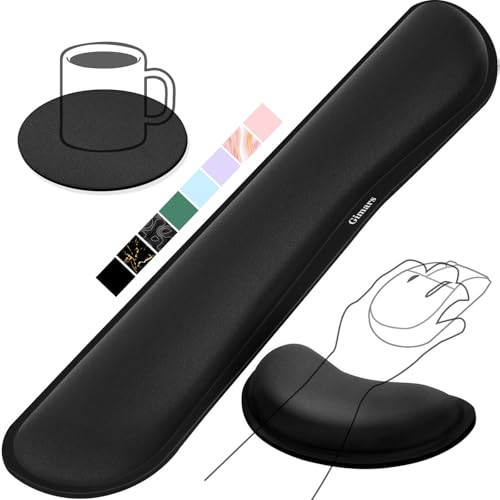
The fix is cheap: use a wrist rest. Keychron sells its own wrist rests for some models, and any decent padded or gel rest will do the job. On Amazon UK a well-reviewed gel wrist rest set costs around £13. Budget for one at the same time as the keyboard.

Which switches should you choose for an office?
Switch | Feel | Noise | Office verdict |
Gateron Brown | Tactile bump, no click | Moderate | The safe choice for most people |
Gateron Red | Smooth linear, no bump | Quietest of the three | Best if you share a room |
Gateron Blue | Sharp tactile click | Loud | Avoid for office use |
Browns are the default recommendation: a soft tactile bump without the theatrical click. Reds are smooth, light and the quietest, so choose them if you type in a shared room. Blues give mechanical keyboards their reputation, lovely to type on and infuriating to sit near, so skip them if you take video calls or live with anyone whose goodwill you value. On hot-swappable versions a wrong choice is not fatal: a switch pack costs around £20 and takes fifteen minutes to fit.
What it is like to type on
Very good, and this is why people make the switch and never go back. Every keystroke feels deliberate and consistent, with a definite point where the key registers. Out of the box the standard version sounds slightly hollow and plasticky, which most people will never notice. Expect two or three days of slightly elevated typos coming from a laptop keyboard while your hands adapt.
Wireless, multi-device and battery
The K2 pairs with up to three devices over Bluetooth and switches between them with a key combination, in under a second. It also works as a plain wired USB-C keyboard, which matters if your workplace blocks Bluetooth. Battery life runs into weeks with the backlight off and drops to a few days with it at full brightness, so keep it dim or off. Bluetooth has been reliable in our testing; for presentations, plug the cable in.
Mac and Windows
A physical switch on the side selects macOS or Windows mode, and the box includes replacement keycaps for the Command and Option keys. Media keys, volume, brightness and the function row behave as expected on both platforms, with no remapping software.
Can you use it on video calls?
With browns, mostly yes: your microphone picks up some typing, but no more than a decent laptop keyboard. With reds, comfortably. With blues, absolutely not. If you type constantly during calls, a directional microphone helps considerably; our Rode NT-USB Mini review covers a good option.
Keychron K2 pros and cons
Pros | Cons |
Excellent 75% layout keeps arrows and function row | Steep typing angle needs a wrist rest |
Solid build, especially the aluminium version | Slightly hollow sound out of the box |
Three-device Bluetooth plus wired USB-C | No low-profile option in the standard range |
Proper Mac and Windows support with spare keycaps | RGB backlight drains the battery quickly |
Good value at around £90 | No number pad if you need one |
Keychron K2 vs the alternatives
Against the Logitech MX Keys S, the choice is philosophical. The MX Keys S is low-profile, near-silent, flatter and more wrist-friendly, with better software, and it is now around £85 on Amazon UK. The K2 is more satisfying to type on by a wide margin. If comfort and silence come first, the MX Keys S wins; if typing feel is the point, the K2 does. Against cheaper mechanical boards, the K2 justifies its price with wireless multi-device support, Mac keycaps and build quality, and against premium custom boards at £200 and up it gives up sound quality but delivers most of the experience for far less.
Who should buy the Keychron K2?
Buy it if you type for a living and have never used a mechanical keyboard, if you want to reclaim desk space and pull your mouse closer, or if you switch between a Mac and a PC. Choose brown switches if you have your own room, red if you do not. Skip it if you need a number pad, want the flattest and quietest keyboard, or have wrist problems and will not use a wrist rest.
The verdict
The Keychron K2 is the keyboard we point people to when they are curious about mechanical keyboards but do not want the noise, the size or the gamer aesthetic. It is well built, sensibly laid out and works with every device on your desk. The steep typing angle is a genuine flaw, but it is a £10–£15 problem with a £10–£15 solution. Choose browns or reds, add the wrist rest to the basket and leave the backlight off. If you are building a desk from scratch, start with our Ultimate Work From Home Kit Guide 2026 and work down from there.
Related reading
- Logitech MX Keys S vs Apple Magic Keyboard: Which Should You Buy?
- Logitech MX Keys S Review: The Best Home Office Keyboard?
- 5 Best Ergonomic Keyboards for Working From Home in 2026
- How to Choose an Ergonomic Keyboard: The Complete UK Guide
- Best Keyboard and Mouse Combos for Home Office
- Rode NT-USB Mini Review: Best Compact Mic for Calls