Affiliate disclosure: WFHKit is reader-supported. We may earn a small commission when you buy through links on this page, at no extra cost to you. Prices reflect UK listings at the time of writing, so always check the current product page before buying.
Black Friday lands on the last Friday of November, and the sales usually start well before it. For home workers it is a good moment to upgrade the kit you use every day, but it is also the easiest time of year to spend money on something you did not need. The trick is to decide what you want before the banners go up.
This guide sets out what is worth waiting for in the Black Friday home office sales, what is not, and four products we have checked live on Amazon UK that make sensible targets. We have not promised any discounts, because deals change by the hour. Instead we give you the everyday price today, so you can tell a real saving from a fake one.
How to shop the Black Friday home office sales
- Write a shortlist now. Decide on two or three products you actually want and note today’s price. A deal is only a deal if it beats that number.
- Check the price history. Tools such as price trackers show whether an item was cheaper in September than it is on the day. Many Black Friday prices are simply the normal price in disguise.
- Prioritise things you use daily. A chair, keyboard, headphones or hub earns back its cost every working day. A gadget that sits in a drawer never does.
- Beware of low-quality extras. Bundles and lightning deals on unbranded accessories are rarely worth it. Stick to products with thousands of reviews.
- Set a budget and stop. Sales are designed to make you add one more thing to the basket. Decide your limit first.
What is worth buying in the sales
Big-ticket items with a recognised brand are the safest places to look for real savings. Headphones, keyboards and mice from the big peripheral makers are often discounted in the run-up to Black Friday, because retailers compete hard on them. Office chairs and monitors also tend to be reduced, so if your chair is falling apart or you are still working on a laptop screen, wait for the sales and compare prices across several shops before you commit.
Cheap accessories such as USB hubs and chargers are rarely reduced by much, because their prices are already low. They are still worth buying if you need one, since everyday prices are so keen, but do not expect big headline discounts. Treat them as sensible additions to a basket rather than the reason to wait.
Four home office products worth watching
Sony WH-1000XM5: best headphones to watch
The Sony WH-1000XM5 are the noise-cancelling headphones many home workers want, and with more than 12,000 ratings at 4.3 stars on Amazon UK they are one of the most reviewed pairs in their class. They sit over the ear, connect by Bluetooth, offer around 30 hours of battery and have clear call quality, which matters if your day is full of video meetings.
Today they cost about £199. Premium headphones are among the products that retailers most often reduce at this time of year, so they make a good target for patient buyers. If you see them at a clearly lower price than today’s £199, that is a genuine win. If you see them at the same price with a “deal” badge, skip.
Our pick: the Sony WH-1000XM5 if you take lots of calls or work somewhere noisy.

- INTRODUCING SONY WH-1000XM5 - Award-winning wireless headphones with premium noise cancellation, premium sound quality, crystal-clear call quality, and luxurious comfort, the headphones are identical to the WH-1000XM5SA but come with a hard case
- PREMIUM NOISE CANCELLATION: With four mics on each earcup, unwanted sound is eliminated more accurately, our Auto NC Optimizer ensures noise cancelling is optimised for your environment
- PREMIUM SOUND QUALITY: Our precision-engineered driver unit improves high frequency sensitivity, and High-Resolution Audio is supported thanks to LDAC, our industry-adopted audio coding technology
- LONG BATTERY LIFE: The huge 30-hour battery gives you enough power for long trips, for quick charging, a USB-PD AC adapter (sold separately) provides 3 hours of playback from a 3-minute charge
- INDULGE IN LUXURY COMFORT: Premium materials in an ergonomic design; plush cushions cradle the ears and the adjustable headband ensures a tailored fit, available in Black, Silver, Midnight Blue, and Smoky Pink, featuring a matching hard case

Logitech MX Keys S: best keyboard to watch
The Logitech MX Keys S is a slim, backlit wireless keyboard with quiet keys, Bluetooth and USB-C charging, and it works with Windows, Mac, Linux and Chrome. It has 828 ratings at 4.6 stars on Amazon UK, which is an excellent score for a premium keyboard.
It costs about £85 today. Logitech’s MX range regularly appears in seasonal sales, so it is one of the best keyboards to put on your shortlist. The keyboard is comfortable for long typing sessions and its low profile keeps your wrists in a natural position. If you work with a laptop and an external monitor, it makes the whole setup feel more professional.
Our pick: the Logitech MX Keys S for a quiet, comfortable upgrade to your daily typing.
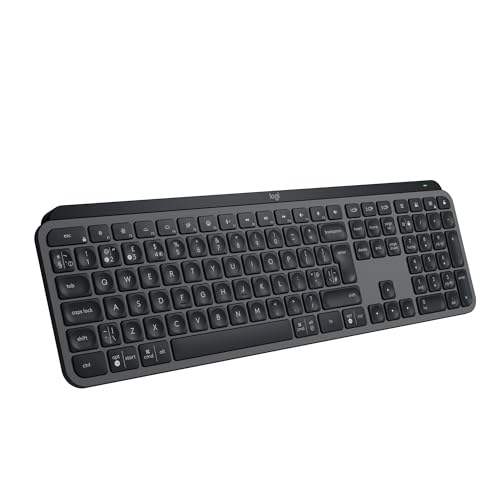
- Fluid Typing Experience: Laptop-like profile with spherically-dished keys shaped for your fingertips delivers a fast, fluid, precise and quieter typing experience
- Automate Repetitive Tasks: Easily create and share time-saving Smart Actions shortcuts to perform multiple actions with a single keystroke with the Logi Options+ app (1)
- Smarter Illumination: Backlit keyboard keys light up as your hands approach and adapt to the environment; Now with more lighting customisations on Logi Options+ (1)
- More Comfort, Deeper Focus: Work for longer with a solid build, low-profile design and an optimum keyboard angle that is better for your wrist posture
- Multi-Device, Multi OS Bluetooth Keyboard: Pair with up to 3 devices on nearly any operating system (Windows, macOS, Linux, Googlebook OS) via Bluetooth Low Energy or included Logi Bolt USB receiver (2)
Anker 7-in-1 USB-C hub: best cheap upgrade
If your laptop has only one or two ports, a hub is the quickest way to make a desk usable. The Anker 7-in-1 USB-C hub adds 4K 60Hz HDMI output, 85W pass-through charging, two USB 3.0 ports, a USB-C data port and an SD and microSD card reader. It has more than 9,200 ratings at 4.6 stars, which shows how widely it is trusted.
It costs about £17 today, so there is little left to discount. We include it because it is the sort of cheap, dependable accessory that quietly improves every working day, and because it is a good gap-filler if you pick up a new laptop in the sales. Do not wait for a lower price on this one; buy when you need it.
Our pick: the Anker 7-in-1 USB-C hub for laptops that are short on ports.

- Sleek 7-in-1 USB-C Hub: Features an HDMI port, two USB-A 3.0 ports, and a USB-C data port, each providing 5Gbps transfer speeds. It also includes a USB-C PD input port for charging up to 100W and dual SD and TF card slots, all in a compact design.
- Flawless 4K@60Hz Video with HDMI: Delivers exceptional clarity and smoothness with its 4K@60Hz HDMI port, making it ideal for high-definition presentations and entertainment. (Note: Only the HDMI port supports video projection; the USB-C port is for data transfer only.)
- Double Up on Efficiency: The two USB-A 3.0 ports and a USB-C port support a fast 5Gbps data rate, significantly boosting your transfer speeds and improving productivity.
- Fast and Reliable 85W Charging: Offers high-capacity, speedy charging for laptops up to 85W, so you spend less time tethered to an outlet and more time being productive.
- What You Get: Anker USB-C Hub (7-in-1), welcome guide, 18-month warranty, and our friendly customer service.
Anker Nano II 65W charger: best compact charger
A good charger replaces the bulky brick that came with your laptop. The Anker Nano II 65W uses GaN technology to stay small while charging a laptop, tablet and phone quickly, and it has more than 3,500 ratings at 4.6 stars on Amazon UK. It is small enough to throw in a bag for days away from the home office.
It is about £17 today, which makes it another everyday-price buy rather than a Black Friday trophy. It does, however, solve a real problem. One compact charger in the bag and one on the desk means you never have to unplug and carry the same brick around again.
Our pick: the Anker Nano II 65W for anyone who splits their week between home and the office.

- The Only Charger You Need: Say goodbye to your old power bricks. Anker Nano II has the power you need to fast charge your phone, tablet, and USB-C notebook from a single tiny charger.
- High-Speed Charging: Charge a 2020 MacBook Air in less than 2 hours, a MacBook Pro 13ʺ at full speed, an iPhone 13 up to 3× faster than with an original 5W charger, and charge the latest Samsung phones at full speed with Samsung Super Fast Charging.
- Downsized Design: At 58% smaller than an original 61W USB-C charger, Anker Nano II takes up less space while giving you just as much power.
- Powered by GaN II Technology: With a 100% increase in operating frequency, an innovative stacked design, and an upgraded circuit board structure, GaN II technology makes our latest charger smaller without sacrificing a drop of power.
- What You Get: Anker Nano II 65W, welcome guide, our worry-free 18-month warranty, and friendly customer service (cable not included).
Black Friday shortlist at a glance
| Product | Type | Today’s price | Worth waiting for a deal? | Approx. price |
| Sony WH-1000XM5 | Noise-cancelling headphones | About £199 | Yes, premium headphones are often reduced | £185–£215 |
| Logitech MX Keys S | Wireless keyboard | About £85 | Yes, worth watching | £80–£90 |
| Anker 7-in-1 USB-C hub | Hub | About £17 | No, buy when needed | £14–£20 |
| Anker Nano II 65W | Charger | About £17 | No, buy when needed | £14–£20 |
What not to buy in the sales
Be wary of unbranded monitor arms, cheap chairs with dramatic “was” prices, and anything sold with a fake countdown. If a product has few reviews, or a long list of identical-looking sellers, a big discount often means the original price was never real. Likewise, skip bundles that include items you did not plan to buy; a bundle only saves money if you wanted every part of it.
Be careful with standing desks and large furniture too. They are often discounted, but delivery times can stretch and returns are a hassle. Buy those only if you have measured your space and checked the returns policy.
A simple plan for Black Friday week
Start by auditing your desk. Sit down for ten minutes on a normal working day and note everything that annoys you: the keyboard that rattles, the headphones that leak sound, the laptop that never has enough ports, the charger you keep forgetting. Each irritation is a candidate for an upgrade, and the ones that annoy you every day should go to the top of the list.
Next, put a price next to each item using the live listing. For the four products in this guide, today’s prices are about £199, £85, £17 and £17. Anything that drops below those figures by a clear margin is worth a look, and anything that matches them is just a normal purchase. Keep the list on your phone so you can check it in seconds when a deal pops up.
Finally, give yourself a cooling-off period. If a deal tempts you and the item is not on your list, wait a day. Real bargains on well-known products tend to come round more than once across the sales period, while impulse purchases are the ones that end up in the returns pile.
Should you buy before Black Friday?
Sometimes, yes. Many retailers start their offers a week or two ahead, and popular items can sell out before the day itself. If a product on your shortlist drops to a price you are happy with, there is no prize for waiting until the Friday. The same goes for anything you need urgently, such as a replacement charger or a hub for a new laptop.
On the other hand, if the item is a nice-to-have, patience usually pays. The final week of November is when the widest range of products are reduced, and it is also when you will see the clearest picture of what the real discount is. Use the early offers to learn the price pattern, then decide.
Whichever way you go, buy from a seller you trust, keep your order confirmation and note the returns date in your calendar. A bargain that cannot be returned is not much of a bargain.
Common Black Friday mistakes for home workers
- Buying a monitor without checking the ports. A cheap screen is no use if it cannot connect to your laptop. Check for USB-C or HDMI before you pay.
- Ignoring size. A big chair or desk that does not fit the room is a costly mistake. Measure first.
- Chasing the biggest percentage. A 50 per cent saving off an inflated price can still be dearer than a normal price elsewhere.
- Forgetting returns. Check the returns window, especially for items you cannot test until they arrive, such as chairs and headphones.
- Buying too much at once. Spread upgrades across the winter. Your desk will not improve faster just because the basket is bigger.
Our verdict
The best Black Friday strategy for a home office is a short, boring list. Pick the one or two upgrades that will make the biggest difference to your working day, note today’s price, and only buy if the sale beats it by a meaningful margin. For most people that means headphones or a keyboard from a trusted brand, plus a hub or charger if the basics are missing.
If you take plenty of calls, the Sony WH-1000XM5 is the headline target. If you type all day, the Logitech MX Keys S is a lovely upgrade. And if your laptop is short on ports, the Anker hub and Nano charger are cheap enough to buy any time. Keep to your list, and you will come out of the sales with a better desk and a lighter bill.