Between a phone, a tablet, a laptop, a pair of earbuds and sometimes a second phone for work, most home offices end up with a small forest of individual wall-wart chargers, each taking up its own socket and each with its own cable trailing across the desk. A multi-port charging dock replaces all of that with a single brick and one socket, splitting its total power output intelligently across whatever is plugged in. It is one of the simplest desk upgrades available, and one of the least visually obvious – the win is entirely in the tidiness and the socket you get back.
What to look for
- Total wattage and how it is shared. A dock rated 100W across five ports does not give every device 20W simultaneously – it distributes power dynamically, giving more to whatever is charging fastest and less to something already nearly full. Check the per-port breakdown if you want to charge a laptop and a phone at full speed at the same time.
- GaN (gallium nitride) construction, which is now standard in good multi-port chargers and lets them run cooler and far more compactly than the older silicon-based chargers of a few years ago.
- A genuine mix of USB-C and USB-A ports matched to what you actually own – a dock all-in on USB-C is little use if half your devices still use USB-A cables.
- Enough wattage on at least one port to fast-charge a laptop, if that is part of the job you want the dock to do – typically 65W or more for most ultrabooks.
- A stable base or a design that will not tip over under the weight of several cables pulling at odd angles – worth checking in reviews rather than assuming from photos.
Best charging docks for multiple devices
All three docks below were checked live on Amazon UK for stock, price and review standing before being included.
Best overall: UGREEN Nexode 100W 5-Port GaN Charger
UGREEN’s Nexode range has built a strong reputation for genuinely delivering its rated wattage rather than an optimistic headline figure, and the 100W 5-port model is sized right for a desk that needs to charge a laptop and several smaller devices at once. Two USB-C ports capable of laptop-charging speeds sit alongside three further USB-C and USB-A ports for phones, tablets and earbuds, with the dock’s own display and smart power distribution handling the split automatically as devices are added or removed.
Its compact, roughly deck-of-cards size is a genuine advantage on a crowded desk compared with the bulkier docks below.
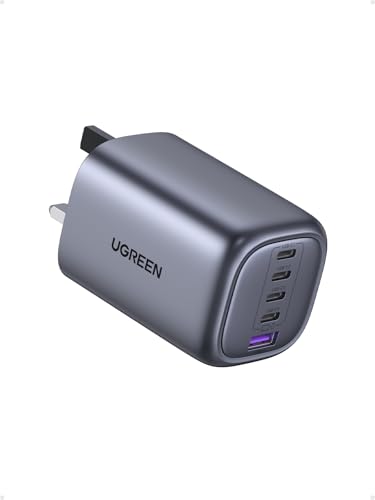
- 100W MacBook Charger: When connected to a single USB-C device, the USB-C1/C2/C3 port delivers a maximum output of 100W, catering to the charging needs of various laptops. This UGREEN 100W USB C charger can charge your Macbook Pro up to 41% in 30 minutes, much faster than other USB C plugs
- 5-Port Fast Charging Station: With 4 USB-C ports and 1 USB-A port, this charging station lets you power up to 5 devices at once, including smartphones, tablets, and laptops; When you connect multiple devices, the charger intelligently distributes power across the ports to ensure you get the best charge
- Safety and Reliability: Thanks to advanced GaN chip technology, enjoy a safer, cooler, and faster charging experience with this 100W 5-port GaN charger block; It protects your devices from short circuits, overvoltage, overheating, and overcurrent
- Universal compatibility: Designed to work perfectly with a wide range of electronic devices, this compact power adapter can charge devices from phones to laptops, such as MacBook Pro/Air, ThinkPad, iPhone 18 Pro Max/18 Pro/17/16 series, Galaxy S26/S25 series, iPad Pro series, Pixel 11 series, Steam Deck, and more (Note: Due to Dell's charging protocol limitations, this charger only supports up to 65W when charging the Dell laptop series)
- More Ports, More Convenience: This 100W charger allows you to get more done with all your devices within reach. It can charge up to 5 devices simultaneously, helping you manage cable clutter and save desktop space

Best for a genuinely packed desk: Zobirez 320W 10-Port GaN5 Charging Station
If one dock needs to cover an entire household’s devices – several phones, a couple of tablets, a laptop and assorted earbuds cases all charging from one spot – the Zobirez’s ten ports and 320W total output is built for exactly that scale. It uses the newer GaN5 component generation, which packs more power into a similar footprint to older GaN chargers, and its higher-wattage ports can still fast-charge a laptop even with several other devices drawing power simultaneously.
It is priced and sized for that larger job specifically – a single-user desk with two or three devices does not need this much capacity, and the UGREEN above is the better fit for that smaller job.

- USB-C CHARGING STATION — 320W total power and 10 ports bring phones, tablets and laptops together in one white charging hub for a tidier shared setup.
- MACBOOK & IPAD AT THE SAME TIME — Connect a compatible MacBook to USB-C1 or USB-C2 for up to 65W and an iPad to USB-C3, USB-C4 or USB-C5 for up to 30W. Both can charge together. Actual output is shared and depends on connected devices and cables.
- GaN5 POWER WITH BUILT-IN PROTECTION — GaN5 technology improves charging efficiency and helps reduce heat in a compact desktop design. Protection against overcharging, overheating, overcurrent and short circuits supports stable daily charging.
- CASE-FRIENDLY WHITE DESK ORGANISER — Variable-width slots hold phones, tablets and laptops, including many devices with protective cases, and anti-slip feet help keep the station steady and protect the desk.
- 10 SHORT CHARGING CABLES INCLUDED: The package includes 4 Lightning cables, 4 USB-C cables and 2 Micro USB cables. This mix covers common Apple, USB-C and Micro USB devices while keeping short desktop leads easy to organise.
Best value and most established: Anker PowerPort 60W 6-Port Desktop Charger
Anker’s PowerPort has been a bestseller for the best part of a decade, and it remains a sound choice for a straightforward job: six USB-A ports and PowerIQ technology that automatically detects each connected device and delivers its fastest safe charging speed, without needing to configure anything. It will not fast-charge a modern USB-C laptop the way the two GaN docks above can, but for phones, tablets, earbuds cases and other everyday devices, it is a reliable, keenly priced way to free up several wall sockets at once.
Its all-USB-A port layout is worth checking against your own cables before buying, since newer devices increasingly ship with USB-C cables as standard.
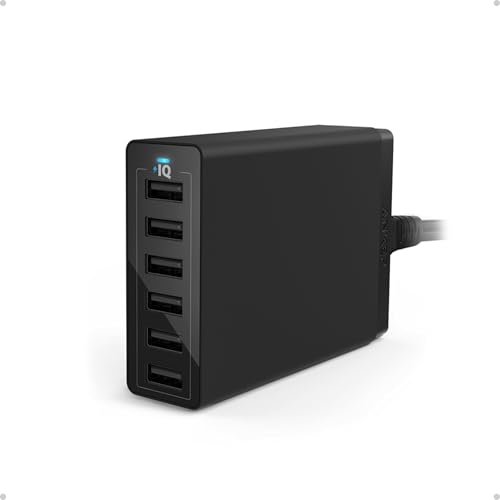
- The Anker Advantage: Join the 10 million+ powered by Amazon's leading charging brand.
- Fast Charging Technology: PowerIQ and VoltageBoost combine to provide the fastest possible charge up to 2.4 amps per port or 12 amps overall (Qualcomm Quick Charge 2.0 not supported. For QC 2.0 charging, please see Anker's 18W USB Wall Charger).
- Ultra Powerful: 6 ports pump out 60 watts of power, enabling simultaneous multi-device charging.
- Certified Safe: Anker's MultiProtect safety system and UL certification ensure complete protection for you and your devices. Worldwide 100-240 volt AC input voltage
- What You Get: Anker PowerPort 6 (60W 6-Port USB Charging Hub), 5ft / 150cm detachable power cord, welcome guide, our fan-favorite 18-month warranty and friendly customer service.
Comparison at a glance
| Model | Total power | Ports | Best for | Approx. price |
| UGREEN Nexode 100W | 100W | 5 (mixed USB-C/A) | Laptop + everyday devices | £30–£36 |
| Zobirez 320W GaN5 | 320W | 10 (mixed USB-C/A) | Whole-household charging | £42–£48 |
| Anker PowerPort 60W | 60W | 6 (USB-A) | Phones, tablets, earbuds | £16–£22 |
What GaN actually changes
Gallium nitride is a semiconductor material that replaced the silicon used in older chargers, and the practical upshot is size and heat rather than anything you would notice in day-to-day charging speed. A GaN charger delivering the same wattage as an older silicon one runs cooler and fits into a noticeably smaller housing, which is why a 100W desktop charger today is roughly the size a 30–40W charger would have been several years ago. It also means the dock generates less waste heat sitting on the desk for hours at a time, which matters more than it sounds for something that is typically left plugged in and running continuously rather than switched off between uses.
All three docks in this guide use GaN components, so the difference between them is genuinely about total capacity and port mix rather than one being a generation behind another.
A word on cheap unbranded docks
Multi-port chargers are one product category where buying an unbranded or unfamiliar-brand version to save a few pounds carries a real downside beyond just build quality. A charger handling this much power needs proper over-current, over-voltage and thermal protection built in, and that is exactly the part a cut-price clone is most likely to have skimped on. All three docks above carry proper UK safety certification and come from brands with a track record and a UK returns process behind them – worth treating as a non-negotiable when buying anything left plugged in and unattended for most of the day, which is exactly how a desk charging dock is used.
Working out how much dock you actually need
Add up what you realistically want charging at the same time, not what you own in total. A single-user desk with a laptop, a phone and a set of earbuds is comfortably covered by the UGREEN’s 100W split across its ports. A household hub where several people’s phones and tablets land at the end of the day, alongside a laptop or two, is where the Zobirez’s higher total wattage and extra ports stop being excessive and start being necessary. And if laptop charging is not part of the job at all – just phones, tablets and earbuds – the Anker covers that for meaningfully less money than either GaN option, since you are not paying for laptop-capable wattage you will not use.
Buying more capacity than you need is not wasted exactly, but it is money better spent elsewhere on the desk; buying too little means devices charging slower than expected whenever more than one or two things are plugged in simultaneously.
Where it earns its place on the desk
The best spot for a charging dock is somewhere all its cables can reach comfortably without pulling at angles, and ideally within sight so you can glance at what is charging – the UGREEN and Zobirez both include small displays or LEDs showing per-port status, which is genuinely useful for confirming a laptop has actually started fast-charging rather than trickle-charging on the wrong port. Keep it away from the very edge of the desk if cables regularly get caught by a chair or a bag being set down, since the one real failure mode of these docks in practice is being knocked off the desk rather than any electrical fault.
Which charging dock should you buy?
For most home offices, the UGREEN Nexode 100W is the right size: enough power and the right port mix to charge a laptop alongside everyday devices, in a compact footprint that will not dominate the desk. If the dock needs to serve the whole household rather than one desk, the Zobirez’s extra ports and wattage are worth the higher price. And if laptop charging is not part of the brief and you simply want phones, tablets and earbuds off individual wall chargers, the Anker PowerPort does that reliably for the least money.
Whichever you choose, count your actual cables before buying – a dock’s port mix only helps if it matches the connectors you already own.