Affiliate disclosure: WFHKit is reader-supported. We may earn a small commission when you buy through links on this page, at no extra cost to you. Our recommendations are independent, and we only recommend products we would be happy to use ourselves.
A 4K monitor packs four times as many pixels into the screen as a Full HD one, and the difference shows most in text. Letters look printed rather than drawn, spreadsheets show more cells without looking cramped, and photos have fine detail. A very good 4K screen is now well within reach for under £300.
This guide picks four 27-inch 4K monitors from £160 to £270. We opened each product’s live Amazon UK page and checked the stock, the reviews and the price before including it, and we read the listing for the refresh rate and the ports. All four have height-adjustable or VESA-ready stands, so you can set the screen at the right height.
One thing to know before you buy: 4K at 27 inches makes text small at its native setting. Windows and macOS both scale the picture up so it stays comfortable to read, and the result is a sharper picture at the same size rather than more room. If you want more room, choose a larger screen.
How to choose a 4K monitor under £300
- Refresh rate. Office work looks fine at 60Hz. A 120Hz screen feels smoother when you scroll and move windows, and it matters if you also game. Check your computer can drive 4K at 120Hz before paying extra.
- Connections. HDMI 2.0 and DisplayPort 1.4 carry 4K at 60Hz. For 4K at higher refresh rates you need DisplayPort 1.4 or a recent HDMI port, and a cable that supports it.
- USB-C. A USB-C port with power delivery gives you one-cable charging and video for a laptop. It adds to the price, so pay for it only if you need it.
- Colour. Look for 99 per cent sRGB at least. Wider coverage such as DCI-P3 helps with photo and video editing.
- Stand and mounting. A height-adjustable stand saves buying an arm. A VESA mount lets you add an arm later.
- Speakers. Built-in speakers are convenient for calls and videos, though they are no match for a good headset.
The best 4K monitors under £300
Best overall: Dell 27 Plus S2725QS
The Dell S2725QS is a 27 inch 4K UHD monitor with a 120Hz IPS panel, a 4ms response time, AMD FreeSync Premium and 99 per cent sRGB coverage. It has DisplayPort, two HDMI inputs and built-in speakers, and the stand adjusts for height. It comes with a three year warranty.
The 120Hz refresh rate makes the desktop feel noticeably smoother than a 60Hz screen. It costs about £231, and more than four hundred buyers have rated it at 4.6 stars. It is the best balance of sharpness, smoothness and price for most people.

- 27-INCH 4K UHD DISPLAY WITH SMOOTH PERFORMANCE: Enjoy ultra-sharp visuals with 3840 x 2160 resolution, 120 Hz refresh rate, and IPS panel technology. Ideal for both productivity and entertainment powered by AMD FreeSync Premium. Easily connect your devices with 2 x HDMI 2.1 and 1 x DisplayPort 1.4 for versatile setup.
- VIBRANT COLOUR ACCURACY: Delivers lifelike visuals with 99% sRGB colour coverage and support for 1.07 billion colours. The 1500:1 contrast ratio ensures deeper blacks and brighter whites for greater detail and immersion in every frame.
- ENHANCED EYE COMFORT FOR LONG SESSIONS: Certified with TÜV Rheinland 4-star eye comfort rating and ComfortView Plus technology that reduces harmful blue light emissions to ≤35%, helping protect your eyes without compromising on colour.
- SMOOTH PERFORMANCE FOR WORK & ENTERTAINMENT: Enjoy a refresh rate of up to 120 Hz and low response time, ensuring a fluid visual experience whether you're working on creative tasks, watching movies, or casually gaming.
- INTEGRATED SPEAKERS & ERGONOMIC DESIGN: Dual 5W speakers offer full-bodied sound with 5 audio presets and 1 customizable profile. Adjust your viewing angle with tilt, swivel, pivot, and up to 130 mm height adjustment for all-day comfort.

Best for one-cable laptops: Dell 27 Plus USB-C Monitor S2725QC
The Dell S2725QC adds USB-C to the same 4K, 120Hz IPS panel. A single USB-C cable sends video, data and up to 65W of charging, and the ports include two USB-C, two HDMI and two USB. Dual 5W speakers are built in, and it carries TÜV 4-star eye comfort certification and a three year warranty.
It costs about £269, and more than seven hundred buyers have rated it at 4.6 stars. It is the pick if you work from a laptop and want a clean desk with one cable between the laptop and the screen.

- IMMERSIVE ENTERTAINMENT EXPERIENCE: Dive into cinematic 4K visuals with vibrant colours and ultra-smooth motion. Whether you're watching movies, gaming, or working, the combination of ultra-high definition, AMD FreeSync Premium, and built-in speakers brings every moment to life.
- STUNNING VISUAL CLARITY & COLOUR: Enjoy breathtaking detail and true-to-life colours with 3840 x 2160 resolution, 99% sRGB colour gamut, and HDR readiness — ideal for creatives, content consumers, and professionals.
- ENHANCED EYE COMFORT FOR LONG SESSIONS: Certified with TÜV Rheinland 4-star Eye Comfort, the built-in ComfortView Plus reduces blue light to ≤35% without affecting colour accuracy — helping reduce eye fatigue during extended use.
- POWERFUL BUILT-IN AUDIO: No need for external speakers — dual 5W integrated speakers deliver spacious, enhanced sound with greater output and multiple preset audio profiles, providing a richer listening experience for any task.
- USB-C SIMPLICITY & CONNECTIVITY OPTIONS: Streamline your setup with a single USB-C cable for video, data, and 65W charging. The monitor includes 2 HDMI 2.1 ports, 2 USB-C ports (upstream and downstream), and 2 USB-A ports for fast, flexible device connectivity, plus pop-out front ports for added convenience.
Best budget 4K: PHILIPS 27E1N1800AE
The Philips 27E1N1800AE is a 27 inch Ultra HD monitor at a very low price. It runs at 60Hz, which is perfectly smooth for office work, and it has HDR10 support, built-in speakers, a height-adjustable stand, HDMI 2.0 and DisplayPort 1.4.
It costs about £169, and more than two hundred buyers have rated it at 4.6 stars. It is the right choice if you want a sharp, adjustable 4K screen and do not need a high refresh rate or USB-C.
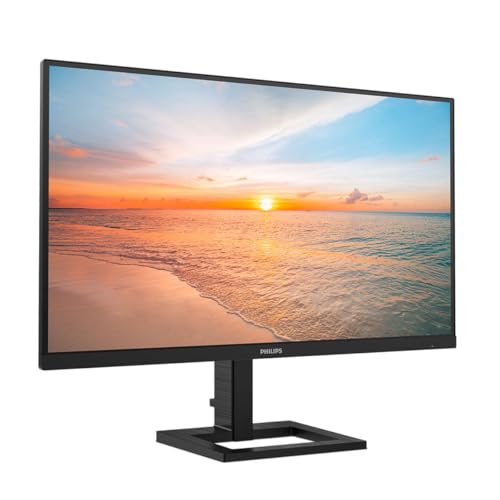
- 68.6 cm (27") ,3840 x 2160 , 4K Ultra HD
- High Dynamic Range (HDR) for more lifelike colourful visuals
- IPS LED wide view technology for image and colour accuracy
Best value for colour: KTC H27P27 4K Monitor
The KTC H27P27 is a 27 inch 4K monitor with a 60Hz refresh rate, 133 per cent sRGB and 100 per cent DCI-P3 colour coverage, and a peak brightness of 400 nits with HDR400 support. It has two HDMI 2.0 ports, a DisplayPort 1.4 input and a VESA 100 by 100mm mount for an arm.
It costs about £160, and more than one thousand buyers have rated it at 4.3 stars. It is the cheapest screen in this guide, and the wide colour coverage makes it a smart choice for photos and design work on a budget.
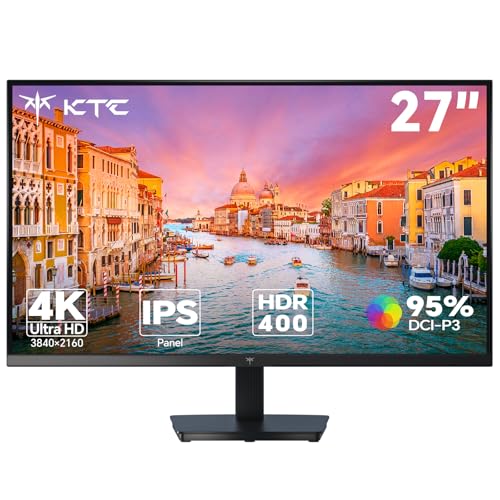
- [4K IPS Panel] This UHD Monitor features an IPS-enabled 4K Ultra HD panel (3840×2160), delivering a high-definition display with 163 PPI. When editing images or multitasking, intricate details remain clearly visible—even the finer points of a single strand of hair are rendered with remarkable clarity.
- [Cinema-Grade Colour] This 4K Monitor features 1.07 billion colours (8-bit + FRC) with 133% sRGB/100% DCI-P3 colour volume, achieving precise coverage of 99% sRGB and 95% P3 DCI-P3 colour gamut. Professional colour calibration with ΔE<2 faithfully reproduces the human visual field, delivering authentic colour vibrancy for both professional work and entertainment.
- [Adaptive Sync and Eye Care Technology] PC Monitor 4K Supports Adaptive Sync technology to effectively prevent screen tearing and stuttering. Hardware blue light filtering (Hardware LBL) and flicker-free design significantly reduce eye strain during prolonged use.
- [HDR400 Support] This 27 inch monitor 4K Supports HDR400 with a peak brightness of 400 cd/m², delivering distinct shadow detail and lossless rendering of highlight scenes, redefining professional-grade visual performance.
- [Versatile Connectivity Options] Monitor 4K equipped with two HDMI 2.0 ports and one DisplayPort 1.4 port, enabling connection to multiple devices such as PCs and gaming consoles. Supports the VESA 100mm × 100mm mounting standard, allowing flexible installation using compatible monitor mounts. Features an ultra-narrow bezel design (three-sided micro-bezel) for seamless multi-screen setups.
Comparison at a glance
| Monitor | Refresh rate | USB-C | Best for | Approx. price |
|---|---|---|---|---|
| Dell S2725QS | 120Hz | No | Best overall | £225–£240 |
| Dell S2725QC | 120Hz | Up to 65W | One-cable laptops | £260–£280 |
| PHILIPS 27E1N1800AE | 60Hz | No | A low price | £165–£175 |
| KTC H27P27 | 60Hz | No | Colour on a budget | £155–£165 |
Is 4K worth it at 27 inches?
For most people who read and write all day, yes. The extra sharpness makes text easier on the eyes, and you will notice it every time you open a document. For video and photos the detail is a pleasure, and for spreadsheets you can fit more on screen when you use a scaling setting of 125 or 150 per cent.
For not much more than a good QHD screen, you get a noticeably sharper picture.
What your computer needs
To run 4K, your computer needs a video output that supports it. Most laptops from the last few years can do 4K at 60Hz over HDMI, DisplayPort or USB-C. For 120Hz you need a newer graphics chip and the right port, so check the specifications of your machine.
A desktop with a dedicated graphics card is fine. An older computer with only integrated graphics may struggle with several 4K screens, but a single one is generally no problem.
Video, photos and a little gaming
A 4K screen suits video and photo work, since you see far more detail in each frame. Streaming services and cameras produce 4K footage, and a sharp panel shows it at its best. If you also play games, the 120Hz Dell models are the better choice, because they stay smooth at 4K when your computer can keep up.
The 60Hz models are best treated as office screens. They are perfectly smooth for documents, video calls and films, and they cost less.
Cables and ports
Most 4K monitors ship with an HDMI or DisplayPort cable in the box. Check which one you receive, and make sure it supports the refresh rate you want. An old HDMI cable can limit you to 30Hz at 4K, which feels sluggish, so use the cable supplied or a certified high-speed cable.
If your laptop has only USB-C, a USB-C monitor such as the Dell S2725QC is the simplest answer. Otherwise a USB-C to DisplayPort cable or a small adapter does the job.
Scaling for comfortable text
At native resolution, text on a 27-inch 4K screen is small. Set the scaling to 125 or 150 per cent in Windows, or use the default scaled setting on a Mac. You still get the sharper picture, and the text stays comfortable to read.
If you find the scaling blurs older apps, try restarting them after changing the setting.
Setting up your monitor
Sit about an arm’s length from the screen, with the top edge at or just below eye level. A 27-inch screen is wide, so centre it in front of you and keep your keyboard directly below. A monitor arm gives extra freedom, and the VESA mounts on these screens make that easy.
Which 4K monitor under £300 should you buy?
For most people the Dell S2725QS is the best 4K monitor under £300. It is sharp, smooth and well reviewed, and it comes with a long warranty.
If you work from a laptop, the Dell S2725QC adds one-cable charging for a little more. The Philips 27E1N1800AE is the best choice on a tight budget, and the KTC H27P27 gives wide colour for the lowest price. Whichever you choose, scale the text so it stays comfortable to read.