A single router sitting in the hallway was fine when the house only needed Wi-Fi for phones and a smart TV. Add a home office at the far end of the house, a video call that cannot afford to freeze, and everyone else in the house streaming or gaming at the same time, and that same router becomes the weak link in your working day. A mesh Wi-Fi system replaces one router doing all the work with two or three units that share the load and hand your laptop off between them as you move, closing the dead zones a single router leaves behind.
This guide is about mesh for working from home specifically, which is a slightly different brief to mesh for gaming or for a smart-home-heavy household. You care about one thing above all: a video call that does not stutter, in the room you actually work in, every day. Everything below is judged against that.
Do you actually need mesh, or would a better router do?
If your office is one or two rooms from the router and calls are already reliable, you may not need mesh at all – a single modern router, or a single Wi-Fi 6 access point, can cover a flat or a small house perfectly well. Mesh earns its keep once you have a genuine dead zone: a converted garage, a garden office, an upstairs box room at the far end of the house, or thick period walls that a single router’s signal cannot get through cleanly. If a video call in your office regularly drops or your laptop shows one or two bars of signal, that is the problem mesh solves.
What actually matters for a home office, not a gaming rig
Most mesh reviews are written for gamers, and the specs that matter to them – headline speed, tri-band radios, gaming-specific QoS – are mostly irrelevant to a video call. Here is what to actually look at.
- Coverage matched to your home, not overbought. A 3-pack rated for a large detached house is wasted money in a two-bedroom flat, and a 2-pack rated for a flat will leave your garden office starved of signal.
- Wired backhaul support. If you can run an Ethernet cable to the node nearest your desk, or between nodes, do it – it removes mesh Wi-Fi’s one real weakness, which is nodes talking to each other wirelessly on the same airwaves they are serving to your devices.
- An Ethernet port on the node nearest your desk. Even on a wireless mesh, plugging your laptop or a docking station straight into the nearest node with a short cable gives you a rock-solid wired connection for calls, with Wi-Fi left for everything else in the house.
- Simple, reliable app-based setup and a single network name across the whole house, so your laptop hands off between nodes automatically as you move rather than you manually switching networks.
- Wi-Fi 6 as the practical baseline. Wi-Fi 6E and Wi-Fi 7 add a genuinely clean, uncongested band for video calls, but they cost more and need supporting devices to get the full benefit.
How much bandwidth does a video call actually need?
It is worth being concrete about this, because it explains why cheap mesh systems handle calls perfectly well even though their headline speeds look unimpressive next to a gaming router. A standard-definition Teams or Zoom call needs roughly 1 to 1.5 megabits per second each way. HD video with screen sharing on top climbs to perhaps 3 to 4 megabits per second. Even a demanding setup – two people on separate calls in the same house, one of them sharing a screen, while someone else streams a film – rarely adds up to more than 20 to 30 megabits per second of combined traffic. Every mesh system in this guide, including the cheapest, delivers many times that comfortably across the house.
What actually causes a call to stutter almost never headline speed. It is latency spikes and dropped packets caused by a weak signal, too many devices fighting for airtime on a congested channel, or a laptop that has quietly roamed onto a distant node instead of the nearby one. That is precisely the problem mesh coverage and clean hand-offs solve, and it is why the placement and backhaul advice below matters more than the number on the box.
Best mesh Wi-Fi systems for working from home
All four systems below were checked live on Amazon UK for stock, price and review standing before being included.
Best overall: TP-Link Deco X55 (3-pack)
The Deco X55 is the sensible default for most homes with a WFH setup: AX3000 Wi-Fi 6 speeds, three units to cover a typical three-to-five-bedroom house, and an Ethernet port on each node so you can wire your desk directly into the nearest one. Setup through the Deco app takes minutes, and the mesh handles hand-offs between rooms invisibly, which is exactly what you want during a call – you should never notice it happening.
It supports wired backhaul if you can run a cable between nodes, which is worth doing to the node covering your office if the router and office are on the same floor or the cable run is easy. Left fully wireless, it is still stable enough for calls in a typical semi-detached or terraced house.
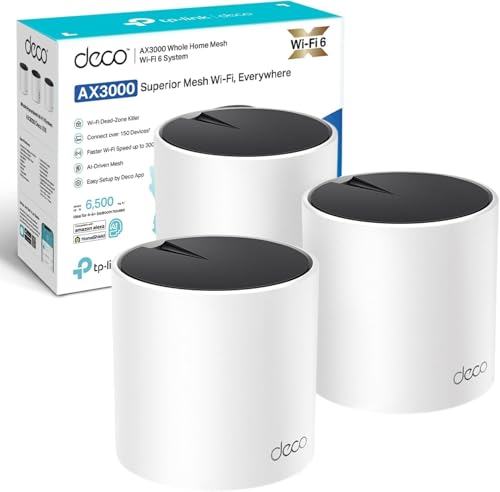
- 𝗪𝗶𝗙𝗶 𝟲 𝗔𝗫𝟯𝟬𝟬𝟬 𝗦𝗽𝗲𝗲𝗱 𝗳𝗼𝗿 𝗛𝗼𝗺𝗲𝘀:Up to 3 Gbps dual-band WiFi 6 performance, built for smooth 4K streaming, video meetings, and online gaming across your home.
- 𝟰 𝘀𝘁𝗿𝗲𝗮𝗺𝘀 𝘄𝗶𝘁𝗵 𝟭𝟬𝟮𝟰-𝗤𝗔𝗠: WiFi 6 technology is designed to deliver 4 × Larger Capacity, 3 × Faster Speed and HE160 Doubling bandwidth.
- 𝗕𝗦𝗦 𝗖𝗼𝗹𝗼𝗿 𝗮𝗻𝗱 𝗕𝗲𝗮𝗺𝗳𝗼𝗿𝗺𝗶𝗻𝗴 𝗳𝗼𝗿 𝗦𝘁𝗿𝗼𝗻𝗴𝗲𝗿 𝗦𝗶𝗴𝗻𝗮𝗹: Boosted WiFi coverage up to 6,500 ft2 (3-pack) with 150+ devices connection.
- 𝗔𝗜-𝗗𝗿𝗶𝘃𝗲𝗻 𝗠𝗲𝘀𝗵 𝗥𝗼𝗮𝗺𝗶𝗻𝗴: Creates one unified WiFi network name and intelligently switches devices between nodes, so you stay connected while moving around your home with no dropouts.
- 𝗕𝘂𝗶𝗹𝘁-𝗜𝗻 𝗧𝗣-𝗟𝗶𝗻𝗸 𝗛𝗼𝗺𝗲𝗦𝗵𝗶𝗲𝗹𝗱 𝗦𝗲𝗰𝘂𝗿𝗶𝘁𝘆: Provides advanced network protection, parental controls and real-time IoT security, helping keep your family and connected devices safe online. 𝗦𝘂𝗯𝘀𝗰𝗿𝗶𝗽𝘁𝗶𝗼𝗻 𝗿𝗲𝗾𝘂𝗶𝗿𝗲𝗱 𝗳𝗼𝗿 𝘀𝗼𝗺𝗲 𝗳𝗲𝗮𝘁𝘂𝗿𝗲𝘀.

Best for small flats and starter budgets: TP-Link Deco X10 (2-pack)
A one or two-bedroom flat rarely needs three mesh nodes, and the 2-pack X10 is priced and sized accordingly. It is a slower AX1500 chipset rather than AX3000, which does not matter for video calls – a Teams or Zoom call needs a few megabits of stable bandwidth, not the several hundred these systems are capable of. Two units are enough to put a strong signal in every room of a flat or small terrace, including a box-room office that a single router in the living room could not reach cleanly.
If you later move somewhere bigger, the X10 is part of TP-Link’s Deco range and a third unit can usually be added rather than needing a whole new system.
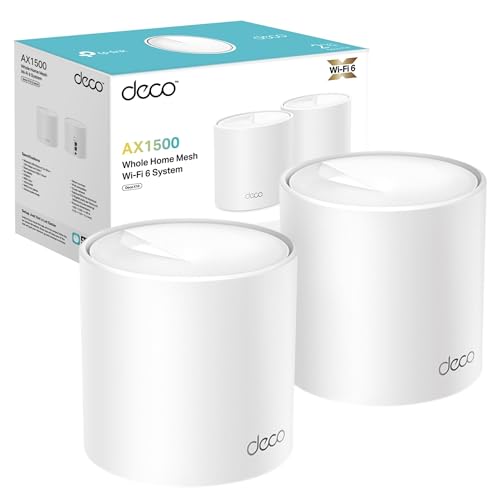
- Ideal for 500Mb+ broadband: A great fit for users with the speed between 500Mbpcs and 900Mbps. For full Gigabit speeds, choose Deco X55/XE75 or new-Gen Wi-Fi 7 Deco.
- Connect More Devices: OFDMA and MU-MIMO technology quadruple capacity to enable simultaneous transmission to more devices.
- Boosted Seamless Coverage: Achieve seamless whole home coverage with a clearer and stronger whole home Wi-Fi signal generated by Wi-Fi 6.
- Ultra-Low Latency: Greater reduction in latency enables more responsive gaming and video chatting.
- One Unified Network: Multiple units form a whole-home network that auto-selects the best connection as you move around your home.
Best for large or multi-storey homes: Amazon eero 6 (3-pack)
Eero’s reputation is for a mesh system that gets out of your way – the app is simple, the hand-offs between nodes are notably smooth, and it is rated for coverage up to 420 square metres across the 3-pack, which suits a large detached house or one with an office in a converted garage or loft some distance from the router. Being an Amazon product, it also integrates cleanly with Alexa if that matters to your household, though that is a bonus rather than the reason to buy it.
It supports 75 or more connected devices, which is plenty of headroom for a household running video calls, streaming and smart-home devices simultaneously without the office suffering for it.

- Comprehensive Wi-Fi 6 home coverage: eero 6 covers up to 420 m² and supports speeds up to 500 Mbps.
- Say goodbye to dead zones and buffering: eero’s mesh Wi-Fi technology optimizes for your space—so you can confidently stream 4K video game, and video conference across your home.
- Supports 75+ devices: eero 6 uses the power of Wi-Fi 6 to increase the capacity and efficiency of your network.
- Set up in minutes: the eero app walks you through setup and allows you to manage your network from anywhere.
- Connect to Alexa: eero 6 doubles as a Zigbee smart home hub, making it easy to connect and control compatible devices on your network with Alexa.
Best future-proof pick: TP-Link Deco BE3600 (3-pack, Wi-Fi 7)
If you are buying once and want headroom for the next five years, the BE3600 is TP-Link’s entry point into Wi-Fi 7. The practical benefit for a home office today is a genuinely uncongested band for your work devices, away from the 2.4GHz and 5GHz traffic every neighbour’s Wi-Fi and smart-home gadget is fighting over – useful in a flat or terrace with dozens of nearby networks visible on a Wi-Fi scan. Your laptop needs a Wi-Fi 7 or 6E adapter to get the full benefit, but the system is fully backward-compatible with older devices in the meantime.
It carries a premium over the Wi-Fi 6 options above, which is worth paying only if you want to be covered for hardware you do not own yet.
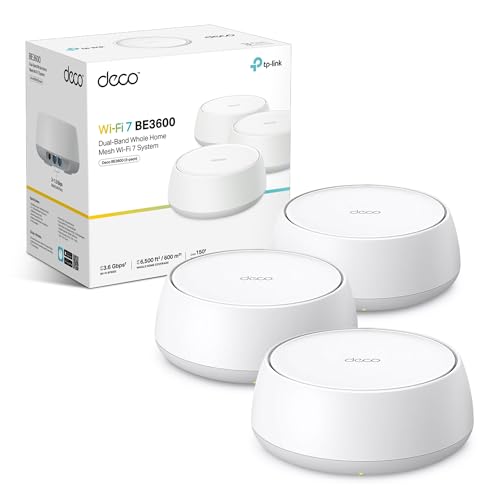
- 𝗪𝗶𝗙𝗶 𝟳 𝗕𝗘𝟯𝟲𝟬𝟬 𝗦𝗽𝗲𝗲𝗱 𝗳𝗼𝗿 𝗛𝗼𝗺𝗲𝘀: Up to 3.6 Gbps dual-band mesh WiFi 7 performance, built for smooth 4K/8K streaming, video meetings, and online gaming across your home.
- 𝗠𝘂𝗹𝘁𝗶-𝗟𝗶𝗻𝗸 𝗢𝗽𝗲𝗿𝗮𝘁𝗶𝗼𝗻 (𝗠𝗟𝗢) = 𝗙𝗮𝘀𝘁𝗲𝗿 + 𝗟𝗼𝘄𝗲𝗿 𝗟𝗮𝘁𝗲𝗻𝗰𝘆: WiFi 7 MLO sends/receives data across multiple bands/channels at once to increase throughput, reduce latency, and boost reliability—ideal for busy households with many connected devices.
- 𝗦𝗲𝗮𝗺𝗹𝗲𝘀𝘀 𝗔𝗜-𝗗𝗿𝗶𝘃𝗲𝗻 𝗠𝗲𝘀𝗵 𝗥𝗼𝗮𝗺𝗶𝗻𝗴: Creates one unified WiFi network name and intelligently switches devices between nodes, so you stay connected while moving around your home with no dropouts.
- 𝗪𝗶𝗿𝗲𝗹𝗲𝘀𝘀 + 𝗪𝗶𝗿𝗲𝗱 𝗖𝗼𝗺𝗯𝗶𝗻𝗲𝗱 𝗕𝗮𝗰𝗸𝗵𝗮𝘂𝗹: Each unit can use wireless and wired backhaul simultaneously to improve overall throughput and reduce lag; plug in Ethernet for even better performance—up to 1 Gbps on wired connections.
- 𝗚𝗶𝗴𝗯𝗶𝘁 𝗪𝗶𝗿𝗲𝗱 𝗖𝗼𝗻𝗻𝗲𝗰𝘁𝗶𝗼𝗻𝘀: Equipped with 2 × 1 Gbps Ethernet ports, ideal for gaming PCs, smart TVs and NAS, ensuring you get the most out of your high-speed broadband.
Comparison at a glance
| Model | Wi-Fi standard | Pack size | Best for | Approx. price |
| TP-Link Deco X55 | Wi-Fi 6, AX3000 | 3-pack | Most homes | £190–£210 |
| TP-Link Deco X10 | Wi-Fi 6, AX1500 | 2-pack | Flats, small homes | £100–£120 |
| Amazon eero 6 | Wi-Fi 6 | 3-pack | Large or multi-storey homes | £220–£240 |
| TP-Link Deco BE3600 | Wi-Fi 7, dual-band | 3-pack | Future-proofing | £230–£255 |
Getting the placement right
Mesh Wi-Fi is forgiving of bad router placement in a way a single router never was, but it still rewards a bit of care. Put the main node wherever your internet comes into the house – that one cannot move. Put a second node roughly halfway between the router and your office, at head height on a shelf or table rather than on the floor or hidden behind a TV cabinet, both of which absorb signal badly. If your office is the room furthest from the router, resist the temptation to put a node inside the office itself and a second one right next to it; spacing them out across the house gives more even coverage than clustering them near the room you care about most.
Run each system’s own network-check tool (all four have one in their app) after setup, and move a node if it flags a weak link to its neighbour – a mesh system is only as strong as its weakest hop.
Wired backhaul: worth the extra effort if you can manage it
Every system above works fully wirelessly, with nodes talking to each other over the air. If you can run an Ethernet cable – through a loft, under a floor, or simply along a skirting board with clips – connecting two nodes by cable instead removes that wireless hop entirely, freeing up airtime for your devices and giving the node nearest your desk a guaranteed-clean connection back to the router. It is not necessary for a good result, but if your office is the room that matters most and a cable run is feasible, it is the single biggest reliability upgrade available.
Common mistakes that undo a good mesh setup
A few habits quietly wreck otherwise good coverage. The first is leaving the old router’s Wi-Fi switched on alongside the new mesh system – put the old router into modem-only or bridge mode, or switch its wireless off entirely, so your laptop is never tempted to connect to a weaker, older signal out of habit. The second is naming each node’s network separately (“Office Wi-Fi”, “Upstairs Wi-Fi”); every mesh system in this guide is designed to run as one single network name, and splitting it up defeats the automatic hand-off that is the whole point of buying mesh. The third is stacking a node on top of other electronics – a games console, a set-top box, a baby monitor base station – which all generate their own interference; a clear shelf a metre or so off the floor works far better than a crowded media unit.
Finally, resist the urge to reboot the whole mesh system every time one call has a bad moment. A single dropped frame is normal even on a wired connection; if calls are stuttering consistently at the same time of day, that is a capacity problem worth investigating – check whether a housemate’s device is mid-download or a scheduled backup is running – rather than a fault with the mesh hardware itself.
Which mesh Wi-Fi system should you buy?
For most homes with a WFH setup, the TP-Link Deco X55 3-pack is the right call: enough coverage for a typical house, an Ethernet port where you need it, and Wi-Fi 6 speeds that comfortably outpace what a video call actually needs. If you are in a flat or a smaller home, save money with the Deco X10 2-pack instead – you will not notice the lower headline speed on a call. A large or awkwardly-shaped house, particularly one with an office some distance from the router, is where the eero 6 3-pack’s extra coverage and smooth hand-offs earn their higher price. And if you want to buy once for the next five years and your budget stretches to it, the Deco BE3600 gives you a genuinely quiet Wi-Fi 7 band to grow into.
Whichever you choose, plug your desk into the nearest node with an Ethernet cable if you possibly can. A wired connection for your work laptop, with Wi-Fi handling everyone else’s devices, is the single most reliable setup for calls that a home office can have.