Choosing between an inkjet and a laser printer is the first and most important decision when you buy a printer for a home office, and it is surprisingly easy to get wrong. Most people compare the purchase price, pick the cheapest, and discover a year later that the cartridges cost more than the printer. The truth is that the right answer depends almost entirely on what you print, how often you print, and whether colour matters to you.
This guide compares the two technologies on the things that actually affect a home office: cost per page, quality, speed, reliability and size, and then tells you which one suits which kind of user.
How inkjet and laser printers work
An inkjet printer sprays tiny droplets of liquid ink onto the paper through microscopic nozzles. It is a flexible technology that handles colour, photographs and different paper types well, which is why it is the standard home printer. A laser printer uses a laser to draw an image onto a drum, which picks up powdered toner and fuses it onto the paper with heat. It is a faster, more precise process, which is why it dominates offices.
There is a third type that sits between them: the ink tank printer, which is an inkjet that uses refillable tanks instead of cartridges. It matters for this comparison because it changes the cost argument completely.
Running cost: where the real difference is
Cost per page is the biggest difference. Conventional inkjet cartridges are small and expensive, so every page costs noticeably more than a laser page. Laser toner cartridges hold far more and cost less per page, which is why a laser is the cheaper printer for anyone who prints more than a few pages a week.
The exception is the ink tank printer. Because the ink comes in cheap bottles rather than pricey cartridges, its cost per page is as low as a laser, and in colour it is far cheaper. If you print a lot in colour, an ink tank is the winner.
Print quality
For black text, a laser is sharper and the print is crisp at small sizes, which makes it ideal for contracts, reports and spreadsheets. It is also smudge-resistant, so a damp page or a highlighter does not ruin it. Inkjets produce good text too, but the ink can run if the page gets wet.
For colour and photographs, inkjets win. They blend colours smoothly and can print on photo paper and other special media. A colour laser produces solid, vivid graphics suited to business documents but is less good at photographs.
Speed
Lasers are faster, especially for multi-page documents, and they start printing quickly because there is no need to prime nozzles. Inkjets are slower and take longer to warm up, which is noticeable when you only want a single page. For occasional printing the difference rarely matters, but if you print long reports regularly, you will feel it.
Reliability and standing idle
This is the point most buyers overlook. An inkjet that sits unused can clog its nozzles, wasting ink on cleaning cycles or needing a replacement printhead. A laser has no such problem, because toner is a dry powder. If you print in bursts, with weeks between jobs, a laser is far more dependable.
Size and noise
Compact inkjets are generally smaller and lighter than lasers, and they are quieter in operation, although they can be slow and make a lot of mechanical noise. Lasers are a little deeper and heavier, and they warm up with a brief hum, but they have become far more compact than they used to be.
Inkjet vs laser at a glance
| Factor | Inkjet | Laser | Ink tank |
| Cost per page | Highest | Low | Lowest in colour |
| Black text quality | Good | Excellent | Good |
| Colour and photos | Excellent | Good for graphics | Excellent |
| Speed | Slower | Faster | Slower |
| Idle for weeks | Can clog | No problem | Usually fine |
| Purchase price | Lowest | Low to mid | Highest |
Who should buy a laser
If you mostly print black-and-white documents, print every week, or leave the printer idle for long stretches, buy a laser. It is the most reliable, cheapest-to-run option for a typical home office, and the toner lasts a long time.
Our pick: the Brother HL-L2400DWE, a compact, wireless mono laser with automatic double-sided printing that is a safe choice for almost any home worker.

- 4 month EcoPro trial: Choose your plan and sign up online with a free four month trial Plus you can change or cancel your subscription at any time
- Automatic delivery of Brother Genuine Supplies: so you never run out, plus free toner cartridge recycling
- LCD CONTROL PANEL: 1 line control panel for quick and easy navigation of the printer fuctions, at your fingertips
- Wireless and mobile connectivity: The Brother mobile connect app offers a range of options from printer function to managing your EcoPro subscription
- UP TO 30PPM PRINT SPEED: With fast print speeds, you can print your professional documents in no time at all without compromising on quality

Who should buy an inkjet
If you print only a handful of pages a month, want colour and photographs, and need a cheap, compact machine, an inkjet is perfectly sensible. The key is to accept that the cartridges are expensive and to print little.
Our pick: the Canon PIXMA TR4755i, a very affordable compact all-in-one that prints, copies and scans.

- NEVER RUN LOW ON INK AGAIN - Subscribe to the PIXMA Print Plan and get inks delivered automatically to your door before you run out, with different tariffs available to suit your usage.
- SMART PRINTER OPERATION - Wi-Fi connectivity and the Canon PRINT app give you control of your printer functions from your smart devices. If you're away from Wi-Fi, just switch to Wireless Direct.
- STAY IN THE CLOUD - Simplify scanning and printing to and from cloud storage with PIXMA Cloud Link via the Canon PRINT app.
- BOOST PRODUCTIVITY - Enhance efficiency with automatic 2-sided printing and a 20-sheet ADF for copying and scanning multiple page documents.
- SETUP CARTRIDGES INCLUDED: The TR4755i printer arrives with starter cartridges offering lower yield than standard replacements. Standard cartridge page yields for reference: Black PG-575 (100 pages), Black XL PG-575XL (400 pages), Colour CL-576 (100 pages), Colour XL CL-576XL (300 pages). Page yields are based on ISO/IEC standards and may vary depending on printer, content printed, print settings, environmental conditions and usage.
Who should buy an ink tank printer
If you print a lot, and especially if you print in colour, an ink tank printer will save you the most money over time. It costs more to buy, but the cost per page is far lower than a cartridge inkjet, and the tanks hold a lot of ink.
Our pick: the Epson EcoTank ET-2862, a Wi-Fi print, copy and scan machine with refillable ink tanks.
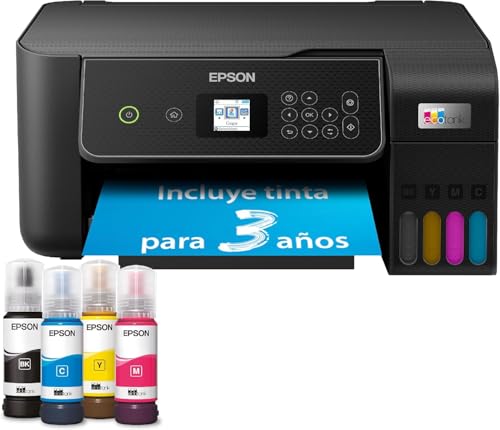
- Finally, print without cartridges - EcoTank enables comfortable printing at home - The large-volume ink tanks allow for straightforward refilling - Since the ink bottles operate on a key-lock principle, only the correct ink can be refilled - The front ink level display lets you easily see when you need to refill the printer.
- Save even more - With this economical printer, you reduce your ink costs by up to 90%* - Included in the delivery is an ink supply for up to 3 years* - One ink bottle set is enough for printing up to 4,500 pages in black and white and 7,500 pages in color* - That equates to an impressive number of up to 72 ink cartridges! *
- Epson Smart Panel App - With this app, you can control your printer from your smart device* - You can print, copy, and scan documents and photos, set up and control the printer, and troubleshoot issues - all from your phone or tablet.
- Full of features - With a 100-sheet paper cassette at the back, support for borderless photo printing (up to 10 x 15 cm) and print speeds of up to 10 pages per minute*, you can easily and quickly handle various tasks.
- Modern flexibility - Thanks to the compact design and connectivity via Wi-Fi and Wi-Fi Direct, you can easily integrate this printer into your home and print from smartphones, tablets, and laptops*.
Questions to ask before you buy
- How many pages do you print in a typical month? Under twenty, an inkjet is fine. Over fifty, a laser or ink tank will repay its higher price.
- Do you need colour? If not, a mono laser is simpler and cheaper to run.
- How long does it sit idle? If it is weeks at a time, avoid cartridge inkjets.
- Do you need to scan? Multifunction machines exist in all three types, but they cost more and take more space.
- Where will it go? Measure the shelf before you buy, because lasers are deeper than inkjets.
A worked example: three kinds of home worker
Take a freelance writer who prints a handful of contracts and invoices each month. They print little, in black and white, and the printer often sits idle for weeks. A laser is the clear answer: it will not clog, the toner will last for years, and the cost per page will barely matter at that volume.
Now take a small business owner who prints dozens of colour documents every week: brochures, proposals, labels and the odd photograph. For them, the ink tank printer pays for itself, because the cost of cartridges would soon outweigh the price of the machine. They also get colour and a scanner in one device.
Finally, take a household that prints a school project every few weeks and the occasional photograph. A small, cheap inkjet is a sensible choice, as long as nobody expects to print much. The key in every case is to match the printer to the habit.
Common myths about inkjet and laser printers
One myth is that lasers are only for big offices. Modern compact lasers are small, quiet enough for a home office and priced close to inkjets, so there is no longer any reason to avoid one for size alone. Another is that inkjets are always cheaper. They are cheaper to buy, but over a couple of years of regular use they are almost always more expensive to run.
A third myth is that laser printing is poor for graphics. Colour lasers handle charts, slides and logos well; where they fall short is photographs. And finally, third-party cartridges are not automatically a bargain: they can work, but compatibility problems are more common with newer printers, so original supplies are the safer choice.
What about the environment?
Lasers use fewer disposable parts, because a toner cartridge lasts a long time, and ink tank printers avoid the plastic waste of small cartridges altogether. Conventional inkjets generate the most waste. Printing double-sided and only when needed is the single biggest thing you can do, whichever type you choose.
The verdict
For most home offices, a mono laser is the better choice: cheaper to run, more reliable and sharper for text. Pick an inkjet only if you print very little and want colour in a small, cheap machine, and an ink tank if you print a lot of colour and want the lowest cost per page.
Whichever you choose, base the decision on your real printing habits, not the price on the box. That is what decides whether a printer is a bargain or a drain on your budget.