There is a particular kind of home office chaos that no amount of tidying fixes: the drawer of identical black power adapters, the box files that all look the same, the bundle of cables behind the desk that nobody can identify without unplugging them one at a time. A label maker solves exactly that problem. A few minutes with a small printer and a roll of tape turns a mystery pile into a system you can navigate at a glance.
Label makers have also improved enormously. The old embossing tape guns have been replaced by compact thermal and laminated-tape printers that produce crisp, durable labels, and some now connect to a phone app so you can design a label in seconds. This guide picks four that suit different needs, all checked live on Amazon UK for stock, price and review standing.
What actually matters when choosing a label maker
- Handheld or app-based. A handheld model with its own keyboard works anywhere with no phone. An app-based Bluetooth printer is faster for long or fancy labels but depends on your phone.
- Tape cost and availability. The printer is cheap; the tape is where the money goes. Check how much a roll costs and how long it lasts before you buy.
- Durability of the label. Laminated labels resist water, heat and fading, which matters for cables behind a desk or files in a garage. Thermal labels can fade in sunlight.
- Label width and shape. Narrow tape is ideal for cables, while wider labels suit files, shelves and boxes.
- Ease of use. A clear screen and a sensible keyboard make the difference between a gadget you use daily and one that lives in a drawer.
- Power. Batteries or a rechargeable cell; a model that eats batteries quickly becomes a nuisance.
The best label makers for a home office
Best overall: Brother P-touch PT-H110
Brother has been making label printers for decades, and the PT-H110 is the sensible, no-fuss choice. It is a handheld labeller that prints on durable laminated tape, so the labels stay put and stay readable on cables, file spines and drawers. With well over two thousand buyers rating it highly, it is the dependable all-rounder.
It is simple to use, and the tapes are widely stocked, so you will never struggle to find a refill.
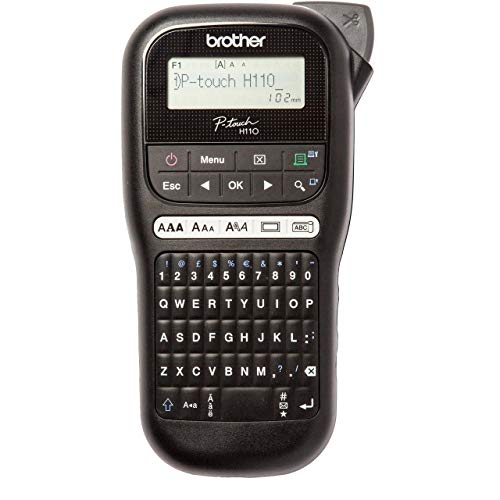
- PERFECT FOR THE OFFICE: There are many uses such as marking cables and plugs, CD’s and DVD’s, USB flash drives, office equipment, file folders, staff and visitor name badges, filing cabinets, signage, mail rooms, notice boards, shelving and telephone extension numbers.
- PERSONALISED LABELS: This feature packed labelling machine prints durable labels up to 12mm in width. Choose from several fonts, font styles, frames and symbols to customise your labels to your exact needs.
- LCD DISPLAY: The 16 character graphic display lets you view and select from the hundreds of symbols, and view the various fonts and frames in more detail than ever before.
- CABLE LABELLING: Clearly mark your AC adapters and other plugs and cables using the cable marking function. Prints a flag label that is wrapped onto itself for easy identification.
- DURABLE LAMINATED TAPES: Brother TZe tapes are available in up to 60 different colour and size combinations. Tested to the extreme, they can be used in indoor or outdoor environments.

Best budget pick: DYMO LetraTag LT-100H
The DYMO LetraTag LT-100H is the cheapest way to get a handheld label maker with an ordinary ABC keyboard and a small screen. It is a straightforward machine for labelling cables, boxes and files, and it has been rated by thousands of buyers.
It is more basic than the others, but for a home office where the main job is naming a handful of things, it does the job at the lowest cost.

- 2 line printing, 5 font sizes, 7 print styles, 8 box styles, 9 label memory, date stamp and 3 language options for total versatility, whatever the task
- 13 character LCD screen and graphical display lets you clearly see messages, fonts and effects on screen before printing
- Thermal printing technology means you'll never need to buy ink or toner
- Automatic Off for power saving; easy to navigate, quick access buttons for swift and easy label making
- Includes: LetraTag 100H+ Label Maker and Label Starter Roll (Black Paper, 12 mm x 3 m); works with 4AA batteries (not included)
Best for phone design: NIIMBOT B1 Label Maker
NIIMBOT’s B1 is a compact Bluetooth thermal printer that you control from a phone app. Because it prints without ink or ribbon, running costs are very low, and the app makes it easy to create labels with text, icons and barcodes. It is a great pick for people who like to label everything and want the option of something more elaborate than a line of text.
Thermal labels can fade in direct sunlight, so use it for indoor jobs such as shelves, drawers, boxes and cables behind the desk.
No products found.
Best for heavy use: Dymo LabelManager 160
If you label a lot, the Dymo LabelManager 160 is the one with a proper QWERTY keyboard, which makes typing labels fast and accurate. It uses D1 tape in a range of colours, so you can colour-code cables, files and shelves, and it has been rated highly by hundreds of buyers.
It costs more than the budget options, but if you want to label an entire office quickly, the keyboard alone is worth it.
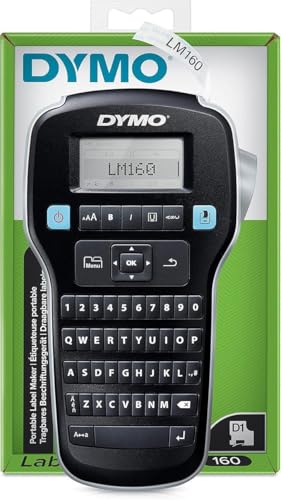
- Type text quickly on the computer-style keyboard, edit with one-touch fast-formatting keys and print for perfect, professional labels every time
- Compact and lightweight for portability, making it easy to label just about anything, anywhere
- Create high-quality labels in 6 font sizes, 8 text styles, 4 boxes plus underline, and 228 symbols and clip art
- Enjoy extended battery life with automatic switch-off
- DYMO is prioritising FSC certified and recycled materials, ensuring that all products are truly made well
Comparison at a glance
| Model | Type | Label style | Best for | Approx. price |
| Brother PT-H110 | Handheld | Laminated tape | Durable everyday labels | £33–£40 |
| DYMO LetraTag LT-100H | Handheld | Tape with ABC keyboard | Cheapest handheld | £25–£32 |
| NIIMBOT B1 | Bluetooth, app-based | Inkless thermal | Phone-designed labels | £23–£30 |
| Dymo LabelManager 160 | Handheld | D1 tape, QWERTY keyboard | Labelling a lot, fast | £42–£50 |
What to label first in a home office
Start with cables, because they are the single biggest source of frustration. Put a label near the plug end of each cable describing what it connects to: monitor, laptop charger, router, printer. The next time you need to unplug one, you will know exactly which it is, rather than tugging at the wrong lead behind the desk.
Next, label the things you reach for and put back: files, storage boxes, drawers and shelves. A clearly labelled box takes seconds to find and, just as importantly, seconds to put back in the right place. If more than one person shares the space, labels settle arguments about where things belong.
Labelling tips that make a tidy system last
- Use a consistent format. Pick a style, such as capitals for categories and lower case for details, and stick to it.
- Label both ends of a cable. A label at each end saves you from following the cable through the tangle.
- Colour-code if you can. Different tape colours for different categories make a shelf readable from across the room.
- Keep labels short. Two or three words are easier to read than a sentence.
- Review once a year. Labels that no longer match what is inside are worse than none.
Laminated tape, thermal paper or embossing?
The type of label matters more than the brand of machine. Laminated tape, used by the Brother and Dymo handhelds, sandwiches the printed text between layers of plastic, so it survives damp, heat, rubbing and years of sunlight. It is the right choice for cables, tools and anything that will be handled.
Thermal labels, used by the NIIMBOT, are printed with heat on special paper. They cost very little to run and are ideal for shelves, boxes and drawers, but they can fade if left in bright light for long periods. Old-fashioned embossing tape is cheap but hard to read and rarely worth buying now.
Making labels that actually help
A label is only useful if you can read it quickly. Choose a clear font size, avoid abbreviations only you understand, and put the label where your eye naturally lands: the top edge of a box, the plug end of a cable, the front of a drawer. For files, label the spine and the front, so you can find them whichever way they sit.
If you share the space with a partner or colleagues, agree the system together before you label. A label maker is brilliant for settling where things live, but only if everyone uses the same logic.
Other jobs for a label maker
Beyond cables and files, a label maker is handy for marking the chargers and adapters you travel with, labelling your router and network equipment with login reminders that do not include passwords, and tagging the spare keys, boxes of cartridges and tools that otherwise disappear into a cupboard.
It is also useful for the less obvious jobs: putting your name and phone number on a laptop charger so it comes back if you leave it behind, marking the stop-cock or fuse-box switches for quick reference, and naming the folders on a shelf of archived work so that you never again open three boxes to find one invoice.
Which label maker should you buy?
For most people, the Brother PT-H110 is the right choice: durable labels, widely available tape and a track record of reliability. If you simply want the cheapest way to start, the DYMO LetraTag LT-100H does the job, and if you enjoy designing labels from your phone, the NIIMBOT B1 is the most flexible.
For anyone who labels heavily and wants to type quickly, the Dymo LabelManager 160 and its QWERTY keyboard are worth the extra. Whichever you pick, an hour with a label maker is one of the cheapest ways to make a home office feel organised.