Affiliate disclosure: WFHKit is reader-supported. We may earn a small commission when you buy through links on this page, at no extra cost to you. Our recommendations are independent, and we only recommend products we would be happy to use ourselves.
A trackball turns the mouse upside down. The body stays still on your desk, and you move the pointer by rolling a ball with your thumb or fingers. There is no arm sweeping across the desk and no wrist twisting, which is why trackballs are popular with people whose wrist, forearm or shoulder complains after a long day on a regular mouse.
They are also useful on a crowded desk. Because the trackball does not move, it needs hardly any space, and it works on any surface, from a notepad to a bedsheet. If you work from a small desk, a sofa or a shared table, that is a real advantage.
This guide picks four trackball mice, from a cheap thumb-operated model to a premium finger-operated design. We opened each product’s live Amazon UK page and checked the stock, the reviews and the price before including it.
How to choose a trackball mouse
- Thumb or finger control. A thumb trackball keeps the ball under your thumb and suits most hands. A finger-operated ball sits in the centre and is moved with the fingertips, which some people find more precise.
- Size and shape. Pick a trackball that fills your hand without making you stretch. A small hand can struggle with a large body, and a large hand can cramp on a small one.
- Connection. Bluetooth works with a laptop, and a USB receiver gives a steady link for a desktop. Look for a model that offers both if you switch between machines.
- Left or right hand. Most thumb trackballs are shaped for the right hand. An ambidextrous model is the better choice if you use your left.
- Buttons. Extra buttons can be set to open apps, switch windows or change pointer speed. A scroll wheel or a scroll ring makes long documents easier to move through.
- Cleaning. The ball picks up dust and skin oils over time. A model that lets the ball pop out for a quick clean is easier to keep smooth.
The best trackball mice for desk workers
Best budget buy: Logitech ERGO M575S Wireless Trackball Mouse
The Logitech ERGO M575S is the easiest trackball to recommend. It is a thumb-operated design with a smooth ball, a scroll wheel and a comfortable shape that supports the heel of your palm. It connects over Bluetooth or an encrypted USB receiver and works with both PCs and Macs.
It costs about £30, and nearly two thousand buyers have rated it at 4.6 stars, the joint highest score in this guide. It is the pick for anyone trying a trackball for the first time, and it is hard to beat for the price.

Best value rechargeable pick: Nulea M501 Wireless Trackball Mouse
The Nulea M501 is a rechargeable thumb trackball that connects to up to three devices over Bluetooth or USB. It has a smooth thumb ball, a scroll wheel and a shape that suits most hands. It works with PC, Mac, Windows and Android.
It costs about £34, and more than thirteen thousand buyers have rated it at 4.5 stars. That is a huge number of reviews for a trackball. It is a good option if you want a rechargeable mouse that pairs with several devices without paying for a premium brand.

- Ergonomic Design with Smooth Thumb Control: Move your cursor by the smooth trackball instead of moving your wrist and arm. Let the easy and smooth thumb control help you reduce your muscle stress. The optimal angle of the trackball mouse allows you to keep your palm in a natural position for all-day comfort.
- Precise Tracking with Adjustable DPI: Nulea trackball mouse provides precise cursor movement for exceptional accuracy and control. With the smooth trackball, you can be more productive on the move on almost any surface, any workplace. Especially on the narrow space, such as the messy desktop, couch, bed, small writing board on a chair, etc.
- True Wireless Freedom: Connect up to 3 devices by either bluetooth or USB dongle. Switch easily between them by the button on the bottom to improve your efficiency.[KINDLY REMINDER: The 2.4G USB receiver is stored at the bottom of the mouse.]
- Rechargeable Battery: (For your best experience, please fully charge the mouse before your first use) The built-in rechargeable battery has a long battery life enables you to say goodbye to dry cell batteries. Please Note: 1. Please use our included charging cable to charge the mouse 2. Do not use a fast charger to charge the mouse. (Directly use the computer USB port or a 5V charger to charge the mouse).
- 6 Button High Performance: Nulea trackball mouse bluetooth is designed with thoughtful ergonomic details and an elegant curved shape. Plus the back and forward button, you can operate easily with higher productivity as well as added comfort. Note: all the buttons are non-programmable.

Best premium thumb trackball: Logitech MX Ergo S
The Logitech MX Ergo S is the upmarket thumb trackball. It is rechargeable over USB-C, it has six programmable buttons, and it connects over Bluetooth or an encrypted USB receiver. It works with PC and Mac, and its hinge lets you tilt the body to a more comfortable angle.
It costs about £73, and more than seven hundred and fifty buyers have rated it at 4.6 stars. It is the right choice if you will use a trackball every day and want the best build, the best customisation and a rechargeable battery that charges over USB-C.

- Advanced thumb control: The MX Ergo S Advanced wireless trackball mouse gives more control with less movement; switch between speed and high-precision tracking at the tap of a button
- 20-degree tilt: A wireless ergonomic mouse with a tilt angle for better forearm posture, reducing muscle strain by 27% (1); now with 80% quieter clicks (5)
- Contoured for your hand: The MX Ergo S is certified by ergonomists for improved comfort, with a sculpted ergonomic design, 20-degree tilt angle, and soft rubber grip; for medium- to large-sized hands
- Boost your productivity using the Logi Options+ App (2): Experience enhanced control in your daily tasks with 6 customisable buttons, time-saving shortcuts, and Smart Actions
- Quick USB-C charging: Enjoy up to 24 h of use from a 1 min charge or up to 120 days (3) with a full charge; charges with a USB Type C to Type C or USB Type A to Type C cable (not included)
Best finger-operated and ambidextrous: Kensington SlimBlade Pro
The Kensington SlimBlade Pro is a different shape of trackball. It has a large ball in the middle that you roll with your fingertips, and it works for both left-handed and right-handed users. It connects over Bluetooth, it is rechargeable, and the maker quotes up to four months of battery life.
It works with Windows and macOS. It costs about £93, and more than nine hundred buyers have rated it at 4.3 stars. It is the one to pick if you are left-handed, if a thumb ball tires your thumb, or if you want a low, sleek design that suits a minimalist desk.
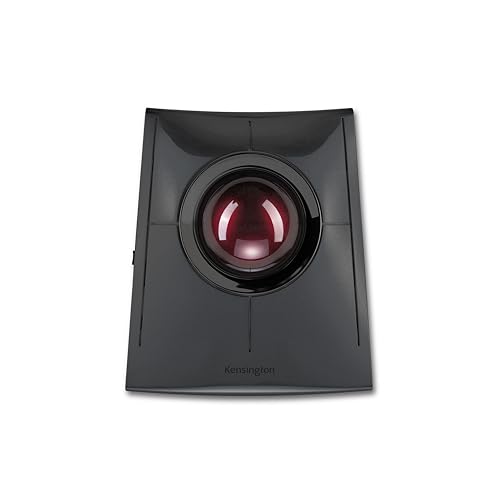
- Rechargeable battery provides 4 months battery life with a single charge via USB-C port and wired connection options for maximum flexibility
- Includes choice of Bluetooth, 2.4GHz wireless and wired connections. Compatible with Bluetooth BT3.0/BT5.0. Features 2.4GHz wireless dongle (USB-A with USB-C to USB -A adapter) and 1.5m USB-C to USB-A charging cable
- Large 55mm trackball lets users scroll up and down web pages and documents with quick precision via a simple twist
- Low-profile shape allows all-day comfort for both right and left-handed users, takes up less desk space than a mouse and is more comfortable during extended use since there is less arm movement
- Dual sensors accurately track the ball, giving users precise cursor control that requires less hand and wrist movement. Provides highly accurate and responsive cursor tracking and scrolling
Comparison at a glance
| Trackball | Control | Connection | Best for | Approx. price |
|---|---|---|---|---|
| Logitech ERGO M575S | Thumb | Bluetooth or receiver | A first trackball | £27–£33 |
| Nulea M501 | Thumb | Bluetooth or USB | Rechargeable value | £30–£38 |
| Logitech MX Ergo S | Thumb | Bluetooth or receiver | Daily power users | £68–£78 |
| Kensington SlimBlade Pro | Fingers | Bluetooth | Left-handed users | £88–£98 |
Why choose a trackball?
A regular mouse needs your whole arm to move. That means your shoulder, elbow and wrist all work throughout the day, and a long session can leave them tired. A trackball moves only your thumb or fingers, so your arm stays still and relaxed. That is why many people who struggle with wrist or shoulder discomfort choose one.
A trackball is not a medical device, and it will not suit everyone. If you have ongoing pain, speak to your GP or a physiotherapist as well as changing your equipment.
Getting used to a trackball
Expect a short learning curve. Aiming feels slow and clumsy for the first day or two, and then it becomes natural. Start by lowering the pointer speed so you can make small, careful movements, and raise it once you feel confident.
Use the trackball for everyday jobs first, such as email and browsing. Fine work such as photo editing takes longer to master. Many people keep a regular mouse in a drawer for gaming and detailed design work.
Keeping your trackball smooth
Dust and oil build up under the ball and can make the pointer stick. Pop the ball out every few weeks, wipe the sensors and the support beads with a dry cotton bud, and wipe the ball with a soft cloth. A clean trackball runs smoothly for years.
Keep the trackball on a stable surface and at the same height as your keyboard. A mouse mat is not needed, but a wrist rest can support the heel of your hand if the body feels low.
Setting up your desk
Place the trackball at the same height as the keyboard and close enough that your elbow stays by your side. Keep your wrist straight and your shoulder relaxed, and check that your chair is high enough that your elbows rest at desk height.
Which trackball mouse should you buy?
For most people the Logitech ERGO M575S is the best trackball mouse for a desk worker. It is comfortable, well reviewed and cheap, and it suits Mac and PC owners.
If you want a rechargeable mouse that pairs with several devices, the Nulea M501 is excellent value. The Logitech MX Ergo S is the premium thumb trackball for daily use, and the Kensington SlimBlade Pro is the right choice for left-handed users or anyone who prefers to roll the ball with their fingers. Give any trackball a full week before you decide, because your hand needs time to adapt.