Affiliate disclosure: WFHKit is reader-supported. We may earn a small commission when you buy through links on this page, at no extra cost to you. Our recommendations are independent, and we only recommend products we would be happy to use ourselves.
A standard mouse makes you turn your palm face down, and over a long day that twist can leave your wrist and forearm aching. A vertical mouse stands the mouse on its side, so your hand rests in a handshake position. The forearm bones stay uncrossed, and many people find the strain eases within a few weeks.
This guide picks four vertical mice at different prices. We opened each product’s live Amazon UK page and checked the stock, the reviews and the price before including it. All four are wireless, and all four have been rated by thousands of buyers.
A vertical mouse takes a little getting used to. Expect a couple of days of clumsy aiming while your hand learns the new position, and give it a fair week before deciding whether it suits you.
How to choose a vertical mouse
- Grip angle. Most vertical mice tilt your hand at about 57 degrees. A steeper angle takes more strain off the forearm, but it feels odder at first.
- Hand size. Check the size. Some mice are made for small to medium hands, and a large hand can end up gripping the edges. A mouse that is too small can cause cramps rather than curing them.
- Connection. Bluetooth works with a laptop without using a port. A 2.4GHz receiver gives a steadier link for a desk. Mice that offer both are the most flexible.
- Buttons and thumb rest. A vertical mouse should have a comfortable thumb rest and buttons within easy reach. Forward and back buttons are useful for browsing.
- Battery. A rechargeable mouse saves you from buying batteries. A mouse with a long battery life, measured in months, is easier to forget about.
- Noise. If you work near other people, look for quiet clicks. They make less noise on a call and in a shared space.
The best vertical mice for wrist comfort
Best overall: Logitech Lift Vertical Ergonomic Mouse
The Logitech Lift is the vertical mouse we would recommend first. It tilts your hand at a 57 degree angle, has a soft textured grip and a thumb rest, and is built for small to medium hands. The clicks are quiet, and it has four buttons for browsing and shortcuts.
It connects over Bluetooth or with the Logi Bolt receiver, and it works with Windows, macOS and iPadOS. It costs about £43, and more than ten thousand buyers have rated it at 4.4 stars. It is the best all-round choice, and it is the one most likely to suit a first-time vertical mouse user.
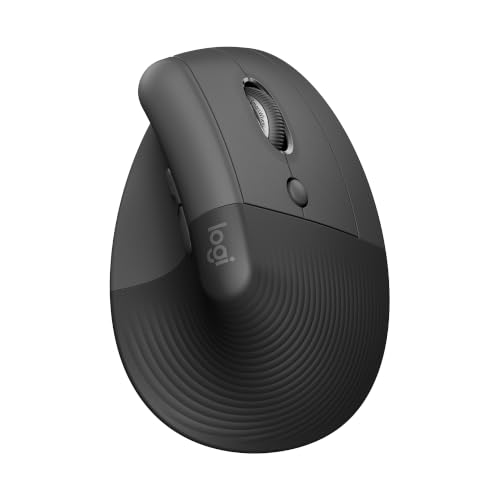
- Lift yourself up: When the desk life gets you down, lift yourself up with Logitech Lift Vertical Ergonomic Mouse - a great fit for small to medium right hands
- Raise your hand into comfort: Rest on Lift upright mouse throughout the day, with a softly textured grip and snug thumb rest for level-above cosiness
- 57 degrees of sooooothe: Lift’s vertical shape helps wrists feel like “ahhh” at work, and promotes a more natural posture in the forearm, for day-long comfort and productivity
- Relax into focus: Settle into work with a cordless mouse featuring easy-to-reach customisable buttons, whisper-quiet clicks and a SmartWheel for smooth, seamless scrolling
- Ergo-certified: Lift wireless vertical mouse has been designed, developed, tested and approved according to criteria set out by leading ergonomists

Best rechargeable pick: ProtoArc EM11 NL Wireless Vertical Mouse
The ProtoArc EM11 NL is a rechargeable vertical mouse that connects to two devices over Bluetooth and to a third with a USB receiver. You switch between them with a button on the underside. It has three adjustable DPI settings, so you can slow the pointer for precise work or speed it up across a large screen, and it works with Windows, Mac and iPad.
The maker designs it for small to medium hands. It costs about £23, and more than five thousand buyers have rated it at 4.5 stars, the highest score in this guide. It is a good choice if you want the charging and multi-device features of a dearer mouse at a lower price.

- 【Ergonomic Design and Enhanced Comfort】The wireless ergonomic mouse features an extended wrist rest that hugs the palm of your hand and promotes a more natural and relaxed position for your forearm and wrist. This design helps minimize the risk of injury from repeated strain and reduce muscle tension in your arms to ensure comfort throughout the day
- 【Connect up to 3 Devices】This ergonomic wireless mouse offers both BT 5.0 and 2.4G USB dual connection modes, allowing it to connect to three different devices simultaneously. Switching between devices is as easy as clicking the mode switch button. Compatible with Windows 8, Windows 10, Mac OS X 10.12 or higher and Android 4.3 or higher (No RGB lighting!!!)
- 【Rechargeable Battery】The vertical mouse is equipped with a built-in 500mAh Li-ion battery, which can be charged via the supplied Type-C cable(For charging purposes only). After 30-minute inactivity, the mouse automatically switches to sleep mode to save energy and can be woken up by simply moving. Besides, the low battery indicator reminds you to charge the wireless mouse when the red light flashes
- 【Adjustable DPI and Practical Features】Our bluetooth ergo mouse features convenient forward/backward buttons for easy web browsing. The 1000/1600/2400 DPI levels offer higher sensitivity than conventional optical mice and enable precise optical tracking. In addition, the whisper-quiet click of the mouse helps you to focus on the essentials. !!!NOTE: All buttons are not programmable and the forward and back buttons are not compatible with Mac OS systems
- 【Warm Note】ProtoArc EM11 NL vertical bluetooth mouse is recommended for medium small hands(Palm size: <17.5CM and 17.5CM-19CM, about the length of 3 bank cards), mouse size 13.8*6.9*6.8cm (5.43*2.72*2.68in). To get a more comfortable fit and a better user experience, we recommend measuring the size of your hand before buying
Best budget buy: UGREEN Ergonomic Wireless Vertical Mouse
The UGREEN vertical mouse is the cheapest way into this style of mouse, and it still has a 57 degree angle, a 4000 DPI sensor and five buttons. It connects over Bluetooth or a 2.4GHz receiver and can pair with three devices. The click is quiet, and the maker quotes a battery life of up to twelve months.
It costs about £12, and nearly four thousand buyers have rated it at 4.4 stars. It is the one to buy if you want to try a vertical mouse without spending much, and it is also a sensible spare for a second desk.

- 57 Degrees for a Straight Wrist: The vertical body holds your forearm, wrist and palm in a natural handshake position instead of a flat twist, easing the wrist ache a standard mouse builds up by the end of a working day
- Connect Up to 3 Devices: Bluetooth 5.4 plus a 2.4G USB-A receiver keep laptop, desktop and tablet paired at once, so you switch with a tap instead of re-pairing. Works with Windows 11/10/8.1/7, macOS 10.15+ and iPadOS 14+
- 4000 DPI Tracking on Real Desks: The 4000 DPI sensor was tested on dark cloth mouse pads, plain paper, laminate, marble, metal pads and wooden desks, so the cursor keeps up on the surfaces you actually work on. (Note: Not suitable for glass surfaces.)
- Back and Forward Under Your Thumb: The thumb-side buttons page through web pages and documents without a trip to the menu - instant on Windows, while on macOS they switch apps instead (fullscreen required). (Note: Middle-click is unavailable on macOS, Linux and iOS)
- A Year on One AA Battery: Up to 12 months per cell, and the mouse sleeps when you step away so idle desk hours don't eat into it. When the year is up, a spare AA costs pennies - no cable, no charging wait (Note: AA battery not included.)
Best proven classic: Anker 2.4G Wireless Vertical Ergonomic Mouse
The Anker is one of the best-known vertical mice, and it has more than fifty thousand ratings. It uses a 2.4GHz receiver rather than Bluetooth, and it has five buttons and three DPI settings. It works with PCs and Macs, and the shape is simple and comfortable.
It costs about £17, and it has a 4.3 star rating across a very large number of buyers. It is an easy, low-risk choice for a desktop computer where you do not need Bluetooth, and it makes a good first vertical mouse.
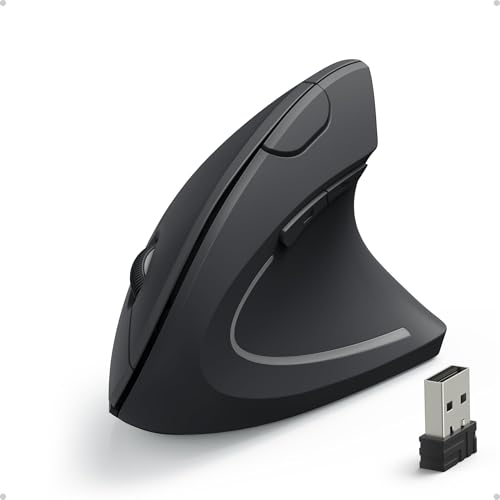
- Scientific ergonomic design encourages healthy neutral "handshake" wrist and arm positions for smoother movement and less overall strain.
- 800 / 1200 / 1600 DPI Resolution Optical Tracking Technology provides more sensitivity than standard optical mice for smooth and precise tracking on a wide range of surfaces.
- Added next/previous buttons provide convenience when webpage browsing; the superior choice for internet surfers, gamers and people who work at length at the computer.
- Enters power saving mode (power is cut off completely) after 8 minutes idle, press right or left button for it to wake. Product dimensions: 120*62.8*74.8 mm; product weight: 3.4 oz.
- Package includes: 1 Anker Wireless Vertical Ergonomic Optical Mouse (2 AAA batteries not included), 1 2.4G USB receiver (in the bottom of the mouse), 1 instruction manual. 18-month hassle-free warranty.
Comparison at a glance
| Mouse | Connection | Rechargeable | Best for | Approx. price |
|---|---|---|---|---|
| Logitech Lift | Bluetooth or Logi Bolt | Yes | Best all-rounder | £40–£46 |
| ProtoArc EM11 NL | Bluetooth and USB | Yes | Charging and multi-device | £20–£26 |
| UGREEN Vertical | Bluetooth and 2.4GHz | Battery | A low price | £11–£14 |
| Anker Vertical | 2.4GHz receiver | Battery | A proven classic | £15–£19 |
Does a vertical mouse really help?
A vertical mouse does not cure wrist problems, but it changes the posture that puts strain on them. Keeping your forearm in a neutral position can reduce the pressure on the tendons and nerves in your wrist. If you already have pain, tingling or numbness, speak to your GP or a physiotherapist, because a mouse is only one part of the picture.
Getting used to a vertical mouse
Start by using the new mouse for a few hours a day and switch back if your hand tires. Hold it loosely and move the pointer with your whole forearm, not just your wrist. Lower the speed a little at first so your aim settles.
Keep your elbow close to your side and your wrist straight. A mouse mat or wrist rest can help, and a mouse that sits at the same height as your keyboard stops you reaching up.
Left-handed users
Vertical mice are shaped for a right hand, and a right-handed mouse will not suit your left. If you use your left hand, look for a mouse sold as a left-handed or ambidextrous design, or consider a trackball, which works for either hand.
Setting up your desk for a vertical mouse
Place the mouse close to the keyboard, so your upper arm stays near your body and your elbow is bent at about ninety degrees. Rest your forearm on the desk if it feels natural, and move the mouse with your arm rather than flicking your wrist. A wrist rest can support the heel of your hand, but avoid pressing down on it while you move.
Check your chair height too. If the desk is too high, your shoulder lifts and tires quickly, and no mouse can fix that. Aim to sit with your elbows level with the desk surface and your shoulders relaxed.
Keeping a vertical mouse clean
A vertical mouse has a textured grip that can hold dirt and skin oils. Wipe it regularly with a soft cloth dampened with a little water, and avoid harsh cleaners that can strip the finish. Clean the sensor on the underside with a dry cotton bud if the pointer starts to stutter.
If you carry the mouse in a bag, a small pouch stops dust and crumbs collecting around the receiver and the buttons.
Which vertical mouse should you buy?
For most people the Logitech Lift is the best vertical mouse for wrist comfort. It has a sensible angle, quiet clicks and a good connection, and thousands of buyers have rated it highly.
If you want a rechargeable mouse that pairs with several devices, the ProtoArc EM11 NL is the better value. The UGREEN is the one to buy if you want to try the idea cheaply, and the Anker is a trusted choice for a desktop. Whichever you choose, give your hand a week to settle in.