British homes are built to keep heat in, which is wonderful in February and miserable in July. Home offices get the worst of it: they are often upstairs, frequently south-facing, and full of equipment quietly converting electricity into warmth. A desktop PC, two monitors and a laptop dock can add several hundred watts of heat to a small room, which is roughly equivalent to leaving a portable heater on low all day.
A desk fan is the cheapest fix by a wide margin. Air conditioning costs hundreds and most UK homes cannot fit it; a good fan costs £30–£70, runs on a few watts, and makes a stuffy 26°C room feel workable. The catch is that the majority of desk fans are too loud to sit next to for eight hours. This guide is about finding the best desk fan that you can actually leave running through a video call.
What to look for in the best desk fan for a home office
Noise, first and last
Everything else is negotiable. A fan you switch off every time someone rings you is a fan you are not using during the hottest part of the day. Look for a quoted figure under 30dB at the lowest setting, and treat manufacturer claims with suspicion – bearing whine and blade turbulence tend not to appear in the marketing.
Two design features correlate strongly with quiet running. Larger blades turning slowly move the same air as small blades turning fast, but with far less noise, so a physically bigger fan run on a low setting usually beats a small one working hard. And a DC brushless motor is meaningfully quieter than the cheap AC motors in supermarket fans, as well as using around a third of the electricity. If the listing does not mention a DC motor, assume it has an AC one.
Footprint and mounting
Desk space is the scarcest resource in most home offices. Before buying, measure what you can actually spare. A 20cm-diameter tower fan takes a corner; a traditional 30cm round fan takes a meaningful chunk of desk. Clip-on fans that grip a desk edge or a monitor arm cost you nothing in surface area and are often the right answer for a small setup.
Also consider height. A fan that blows across your keyboard cools your hands and does very little for your face; one raised to roughly chest or shoulder height moves air where it helps. Adjustable-height stems or a clip mount you can position high are worth paying for.
Oscillation and airflow quality
Constant airflow directly on your face for eight hours dries eyes out and gives some people a stiff neck and a headache – a genuinely common complaint among home workers who solve one problem and create another. Oscillation spreads the effect and makes a fan much more tolerable over a full day. Wide-angle or dual-axis oscillation, which sweeps vertically as well as horizontally, is better still, because it stirs the room rather than repeatedly hitting you.
Some fans produce a broad, soft airflow and some produce a narrow jet. For desk use over long periods, broad and soft is far more comfortable, even though the jet feels more impressive in the first thirty seconds.
Controls, timers and remotes
Small things that matter daily: can you change speed without leaning across the desk, does it remember its setting after a power cut, is there a timer so it does not run all night if you forget it, and can any indicator light be turned off. A remote sounds like an unnecessary luxury until the fan is clipped to the far side of a monitor.
The best desk fans for working from home
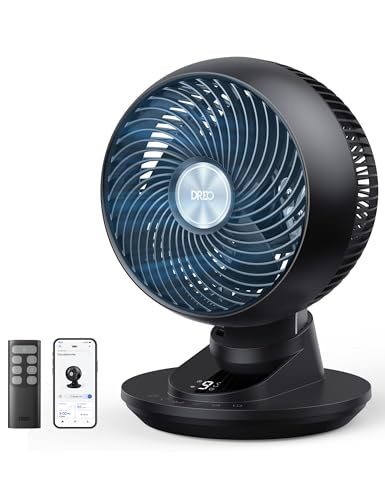
Best overall: Dreo 20dB Smart Desk Fan
Dreo has quietly become a default recommendation for anyone who cares about fan noise, and its 20dB Smart Desk Fan is the one sized for a desk. It uses a DC motor, runs genuinely quietly at its lower speeds, and oscillates both horizontally and vertically, so it can move air around the room rather than just at your face. Airflow is the broad, soft kind rather than a narrow jet, and app and voice control are there if you want them.
It is more expensive than a supermarket fan by a factor of three or four. It is also the one that is still running at 3pm on a call, which is the entire point.

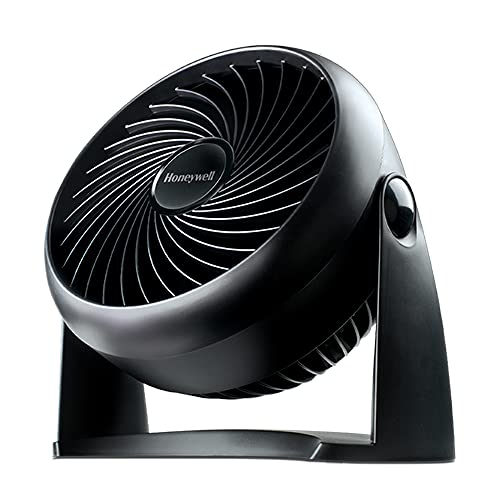
Best value: Honeywell TurboForce Power Fan
A blunt instrument, but an effective and cheap one. The TurboForce moves a lot of air for the money and its pivoting head lets you aim it up from a low position, which is the trick to making a small fan useful. On its lowest of three speeds it is acceptable in a room where you are not on calls constantly.
There is no oscillation, no remote and no subtlety – speeds two and three are loud enough to be picked up by a microphone. Buy it if you want maximum airflow per pound and can live with running it on low.
Best for small desks: Vornado Flippi V6
A neat solution to the footprint problem: a small circular fan on a base that flips to change the angle, taking up roughly the space of a coffee mug’s saucer. Vornado’s blade design produces a wider, gentler column of air than most fans this size, so it does not feel like being pointed at. Two speeds, simple mechanical control, no app or nonsense.
It will not cool a whole room, and it has no oscillation. As a personal fan for a cramped desk, though, it is hard to beat on size-to-effect.

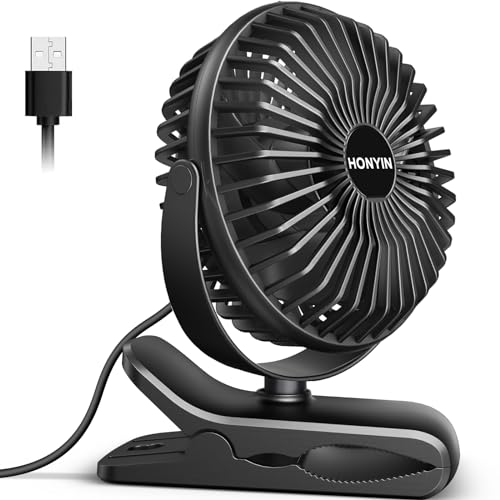
Best clip-on: HONYIN Mini USB Clip Fan
The clip-on category is dominated by near-identical units, and the good news is that most of them are fine. What you want is a sturdy clamp rather than brittle plastic and a head that rotates fully so you can clamp it to a shelf and aim downwards. The HONYIN Mini USB Clip Fan ticks both boxes – a solid clamp, 720-degree rotation and three speeds – and it runs straight from a USB port.
Powered from a monitor’s USB port or a dock, it uses no mains socket and no desk space at all. Expect to replace it every couple of years – at this price that is a reasonable trade.
Comparison at a glance
| Model | Best for | Motor | Oscillates | Approx. price |
| Dreo Smart Desk Fan | Quiet all-day use | DC | Yes, dual-axis | £80–£90 |
| Honeywell TurboForce | Airflow on a budget | AC | No | £20–£30 |
| Vornado Flippi V6 | Very small desks | AC | No | £35–£45 |
| HONYIN USB clip fan | Zero desk footprint | DC | No | £12–£25 |
Getting more from a fan than the fan alone gives you
- Point the fan out of an open window in the evening, not into the room. Extracting hot air once outside temperatures drop below inside ones cools a room far faster than blowing air around it.
- Close blinds and curtains on sunny sides during the day. Stopping heat entering beats moving it around afterwards.
- Put a shallow tray of ice or a frozen bottle behind the fan for a genuine but short-lived temperature drop – useful for the worst hour of the afternoon.
- Turn off equipment you are not using. A second monitor and a games console on standby are quietly heating the room you are trying to cool.
- Clean the blades and grille each spring. Dust build-up cuts airflow noticeably and adds whine.
Which desk fan should you buy?
If you are on calls regularly – and most home workers are – buy the Dreo Smart Desk Fan. It is the only one on this list that is comfortably quiet enough to run continuously through a working day, and its dual-axis oscillation spreads the air rather than blasting one spot. It costs more than it looks like it should; it is also the one you will still be using in August rather than switching off.
If the budget is tight, the Honeywell TurboForce moves more air per pound than anything else here, provided you accept running it on its lowest speed. For a genuinely cramped desk, the Vornado Flippi V6 or a decent USB clip-on solves the space problem outright.
One last thing: whatever you buy, aim it across the room rather than straight at your face, and use oscillation if you have it. Dry eyes and a stiff neck are a poor trade for feeling two degrees cooler.