A printer is one of those home office purchases that people either put off for years or get badly wrong. Put it off and you end up queuing at a print shop to post a single signed form; get it wrong and you own a cheap machine that costs a small fortune in ink, jams on every third page and demands a driver update every time you want to print a boarding pass. The good news is that choosing well is mostly about being honest about how much you actually print.
This guide picks four printers that cover the main kinds of home worker: the person who prints text documents all week, the person who prints a lot and wants low running costs, the person who prints now and then and wants a cheap, compact machine, and the person who needs colour and a scanner in the same box. All four were checked live on Amazon UK for stock, price and review standing before being included.
What actually matters when choosing a home office printer
- How much you print. If you print a few pages a month, a cheap inkjet is fine. If you print dozens of pages a week, the cost of every page matters more than the price of the printer.
- Running cost, not purchase price. A very cheap printer with expensive cartridges costs more over its lifetime than a pricier one that is cheap to feed. Laser toner and refillable ink tanks both beat conventional cartridges on cost per page.
- Mono or colour. Most home offices print mostly black-and-white text. Paying for colour you rarely use is a common waste, and colour toner or ink sits unused and dries out.
- Automatic double-sided printing. It halves paper use and makes long documents far easier to handle, and it is now standard on good home office printers.
- Wi-Fi that actually works. A printer you can print to from a laptop, phone or tablet without plugging in anything is a much better printer than one that needs a cable.
- Do you need a scanner? An all-in-one costs more and takes up more desk, but being able to scan a document to your phone or computer is genuinely useful for tax, contracts and expenses.
The best home office printers
Best overall: Brother HL-L2400DWE Mono Laser Printer
For most people who work from home, a mono laser printer is the answer, and the Brother HL-L2400DWE is the one we would buy. It prints crisp black text quickly, it supports automatic double-sided printing, and it connects over Wi-Fi so every device in the house can use it. Toner lasts far longer than an inkjet cartridge, and it does not dry out if you leave the printer untouched for a fortnight, which is exactly what happens in a home office.
It is a single-function machine, so it prints and nothing else, which is a feature as much as a limitation: there is less to go wrong and the footprint is small. It is also backed by a very large number of buyer ratings, so any problems would have shown up by now. It comes with Brother’s optional toner subscription scheme, which suits people who print a lot, though you are free to buy toner in the usual way.

- 4 month EcoPro trial: Choose your plan and sign up online with a free four month trial Plus you can change or cancel your subscription at any time
- Automatic delivery of Brother Genuine Supplies: so you never run out, plus free toner cartridge recycling
- LCD CONTROL PANEL: 1 line control panel for quick and easy navigation of the printer fuctions, at your fingertips
- Wireless and mobile connectivity: The Brother mobile connect app offers a range of options from printer function to managing your EcoPro subscription
- UP TO 30PPM PRINT SPEED: With fast print speeds, you can print your professional documents in no time at all without compromising on quality

Best for low running costs: Epson EcoTank ET-2862
If you print a lot and need colour, the cheapest way to do it is an ink tank printer, and the Epson EcoTank ET-2862 is the sensible entry point. Instead of small cartridges, you top up refillable tanks from bottles of ink, and the cost per page falls dramatically compared with a conventional inkjet. It is a print, copy and scan machine with Wi-Fi, so it covers most home office jobs in one device.
The printer costs more to buy than a cartridge inkjet, but the saving on ink repays that difference quickly for a heavy user. It is a little slower than a laser at 10 pages a minute, which is fine for a home office but worth knowing if you routinely print long documents.
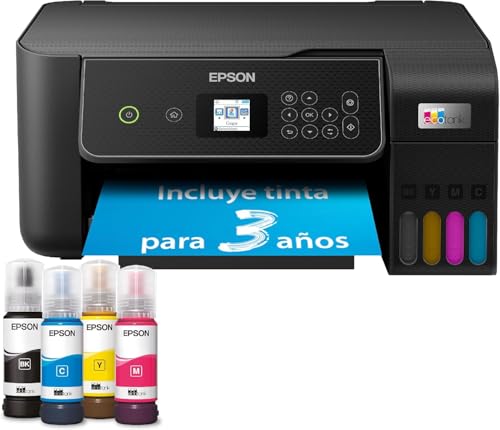
- Finally, print without cartridges - EcoTank enables comfortable printing at home - The large-volume ink tanks allow for straightforward refilling - Since the ink bottles operate on a key-lock principle, only the correct ink can be refilled - The front ink level display lets you easily see when you need to refill the printer.
- Save even more - With this economical printer, you reduce your ink costs by up to 90%* - Included in the delivery is an ink supply for up to 3 years* - One ink bottle set is enough for printing up to 4,500 pages in black and white and 7,500 pages in color* - That equates to an impressive number of up to 72 ink cartridges! *
- Epson Smart Panel App - With this app, you can control your printer from your smart device* - You can print, copy, and scan documents and photos, set up and control the printer, and troubleshoot issues - all from your phone or tablet.
- Full of features - With a 100-sheet paper cassette at the back, support for borderless photo printing (up to 10 x 15 cm) and print speeds of up to 10 pages per minute*, you can easily and quickly handle various tasks.
- Modern flexibility - Thanks to the compact design and connectivity via Wi-Fi and Wi-Fi Direct, you can easily integrate this printer into your home and print from smartphones, tablets, and laptops*.
Best budget pick: Canon PIXMA TR4755i
Not everyone needs a heavy-duty machine. If you print a handful of pages a month, such as invoices, forms and the odd photo, the Canon PIXMA TR4755i is a compact, wireless all-in-one inkjet that does the job for a very low outlay. It prints, copies and scans, has an automatic document feeder for multi-page originals, and it is small enough to sit on a shelf rather than take over a desk.
The catch with any cheap inkjet is the cost of the cartridges, so this is a printer for light use. If you find yourself printing more than a few pages a week, one of the options above will save you money.

- NEVER RUN LOW ON INK AGAIN - Subscribe to the PIXMA Print Plan and get inks delivered automatically to your door before you run out, with different tariffs available to suit your usage.
- SMART PRINTER OPERATION - Wi-Fi connectivity and the Canon PRINT app give you control of your printer functions from your smart devices. If you're away from Wi-Fi, just switch to Wireless Direct.
- STAY IN THE CLOUD - Simplify scanning and printing to and from cloud storage with PIXMA Cloud Link via the Canon PRINT app.
- BOOST PRODUCTIVITY - Enhance efficiency with automatic 2-sided printing and a 20-sheet ADF for copying and scanning multiple page documents.
- SETUP CARTRIDGES INCLUDED: The TR4755i printer arrives with starter cartridges offering lower yield than standard replacements. Standard cartridge page yields for reference: Black PG-575 (100 pages), Black XL PG-575XL (400 pages), Colour CL-576 (100 pages), Colour XL CL-576XL (300 pages). Page yields are based on ISO/IEC standards and may vary depending on printer, content printed, print settings, environmental conditions and usage.
Best for colour and scanning: Epson Expression Home XP-3200
The Epson Expression Home XP-3200 is the one for people who want a colour all-in-one that prints, scans and copies, and that is easy to live with. It connects over Wi-Fi, prints double-sided automatically, works well with phones and tablets, and it has hundreds of positive buyer reviews behind it, which gives some confidence in its reliability. It suits a home office where the printer also handles the odd school project or photograph.
It is a cartridge inkjet, so cost per page is higher than the laser or ink tank options, and it comes with an introductory period of HP’s ink subscription service. Treat that as a trial rather than a necessity: you can still buy cartridges normally.

- SLEEK and STYLISH - This AFFORDABLE model efficiently uses your space combining print, scan and copying facilities in one unit.
- EASY to USE - with a range of essential and easy to use features, the XP-3200 is flexible with Wi-Fi for printing and scanning wirelessly and Wi-Fi Direct for printing without a wireless network. Its 3.7cm LCD screen makes it easy to copy and print without a computer and double-sided printing reduces paper usage.
- FLEXIBLE WIRELESS SOLUTIONS - Print, scan and more, directly from your phone or tablet using the Epson Smart Panel app, Plus, with the Epson Creative Print app, you can use your photos to create and print photo books, greeting cards, collages and more.
- AFFORDABLE SOLUTION - Epson’s four-colour Pineapple 604 ink set provides reliable, clear prints with minimal outlay, In addition to reducing your printing costs with AFFORDABLE, individual inks in standard and XL cartridges.
Comparison at a glance
| Model | Type | Functions | Best for | Approx. price |
| Brother HL-L2400DWE | Mono laser | Print only | Everyday text printing | £97–£108 |
| Epson EcoTank ET-2862 | Ink tank (colour) | Print, copy, scan | High-volume colour at low cost | £150–£165 |
| Canon PIXMA TR4755i | Cartridge inkjet (colour) | Print, copy, scan | Light, occasional use | £40–£48 |
| Epson Expression Home XP-3200 | Cartridge inkjet (colour) | Print, copy, scan | Colour all-in-one for the family | £52–£60 |
Laser, inkjet or ink tank?
This is the decision that matters most, and it comes down to your printing habits. A laser printer is best if you mostly print text: it is fast, the toner lasts, and the printer is happy to sit idle for weeks. An ink tank printer is best if you print a lot and want colour at a low cost per page. A conventional cartridge inkjet is best only if you print very little, because the cartridges are expensive and can dry out if the printer is left unused.
If you are unsure, think about the last month. If you printed a few pages, buy the cheap inkjet. If you printed a few dozen and most were black text, buy the laser. If you printed a mix and a lot of it was colour, buy the ink tank. Our separate comparison of inkjet and laser goes into more detail if you want to weigh the two types properly.
Where to put a printer in a home office
A printer is bulky, a little noisy and needs a power socket and, for older models, a cable. The best place for it is on a shelf or a low unit within arm’s reach of your desk, rather than on the desk itself, where it takes up valuable space. Wi-Fi printing removes the need for a cable to your computer, which makes a shelf a perfectly practical home.
Leave a little space around the printer for paper to feed in and out, and keep a ream of paper nearby so a missing sheet never interrupts a call. Tidying the power cable matters too: an under-desk tray or a few cable clips stop the printer’s lead from becoming another loose cable behind the desk.
Paper, toner and ink: keeping costs under control
Whatever you buy, the printer is only the start of the cost. Buy paper in boxes rather than single reams, because the price per sheet falls sharply. Use draft or economy mode for internal documents, and print double-sided by default so a ten-page document uses five sheets.
With a laser or ink tank printer, original replacement toner and ink is usually the safest choice, because compatible cartridges vary in quality and can occasionally cause errors on newer printers. If you do try a compatible brand, buy from a seller with good reviews and keep the receipt in case it does not work.
Setting up and keeping a printer reliable
Most modern printers set up through a phone app in a few minutes, and connecting over Wi-Fi is the most reliable approach. Give the printer a fixed spot on your router’s network if you can, so it does not change address and drop off your computer’s list of devices. Keep the printer’s firmware up to date, because manufacturers regularly fix connection problems with updates.
Printers like to be used. If you print rarely, run a test page once a fortnight to keep inkjet nozzles clear. Laser printers do not suffer from this, which is another reason they suit occasional home office use.
Do you really need to own a printer?
It is a fair question. Many home workers print a few times a year, and for them a print shop or library is cheaper than a machine that sits idle. If you print fewer than a dozen pages a year, owning a printer may cost you more in ink, dried cartridges and desk space than it saves.
The balance tips once printing becomes a routine part of work: signing and returning contracts, printing invoices, handling tax paperwork, or running a small business from home. At that point the convenience of printing at any hour, without leaving the house, is worth far more than the cost of the machine, and a laser or ink tank printer makes it cheap.
Security, privacy and paperwork
A home printer handles sensitive documents: bank statements, contracts, tax forms. Keep it on your home network rather than leaving it open to guests, change any default password, and collect your pages promptly. When you finish with old paperwork, a cross-cut shredder is the sensible partner to a printer, because a printer makes it easy to accumulate paper that is not safe to put in the recycling.
It also pays to scan important documents and store a digital copy. An all-in-one makes this effortless, and a scanned copy of a contract is far safer than a single sheet in a drawer.
Mobile printing and working with phones
Modern printers work with phones and tablets without any cables, using either the manufacturer’s app or the built-in printing support in your phone. Setting this up once means you can print a boarding pass, a ticket or a form from your phone in seconds.
If you work across several devices, choose a printer with strong Wi-Fi, and keep it close enough to your router for a reliable signal. A printer that drops off the network is far more frustrating than one that is a little slower.
Which printer should you buy?
For most home offices, the Brother HL-L2400DWE is the printer to buy: fast, tidy, cheap to run and reliable, with nothing to dry out or clog. If you print a lot in colour, the Epson EcoTank ET-2862 will save you money over the years, and if you print only occasionally, the Canon PIXMA TR4755i is a very low-cost way to have a printer when you need one.
The Epson Expression Home XP-3200 is the choice for a household that wants a colour all-in-one that works with every device. Whichever you pick, buy with your real printing habits in mind rather than the headline price, because that is what decides what the printer costs you over time.