Finding the best monitor arm UK 2026 buyers can rely on is less about chasing the most expensive German-engineered gas spring and more about matching an arm to your desk, your monitor’s weight, and how often you actually move the screen. We have spent the last two years bolting arms to the edge of an IKEA worktop, hanging everything from a 5 kg 24-inch panel to a 9 kg 32-inch 4K monitor off them, and watching which ones sag, drift, or wobble when you knock the desk.
This roundup is the shortlist that survived. We have picked a clear winner for most people, plus the best premium, budget, dual-monitor, heavy-monitor, and standing-desk options, so that whatever you are mounting and whatever you are spending, there is a sensible answer below. If you only read one line: most UK home-office workers should buy the Ergotron LX at around £150–£180, and almost nobody needs to spend more than that.
| In a hurry? Best overall: Ergotron LX (~£170). Best budget: Amazon Basics single arm (~£30). Best dual: Ergotron LX Dual (~£260). Best for heavy 32-inch panels: Ergotron HX (~£230). Full picks and a comparison table are below. |
Why a monitor arm is the cheapest ergonomics upgrade you can buy
The stand that ships in the box with your monitor has one job: hold the screen upright. It is not designed to put the top of the panel at eye level, to pull the screen toward you when you lean in, or to swing it out of the way when a colleague leans over your desk. A good monitor arm does all three, and it does it while freeing up the 20–30 cm of desk depth that a chunky factory base eats up.
For most people the ergonomic win is simple. Your eyeline should fall on the top third of the screen so your neck stays neutral. Factory stands are almost always too low, especially on a laptop-plus-monitor setup. A £30 arm fixes that for less than the cost of a decent desk lamp, which is why it is the first upgrade we recommend to anyone complaining of neck or shoulder ache by 4pm.
How we tested, and what to look for in a monitor arm
We rate arms on five things: weight range, build and stability, range of motion, fitting options, and value. Before you read the picks, here is what each of those means in practice so you can match an arm to your own setup.
VESA and weight range come first
Almost every arm uses a VESA mounting pattern of 75×75 mm or 100×100 mm, and almost every monitor over 22 inches supports one of those. Check your monitor’s spec sheet before buying. More important is the weight range: every gas-spring arm has a minimum and maximum it can hold without drifting. A 9 kg 32-inch monitor on an arm rated to 8 kg will slowly sink; a 3 kg 24-inch panel on an arm rated 5–15 kg will float upward. Match the arm to the monitor’s weight, not just its size.
Gas spring versus mechanical spring
Gas-spring arms (Ergotron, Humanscale, most mid-range options) let you reposition the screen with one finger and hold it anywhere. Cheaper mechanical-spring or two-piece tension arms are stiffer, need a screwdriver to adjust tension, and hold fewer positions, but they cost a fraction as much and are perfectly fine if you set the screen once and rarely move it.
Clamp versus grommet, and desk thickness
Most arms ship with a C-clamp that grips the back edge of the desk (good for 10–60 mm tops) and a grommet mount for drilling through. Check your desk is not thicker than the clamp’s maximum and that you have 5–8 cm of clear space behind it. Thin or hollow flat-pack tops can flex under a heavy clamp, so add a backing plate if yours feels soft.
The best monitor arms UK 2026: our picks
Best overall: Ergotron LX
The Ergotron LX is the arm we mount more often than any other and the one we would tell a friend to buy without a second thought. Its patented Constant Force gas spring is genuinely one-finger smooth, it holds any position dead still, and the aluminium build shrugs off years of daily use — Ergotron backs it with a 10-year warranty, which tells you how confident they are. It handles monitors from roughly 3.2 kg to 11.3 kg and up to about 34 inches, covering the vast majority of home-office screens.
- Weight range: ~3.2–11.3 kg
- Fits: up to ~34-inch monitors, VESA 75/100
- Mounting: C-clamp and grommet both included
- UK price: around £150–£180
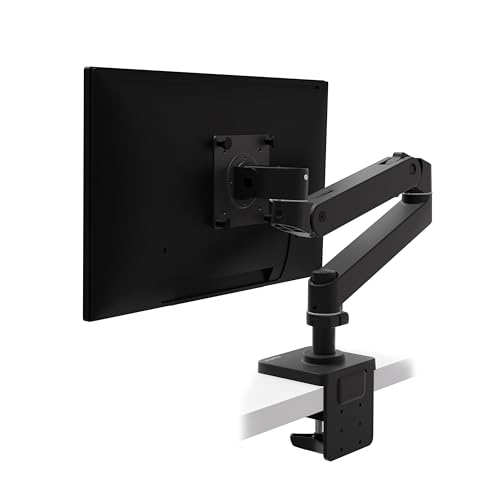
- Broad compatibility: Fits single screens up to 34 inches diagonal, 4 to 22 pounds and up to 3.6 inches deep; compatible with VESA patterns 75x75mm and 100x100mm
- Versatile mounting options: Includes two-piece desk clamp to fit a variety of desk types; desk clamp attaches to desks 0.4 to 2.4 inches thick; grommet mount available as separate accessory (98-728-292)
- Elevate comfort: Easily raise your monitor up to 18.3 inches above your worksurface with 13 inches of lift; find your best view for each project with up to 360 degrees of rotation and 85 degrees of tilt
- Sleek and modular design: Designed with aesthetics in mind to enhance your workspace, improved built-in cable management creates a streamlined look; a suite of compatible accessories lets you customize your work or gaming space
- Built to last: Extensive quality testing ensures your monitor stays stable and secure; Ergotron products set the standard for quality with a 10-year warranty and expert technical support
It is not the cheapest option here, but it is the one that disappears into your setup and never gives you a reason to think about it again. For a full breakdown, see our dedicated Ergotron LX review.
Best budget: Amazon Basics single monitor arm
If £170 is more than you want to spend on something that holds a screen, the Amazon Basics single arm is the value pick that punches well above its price. It uses a gas spring, supports VESA 75/100, holds monitors up to 10 kg, and includes both clamp and grommet fittings. It is not as buttery to adjust as the Ergotron and the finish is plainer, but for a screen you position once and leave, it is hard to argue with around £30.
- Weight range: up to 10 kg
- UK price: around £19–£25
- Best for: a first arm, a secondary screen, or anyone on a tight budget

- ADJUSTABLE TENSION: Supports monitors up to 10 kg. Tension must be adjusted based on monitor weight and position to maintain stability and prevent sagging or drifting
- VESA COMPATIBILITY: Works with 75×75 mm and 100×100 mm VESA patterns. Select appropriate screw length and use spacers if needed based on your monitor's mounting depth
- FULL MOTION WITH CONTROLLED ADJUSTMENT: Offers tilt (−45° to +90°), swivel (±90°), and 360° rotation. Joints may require adjustment before use to achieve smooth movement and correct positioning
- PROPER INSTALLATION REQUIRED FOR STABILITY: Includes C-clamp and grommet mounting options for desks 1.0 cm–10.8 cm thick. Ensure correct installation, secure tightening
- PERFORMANCE DEPENDS ON LOAD: Optimal performance varies depending on monitor size, weight distribution, and arm extension. Proper adjustment is required to achieve balanced and stable positioning

Best dual-monitor arm: Ergotron LX Dual
Two screens off one clamp keeps a desk tidy and lets you butt the monitors together with no stand gap in the middle. The Ergotron LX Dual stacks two LX arms on a single stacking pole, each handling up to around 10 kg, and gives you independent height and tilt for each panel. It is the dual arm we trust for a pair of 27-inch monitors, and it clears the desk surface completely.
- Weight range: up to ~10 kg per arm
- UK price: around £280–£300
- Best for: matched twin 24–27-inch setups
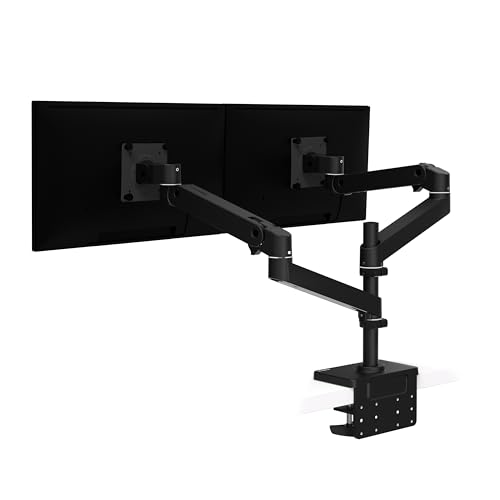
- Broad compatibility: Fits two screens up to 27 inches diagonal and 4 to 22 pounds each; compatible with VESA patterns 75x75mm and 100x100mm
- Versatile mounting options: Includes two-piece desk clamp to fit a variety of desk types; desk clamp attaches to desks 0.4 to 2.4 inches thick; grommet mount available as separate accessory (98-729-292)
- Elevate comfort: Easily raise your monitor up to 20 inches above your worksurface with 13 inches of lift; find your best view for each project with up to 360 degrees of rotation and 85 degrees of tilt
- Sleek and modular design: Designed with aesthetics in mind to enhance your workspace, improved built-in cable management creates a streamlined look; a suite of compatible accessories lets you customize your workspace
- Built to last: Extensive quality testing ensures your monitor stays stable and secure; Ergotron products set the standard for quality with a 10-year warranty and expert technical support
On a budget, the Amazon Basics or VIVO dual arms do a similar job for £45–£70, but check the per-arm weight rating carefully if your screens are over 6 kg each.
Best for heavy 32-inch panels: Ergotron HX
Big 32-inch 4K monitors and ultrawides routinely weigh 8–11 kg, which pushes a standard LX to its limit. The Ergotron HX is built for them, handling up to around 19.5 kg. It is overkill for a 27-inch panel but exactly right for a heavy curved ultrawide or a 32-inch creative monitor where you do not want any droop over the working day.
- Weight range: ~3.5–19.5 kg
- UK price: around £240–£260
- Best for: 32-inch 4K, 34-inch and 38-inch ultrawides

- Support ultrawides: To use with the Samsung 49-inch Odyssey G9, the separate accessory HX Heavy Duty Tilt Pivot (98-540-216) is required; or choose the bundled solution that includes the HD Pivot in the box (45-647-224 or 45-647-216)
- Broad compatibility: Fits large, single screens up to 49 inches diagonal and 9.1-19.1kg; compatible with VESA patterns 75x75mm, 100x100mm, 200x100mm and 200x200 mm; separate accessory VESA Bracket Adaptor Kit (97-759) fits larger VESA patterns
- Multiple mounting options: Includes arm, extension, monitor pivot, mounting hardware; two-piece desk clamp for surface edges 1 to 6.6 centimeters thick and grommet mount for installation through a surface hole
- Comfortable working: Offers full monitor motion with 29.2 centimeters of lift, screen rises 45.2 centimeters above your desktop; customize how you work or collaborate with 360 degrees of rotation and 75 degrees of tilt
- Stylish and functional: Sleek design with heavy duty capacity allows easy positioning of large monitors; low-profile clamp fits in tight spaces with cable management for a neat workspace; optional dual (97-783) and triple (98-009-026) monitor kits up your workstation’s screen count and productivity
Best for standing desks: Humanscale M2.1 or a sturdy clamp arm
On a sit-stand desk the arm goes up and down with the desk all day, so stability matters more than usual. We favour a rigid, well-clamped gas-spring arm here. The Humanscale M2.1 is the premium choice — beautifully made, weight-balanced rather than gas-sprung — but it is dear at £250-plus. The Ergotron LX works just as well in practice for most people, provided the clamp is firmly tightened against a solid section of the desk frame.
Monitor arm comparison table
At a glance: our best monitor arm UK 2026 picks
| Arm | Type | Weight range | Best for | UK price |
| Ergotron LX | Single, gas spring | 3.2–11.3 kg | Most people | £150–£180 |
| Amazon Basics Single | Single, gas spring | 2–9 kg | Budget / second screen | £28–£35 |
| Ergotron LX Dual | Dual, gas spring | up to 10 kg/arm | Twin 24–27-inch | £240–£280 |
| Ergotron HX | Single, gas spring | 3.5–19.5 kg | Heavy 32-inch / ultrawide | £200–£240 |
| Humanscale M2.1 | Single, weight-balanced | 2.3–6.9 kg | Standing desks, premium | £250+ |
Pros and cons of putting your monitor on an arm
| Pros | Cons |
| Sets eye-level height properly, protecting your neck | Upfront cost on top of the monitor |
| Frees 20–30 cm of desk depth | Needs a desk edge or grommet hole that fits the clamp |
| Lets you tilt, swing and pull the screen to suit the task | Thin flat-pack tops can flex under a heavy clamp |
| Makes cleaning and cable routing far easier | Cheap arms drift if the monitor weight is mismatched |
Which monitor arm should you buy?
For the clear majority of UK home-office desks, buy the Ergotron LX. It fits almost any monitor up to 34 inches, the gas spring is the best in its class, and the 10-year warranty means it will outlast several monitors. It is the safe answer to the best monitor arm UK 2026 question and the one we keep coming back to.
If money is tight, the Amazon Basics single arm at around £30 gets you 80% of the benefit. If you are running two matched screens, step up to the LX Dual. And if you are hanging a heavy 32-inch 4K or an ultrawide, spend the extra on the HX so the screen never sags. Whatever you pick, fitting any arm at all is a bigger upgrade than agonising over which one — your neck will notice the difference by the end of the first week.
Once your screen is floating at the right height, the next thing worth sorting is what is under it. See our home office monitor buying guide for matching the panel to your desk, and our £500 home office setup for the rest of the kit.