
Affiliate disclosure: WFHKit is reader-supported. We may earn a small commission when you buy through links on this page, at no extra cost to you. Our recommendations are based on real home-office use. Prices reflect UK listings at the time of writing – always check the current product page before buying.
Anyone who has worked on a single laptop screen for a full day knows the problem: a document on one half, a video call on the other, and constant switching between windows that breaks your concentration every few minutes. A second screen fixes that, and a portable monitor puts one in your bag. Thin, light and powered by a single USB-C cable, these screens turn a café table, a hotel desk or a spare room into a proper two-screen workspace.
Portable monitors have matured quickly. The good ones are now sharp, reasonably bright and cost far less than a desktop monitor, and the best are as simple to use as plugging in a cable. This guide picks four that suit different budgets and uses, all checked live on Amazon UK for stock, price and review standing.
What actually matters when choosing a portable monitor
- Size and weight. A 15.6-inch screen is the sweet spot: large enough to be useful, small enough to slip into a laptop bag beside the laptop. Bigger screens are more comfortable but heavier.
- USB-C with power and video. The best portable monitors run on a single USB-C cable that carries both video and power from the laptop. Check that your laptop’s USB-C port supports video output, because not all do.
- Mini HDMI as a backup. If your laptop lacks video over USB-C, an HDMI input lets you connect it anyway, though the monitor then needs its own power.
- Resolution. Full HD at 1920 by 1080 is the norm and is sharp enough at this size. Higher resolutions look better but use more battery and cost more.
- Brightness and panel type. IPS panels have good viewing angles and colour, and brightness matters if you work near windows.
- Stand or cover. A built-in kickstand or a folding cover that doubles as a stand makes setup quick anywhere. Without one you will struggle on a train table.
The best portable monitors for laptops and travel
Best budget pick: COOLHOOD 15.6 Inch Portable Monitor
The COOLHOOD is the portable monitor that proves a second screen no longer needs to cost much. It is a 15.6-inch Full HD IPS display with a USB-C port and a mini HDMI port, and it costs about as much as a decent keyboard. More than twelve hundred buyers rate it highly, which is a good sign for such a low price.
It is a plain, practical screen that does the basics well, and for most people who just want a second window for email and documents, it is all they will ever need.
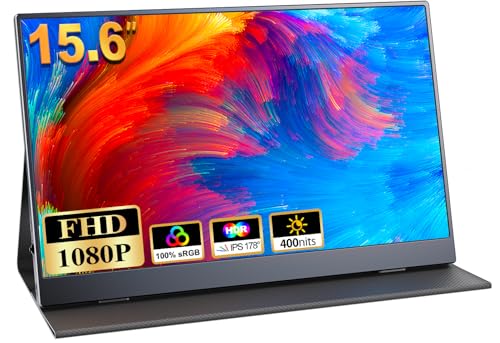
- 1080P FHD IPS Screen:This 15.6" portable monitor will offer you more vivid colors and crisp images with a stunning 1920x1080 resolution. With the 2000:1 contrast ratio, 100% sRGB color gamut, and 178° viewing angle, you'll have a truly immersive viewing experience. Eye-care technology(Blue Light Reduction) also helps keep your eyes from getting tired during prolonged use.
- Wide Compatibility:Thanks to a USB Type C port and one mini HDMI port, this portable screen can be connected to a variety of devices such as PCs, laptops, phones, and gaming devices like Switch, Xbox, PS4, and so on. Please note that if your device's USB type C port is not USB 3.1 or Thunderbolt 3, then this USB C port will charge power ONLY without transmitting any signal.
- Handy for Traveling: Lightweight and thin this travel monitor is easy for traveling professionals and plug and play makes it easy to put wherever you want. No need to install any extra drivers. While 13.3 inches may be too small, this 15.6 inch will make a huge difference for working on Excel, etc.
- Built-in Speakers & Multiple Display Modes:There are also three display modes you can use with this 15.6" portable display: Duplicate mode, extend mode, and second screen mode. There are two built-in dual stereo speakers that provide an immersive experience when you're listening to music, watching movies, playing games, and so on. The 3.5mm audio output can also be used to connect to an outer speaker for a better audio experience.
- Smart Case:The smart case made of PU magnetic material keeps the screen safe from scratches and it also doubles as a stand for the monitor at the same time. There are two grooves in the cover base to give at least some choice of viewing angle for your comfort. And the 24/7 professional support team.

Best overall: ARZOPA 15.6 Inch Portable Monitor
ARZOPA is one of the best-known names in portable screens, and its 15.6-inch Full HD model is the one we would buy for everyday use. It has a sharp IPS panel, an ultra-slim body, a kickstand and ports for USB-C and HDMI. With thousands of buyers behind it, it has a long track record of working properly out of the box.
It costs a little more than the budget option, but the build quality and reliability justify the difference for anyone who will use it regularly.

- [Ultra Slim Design] ARZOPA 15.6 inch portable monitor weight: 1.63lb, top thickness 0.2 inch, bottom thickness 0.35 inch. Almost half the weight of a laptop of the same size.you can put it in your computer bag with your laptop.
- [Portable Monitor with Stand] The ARZOPA portable monitor with built-in kickstand can be easily adjusted to your preferred viewing angle. And no matter where you are, you don't need another stand.
- [Multiple Display Mode] 3 in 1 display mode: duplicate mode, extend mode, second screen mode. Easy change mode.
- [Full HD 1080P IPS Screen] IPS portable screen delivers 178° full view angle. 800:1 contrast ratio offer the accurate and vivid image.
- [Wide Compatibility for Working/Gaming] The portable laptop monitor is easily connect laptop, PC, mac, XBOX, PS3 /PS4 /PS5, Switches, etc via Type-c or Mini HDMI port, which deliver a stable connection and steady data transmission.
Best for convenience: ASUS ZenScreen MB169CK
ASUS’s ZenScreen is built for people who want the simplest possible set-up. The MB169CK is a 16-inch Full HD IPS screen with a 15.6-inch viewable area and dual USB-C ports, so you can plug it in and power it from one cable, and it offers a flip-over case that doubles as a stand. It is the kind of monitor you leave in a bag and use without thinking.
ASUS also tunes its panels for comfort, with flicker-free backlighting and a low blue light mode, which helps if you spend long hours looking at it.

- 15.6-inch Full HD portable anti-glare IPS display with an ultraslim and thin design helps you get things done more efficiently when you’re on the go
- USB Type-C connector (DP Alt mode) for user convenience and compatibility with compatible devices
- ASUS Eye Care monitors feature TÜV Rheinland-certified Flicker-free and Low Blue Light technologies to ensure a comfortable viewing experience
- Automatically sense its orientation and switch the monitor between landscape and portrait modes via DisplayWidget Center software
- User-friendly design with embedded tripod socket on the rear and 360° kickstand for versatility.
Best for bigger screen space: ARZOPA 17.3 Inch Portable Monitor
If you want a more generous second screen and can live with a little extra weight, the ARZOPA 17.3-inch is the choice. It is a Full HD HDR IPS screen with a kickstand and both USB-C and HDMI, and the larger panel makes spreadsheets and documents far more comfortable to read than a 15.6-inch screen.
It is more of a home or hotel companion than a train-table tool, because of its size, but for anyone who splits time between a spare room and the office it is a very good screen.
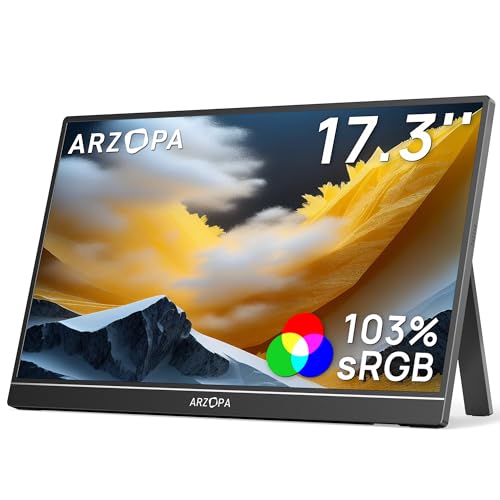
- [Big Monitor] 17.3 inch monitor, It makes it less difficult for you to view the screen and display larger fonts or images. If you don't need to take it out often, this size will be the most suitable choice for you.
- [Portable Monitor with Stand] The ARZOPA portable monitor with built-in kickstand can be easily adjusted to your preferred viewing angle. You don't need another stand, very convenient to use and store.
- [Multiple Display Mode] 3 in 1 display mode: duplicate mode, extend mode, second screen mode. Easy change mode.
- [Dual Speakers]Built-in 2 speakers deliver an incredible sound and more immersive entertainment especially when listen to music /watch movies /play games/meeting/training.
- [Easy Setup] No apps or drivers needed, only need one USB-C cable(Phones need full-featured USB port), Arzopa HDR IPS portable monitor will synchronously restore real, vivid and smooth images.
Comparison at a glance
| Model | Size | Connections | Best for | Approx. price |
| COOLHOOD | 15.6 inch | USB-C, mini HDMI | Lowest cost | £50–£58 |
| ARZOPA 15.6 inch | 15.6 inch | USB-C, HDMI | Reliable everyday use | £86–£95 |
| ASUS ZenScreen MB169CK | 15.6 inch viewable | Dual USB-C, mini HDMI | Simple one-cable setup | £78–£88 |
| ARZOPA 17.3 inch | 17.3 inch | USB-C, HDMI | Larger screen space | £110–£122 |
Will it work with your laptop?
This is the question that matters most, and it comes down to the USB-C port. Many modern laptops have a USB-C port that supports video output, often labelled as DisplayPort Alt Mode or Thunderbolt. If yours does, a single cable is all you need. If your laptop’s USB-C is for charging and data only, you will need to connect with HDMI, and the monitor will need a separate power source, such as a phone charger or power bank.
Check your laptop’s specification or the symbol beside the port. A small DisplayPort or lightning-bolt icon is a good sign. Using a USB-C hub with HDMI output is another route if your laptop lacks direct support.
Battery and power
Portable monitors have no battery of their own, so they draw power from your laptop. That is convenient but it shortens the laptop’s battery life, sometimes noticeably. Dim the monitor’s brightness, use it only when you need it, and carry a power bank that can supply enough power for both devices on long days away from a socket.
At a desk, plug the laptop into its charger and the monitor into the laptop. If the laptop port cannot supply enough power for both, plugging the monitor into a separate phone charger usually solves the problem.
Getting the most from a second screen
A portable monitor works best when it sits at a sensible height and distance. Prop it beside the laptop at roughly the same height as the main screen, using the kickstand, and angle it slightly towards you. Place the screen you use most directly in front of you, and the second one slightly to the side.
Use the second screen for the things that distract you: chat, email, a video call, reference documents. Keep your main work on the larger, better-positioned screen. This division is what produces the productivity gains that people report from dual-screen work.
Using a portable monitor as a second screen for a phone or tablet
Some portable monitors also work with phones and tablets that support video output over USB-C. This lets you use the screen as a larger display for presentations, photos or even gaming. It is a nice extra, but check that your device supports it before relying on it, because many do not.
Caring for a portable monitor
These screens are thin and a little fragile. Always carry the monitor in its protective cover or a padded sleeve, and never put heavy objects on top of it in a bag. Wipe the screen with a soft, dry cloth, and avoid pressing on it when it is open, because the panel can be damaged by pressure.
Portable monitor or a second desktop monitor?
If you work in one place, a full-size desktop monitor on an arm is more comfortable and cheaper per inch of screen. A portable monitor makes sense when you move around: between home and the office, between rooms, or on trips. It is also a good way to try dual-screen working before committing to a full desktop setup, because it costs little and can be stored away when not in use.
Many people end up using a portable monitor in both worlds, keeping it on the home desk for most of the week and slipping it into a bag on office days. Its light weight is what makes that possible.
Setting up with Windows, macOS and Chromebooks
Setup is usually automatic: plug the monitor in and your laptop recognises it. On Windows, press the Windows key and P to choose between duplicating the screen and extending it, and use the display settings to arrange the screens in the order they sit on the desk. On a Mac, open the display settings and drag the screens into position.
Most modern Chromebooks also support external screens over USB-C. If the picture does not appear, try a different cable first, because cables that only carry power and data will not carry video, and the cable that came in the box is the safest choice.
Common problems and quick fixes
- No picture. Check that the USB-C cable supports video and that your laptop’s port supports video output. Try the HDMI connection as a test.
- The screen flickers or cuts out. This is usually a power problem. Use a separate power source for the monitor or a better cable.
- The image looks blurry. Set the resolution in your display settings to the monitor’s native Full HD.
- The wrong screen is the main one. Choose which screen is the main display in your display settings, then drag windows across.
- The screen is the wrong way up. Check the rotation setting, and in the monitor’s own menu if it has an auto-rotate feature.
Which portable monitor should you buy?
For most people, the ARZOPA 15.6-inch is the best all-round choice: sharp, reliable and neatly built. If you want to spend as little as possible, the COOLHOOD gives you a second screen for the price of a lunch, and if you want the simplest setup and a comfortable screen, the ASUS ZenScreen is excellent.
Pick the ARZOPA 17.3-inch if screen space matters more than portability. Whichever you choose, a second screen is one of the most effective upgrades you can give a laptop, and a portable monitor makes it possible wherever you work.