A wired connection is still the single most reliable way to keep a video call from stuttering, but running an Ethernet cable through a period house, under a floor, or up through two storeys to a converted loft office is often impractical without proper building work. A powerline adapter sidesteps that entirely: it sends your network signal through your home’s existing electrical wiring instead, using one unit plugged in next to your router and a second plugged in at your desk, with an ordinary Ethernet cable at each end. No new cabling, no drilling, and it is usually working within five minutes of unboxing.
How it actually works, and when it does not
Both adapter units need to be on the same electrical ring or consumer unit – which almost every home is, since it just means the same property rather than the same room. Performance depends heavily on your home’s wiring: a modern house with a single well-maintained consumer unit typically gets excellent, near-Ethernet performance, while an older property with multiple fuse boards, long unshielded cable runs, or a lot of interference-generating appliances (large motors, some older dimmer switches) on the same circuit will see speeds drop, sometimes substantially. It is worth setting expectations around this rather than assuming headline Mbps figures will be hit in every home.
One thing to avoid: plugging a powerline adapter into an extension lead or a surge-protected power strip. Surge protection components actively filter the exact electrical signal the adapter relies on, which can weaken or kill the connection entirely. Always plug a powerline adapter straight into a wall socket.
What to look for
- AV rating, which indicates maximum theoretical throughput – AV600 is plenty for a single desk’s internet and video calls, AV1000 or higher suits 4K streaming or file transfers alongside it.
- A pass-through socket, so plugging the adapter into the wall does not lose you the socket it is using – valuable in a room that is already short on outlets.
- A Wi-Fi extender built in, if your office also has weak wireless signal rather than just needing a wired point – this turns the adapter into a mini access point as well as a wired bridge.
- Enough Ethernet ports at the desk end for everything you want wired – a single port is fine for one laptop, but a desktop PC plus a games console or smart TV in the same room needs more.
- Realistic expectations set by your own home’s wiring age and layout, which matters more to real-world speed than any spec on the box.
Best powerline adapters for a home office
All four kits below were checked live on Amazon UK for stock, price and review standing before being included.
Best overall: TP-Link TL-WPA4221 AV600 Powerline Wi-Fi Extender Kit
This is the sensible default for most home offices: an AV600 powerline pair for a stable wired connection at your desk, plus a Wi-Fi extender built into the desk-end unit, useful if your office also has patchy wireless signal for a phone or a second device. Two Ethernet ports at the desk end cover a laptop and one other wired device, and setup is genuinely plug-and-play – no configuration screen to wrestle with.
AV600 is comfortably enough bandwidth for video calls, general browsing and moderate file transfer; it is not the pick if you specifically want gigabit-class wired speed for large file transfers.

- HomePlug AV2 Standard - Provides fast powerline transfer speeds of up to 600 Mbps
- Extended Range – Covers up to 300 meters / 1000 feet via your home’s existing electrical wiring
- 300Mbps Wi-Fi - Extend 300 Mbps wireless connections to previously hard-to-reach areas of your home and office
- Plug and Play - Set up your powerline network and start enjoying fast, seamless wired/wireless connections in minutes
- 2 Ethernet Ports – Offers stable wired connections (100 Mbps Fast Ethernet) for game consoles, smart TVs, and more

Best for a single wired desk: TP-Link TL-PA4010PKIT AV600 Passthrough Kit
If your office already has decent Wi-Fi and you simply want a reliable wired point for your desk – for a docking station, a desktop PC, or just a rock-solid connection during calls – this kit does exactly that and nothing more. There is no Wi-Fi extender to configure, and each unit has a pass-through socket on the front, so plugging an adapter into the wall does not cost you the socket it uses. It is one of the most widely bought powerline kits on Amazon UK, and its job is simple: get a wired connection to a room without a cable run.
Each unit has one Ethernet port, which is enough for a laptop or a dock; its 100Mbps port comfortably covers video calls and everyday broadband, but if you want to wire up more than one device or move large files, one of the Gigabit kits below suits better.

- Data transfer rate up to 600Mbps over electrical wires, ideal for HD video streaming and online gaming
- No new wires or drilling required, just use existing electrical wires, no setup required, simply plug and play
- Embedded power socket ideal for other devices using the same outlet
- Up to 300 m range over the household power circuit for better performance through walls or across floors
- Up to 3 years warranty, works with any broadband and power line adapters
Best for gigabit wired speed: TP-Link TL-PA7017PKIT Gigabit Passthrough Kit
Stepping up to AV1000 and genuine Gigabit Ethernet ports makes sense if your desk setup includes a NAS drive, large file transfers, or a games console or smart TV alongside a work laptop, all wanting more bandwidth than a video call alone needs. The pass-through socket on both units means you are not losing a wall socket to gain a network point, which matters in an office that is already short on outlets.
It has no Wi-Fi extender built in – purely a wired bridge – so pair it with your existing router’s Wi-Fi or a separate extender if wireless coverage in the office is also weak.
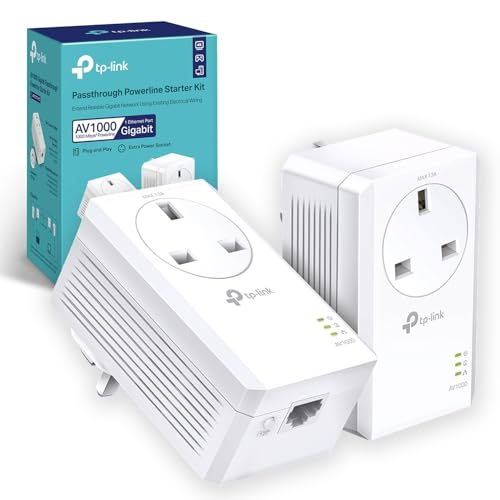
- HomePlug AV2 Standard - high-speed data transfer rates of up to 1000 Mbps, supporting all your online needs
- Gigabit Port - provides secure wired networks for desktops, smart TVs or games consoles
- Plug and Play - allows setup of your powerline network in minutes, so you can enjoy fast, seamless wired and wireless connections right away
- Integrated Power Socket - ensures no power outlet goes to waste
- Patented Power-Saving Mode - automatically reduces power consumption by up to 85%
Best for a busy desk: TP-Link TL-PA8033PKIT AV1300 3-Port Gigabit Kit
If your desk has more than one thing that wants a wired connection – a work laptop dock, a desktop PC, a NAS drive or a printer – this kit puts three Gigabit Ethernet ports on the desk-end unit, so you do not need a separate network switch. AV1300 with 2×2 MIMO is TP-Link’s faster powerline technology, using all three wires in the socket rather than two, which tends to hold its speed better over longer cable runs and in older wiring. Both units have a pass-through socket, so you keep the wall socket for something else.
It has no Wi-Fi extender, so it is the right pick when the problem is wired ports and speed rather than wireless coverage; if your office needs a Wi-Fi boost too, the TL-WPA4221 above covers both at a lower price.

- HomePlug AV2 standard compliant, high-speed data transfer rates of up to 1300Mbps, supports all your online needs.Power Output to Integrated Socket: 16 A
- Line-Neutral/Line-Ground 2×2 MIMO with Beamforming ensures larger range, higher transmission capacity and more stable connections;
- Plug and play, no configuration required: 3 gigabit ports create secure wired networks for desktops, smart TVs or games consoles;
- Integrated power socket ensures no power outlet goes to waste;
- Patented Power-Saving Mode automatically reduces power consumption by up to 85%
Comparison at a glance
| Model | AV rating | Wi-Fi extender | Ports at desk end | Approx. price |
| TP-Link TL-WPA4221 | AV600 | Yes | 2 | £45–£55 |
| TP-Link TL-PA4010PKIT | AV600 | No | 1 | £40–£46 |
| TP-Link TL-PA7017PKIT | AV1000, Gigabit | No | 2 (Gigabit) | £45–£55 |
| TP-Link TL-PA8033PKIT | AV1300, Gigabit | No | 3 (Gigabit) | £70–£80 |
Getting the best speed out of any of them
Plug both units directly into a wall socket, never into an extension lead. Where possible, choose a socket on the same ring as your consumer unit’s main incoming supply rather than one at the far end of a long spur, and avoid sockets shared with large appliances like a washing machine or a fridge-freezer, both of which generate electrical noise that can reduce throughput. If your first result feels slower than expected, try the alternative socket in the room – it is common for one socket on a ring to perform noticeably better than another, and there is no way to know which without trying both.
Run a quick speed test once set up, comparing it to a laptop connected directly to the router by cable, to get a realistic sense of what the powerline link is actually delivering in your specific home before assuming a fault if it feels underwhelming.
When powerline is not the right answer
If your home has more than one consumer unit or fuse board – common in houses that have been extended, converted into flats, or rewired in stages – powerline adapters may not bridge between them at all, since they need to share the same electrical circuit to communicate. In that situation, a mesh Wi-Fi system or a dedicated Ethernet cable run, even if it means a professional installer, will likely serve you better than a powerline kit that quietly fails to perform. It is worth checking your consumer unit setup, or asking whoever wired the property, before buying if you are unsure.
Which powerline adapter should you buy?
For most home offices, the TP-Link TL-WPA4221 is the right balance: a stable wired connection plus a Wi-Fi top-up in the same kit, at a sensible price. If your Wi-Fi is already fine and you just want a dependable wired point for one device, the simpler TL-PA4010PKIT does that job without any setup. Choose the Gigabit TL-PA7017PKIT if your desk needs more bandwidth than a video call demands, and step up to the three-port TL-PA8033PKIT when several devices on the same desk all want a wired connection.
Whichever you pick, plug it straight into the wall, keep it off extension leads, and test both units in more than one socket if the first result underwhelms – the difference between a good and a mediocre result is often nothing more than which two sockets you chose.