Affiliate disclosure: WFHKit is reader-supported. We may earn a small commission when you buy through links on this page, at no extra cost to you. Our recommendations are independent, and we only recommend products we would be happy to use ourselves.
Mechanical keyboards have a reputation for rattling, and nobody on a video call wants to hear your typing over your own voice. If you share a house, a flat or a spare room with a partner who works nearby, a loud keyboard can also become a daily annoyance. The good news is that a mechanical keyboard does not have to be noisy. Switch choice, internal foam and the way the board is built all change how much sound you make.
This guide picks three quiet mechanical keyboards for a home office, at three different prices. All three have a UK layout, so the Enter key, the pound sign and the punctuation keys are where you expect them. We opened each one’s live Amazon UK page and checked that it was in stock, well reviewed and sold with a UK layout before including it. Prices are the UK listing prices when we checked.
Keep in mind that no mechanical keyboard is silent. Every key press still makes a small sound as the key bottoms out. What these three do is soften and lower that sound, so it fades into the background rather than cutting across a call.
How to choose a quiet mechanical keyboard
- Switch type. Linear switches glide straight down without a bump or click, and they are usually the quietest. Tactile switches have a small bump you can feel, which many typists like, and the quiet versions keep the bump without the clack. Avoid anything sold as clicky if noise matters.
- Internal foam. Foam layers inside the case absorb the hollow, ringing sound that cheap boards make when you type. A board with silencing foam sounds deeper and softer even with the same switches.
- Mounting style. A gasket mount suspends the typing plate on soft pads rather than screwing it to the case. It cushions each press, which reduces the sharp sound at the bottom of the stroke.
- Low-profile or full height. Low-profile boards have shorter keys, so your fingers travel less and the sound is usually lower. Full-height boards feel more traditional, and many people find them easier to hold a good wrist angle with.
- Layout and size. A compact board leaves more room for your mouse. Make sure the layout is the UK type, with a large Enter key, if you type a lot of text.
- Connection. Bluetooth lets you pair with a laptop and a phone, and a 2.4GHz receiver or a USB-C cable gives a steadier link for a desk setup. A board with all three covers most homes.
The best quiet mechanical keyboards for a home office
Best overall: Logitech MX Mechanical Mini
The Logitech MX Mechanical Mini is a compact, low-profile mechanical keyboard built for office work. Its tactile quiet switches give you a clear bump when a key registers without the loud clack of a standard tactile switch, so it sounds restrained on a call. The keys are backlit, and the lighting comes on when your hands approach.
It pairs with Windows, Mac, Linux, iOS and Android devices over Bluetooth, and it charges over USB-C. You can store several connections and switch between them with a key. It has a UK QWERTY layout. It costs about £150, and more than four hundred buyers have rated it at 4.4 stars. It is the pick if you want a polished, quiet board that feels at home in a work setup, and you are happy to pay for it.
No products found.
Best for a gasket feel: OMOTON 75% ISO-UK Mechanical Keyboard
The OMOTON is a 75% keyboard, which keeps the arrow keys and function row while saving space compared with a full-size board. It has a true ISO-UK layout with the large Enter key and proper UK legends. The red switches are linear, which means no bump and a smooth, soft stroke that suits quiet typing.
The case uses a gasket mount with multi-layer dampening, so each key press lands softly. It connects over Bluetooth, 2.4GHz or USB-C, and the 4000mAh battery is designed for long gaps between charges. The switches are hot-swappable, so you can change them later if you want a different feel, and a volume knob sits in the corner. It costs about £70, and more than four hundred and seventy buyers have rated it at 4.4 stars. It is the best way to get a cushioned, gasket-style feel at a mid-range price.
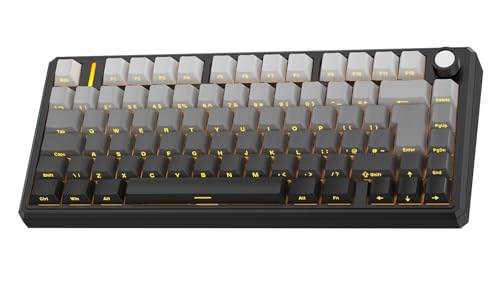
- 【ISO-UK Layout】 Type naturally with a true ISO-UK layout — featuring a large Enter key and genuine UK legends. This compact 75% keyboard saves desk space while keeping all essential keys within reach, ideal for British users who want a layout that feels like home
- 【Tri-Mode Wireless】 Connect via Bluetooth, 2.4G, or USB-C and switch between desktop, laptop, tablet, and phone in seconds. The 4000mAh battery delivers up to 266 hours of use without backlighting — charge once, forget about cables for weeks
- 【QMK/VIA Programmable】 Customise every key, create macros, and set layers through your browser — no software download needed. Perfect for developers, programmers, and power users who need their keyboard to work the way they do
- 【Hot Swap & Gasket Mount】 Swap switches without soldering — compatible with 3-pin and 5-pin switches. The gasket mount structure with multi-layer dampening delivers a creamy, quiet typing sound that suits shared offices and late-night sessions alike
- 【Smart Control & Broad Compatibility】Adjust volume and RGB effects with the integrated knob. Two-stage adjustable feet provide ergonomic typing angles. Works with Windows, Mac, PS4, and PS5 — built for hybrid work, gaming, and everything in between
Best budget buy: RK ROYAL KLUDGE RK61 60% Mechanical Keyboard
The RK61 is a small 60% board with 61 keys, which makes it the most compact keyboard in this guide. It uses two thick layers of silencing foam, plus extra foam under the spacebar, to take the hollow sound out of typing. The result is a deeper, softer sound than most boards at this price.
It has a UK layout, connects over Bluetooth, 2.4GHz or USB-C, and holds up to three devices. The switches are hot-swappable, and the PBT keycaps resist the shine and grease that cheaper plastic keys pick up. Because it has no arrow keys on their own and no function row, you reach those with a layer key, which takes a day or two to get used to. It costs about £60, and nearly two thousand buyers have rated it at 4.2 stars. It is a good choice if you want a small, quiet board without spending much.
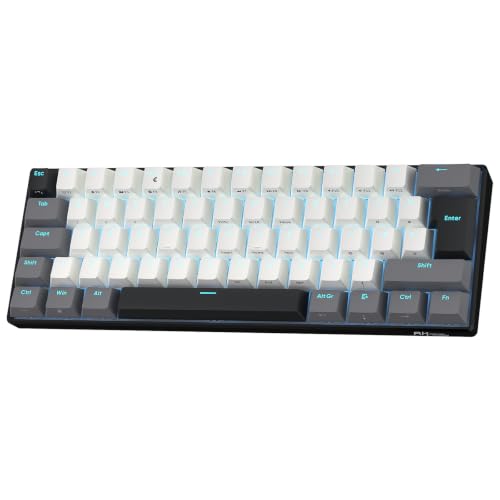
- 60% Compact, Portable Size — The ultra-minimalist 61-key layout reclaims precious desk space, providing more space for large mouse movements —essential for FPS precision. Mini Size and lightweight build also make it easy to carry and suitable for a mobile office.
- Versatile 3-Mode Connectivity — Seamlessly toggle between Bluetooth 5.0, 2.4GHz wireless, and USB-C wired modes. This compact keyboard connects up to 3 devices simultaneously, ensuring a clean, efficient, minimalist setup.
- Thocky Typing Experience — Engineered with dual-layer thick silencing foam and spacebar sound-absorbing foam, the RK61 significantly eliminates hollow sounds and cavity noise. Combined with factory-lubricated stabilizers, it delivers a solid, satisfying typing feedback.
- Hot-Swappable Keyboard with Custom Switches — Personalize your typing experience with RK’s hot-swap PCB, compatible with both 3-pin and 5-pin switches. Choose from pre-lubed RK Linear Creamy Switches for smooth keystrokes, Tactile Snowfall Switches for quick, satisfying feedback, and Linear Silent Switch for an ultra-quiet typing experience — effortlessly DIY your ideal setup for either work or gaming.
- Oil-Resistant PBT Keycaps — Features durable double-shot PBT keycaps that resist oil and wear over time. The ergonomic Cherry profile design reduces finger fatigue during long hours of office work or a gaming marathon.
Comparison at a glance
| Keyboard | Size | Switch feel | Best for | Approx. price |
|---|---|---|---|---|
| Logitech MX Mechanical Mini | Compact, low-profile | Tactile quiet | A polished office board | £140–£160 |
| OMOTON 75% ISO-UK | 75% | Linear (red) | A cushioned gasket feel | £65–£75 |
| RK ROYAL KLUDGE RK61 | 60% | Linear, foam-dampened | A small, low-cost board | £55–£65 |
Why mechanical keyboards can be quiet
A mechanical keyboard makes noise in two ways. The first is the switch itself, which can click or clack as it moves. The second is the sound of the key hitting the bottom of its stroke, and the hollow ring from the case underneath. Quiet boards tackle both. Linear and quiet tactile switches remove the click, and foam and gasket mounts soften the bottom-out sound.
How you type matters as well. Pressing keys lightly and not slamming them down to the bottom makes any board quieter. A desk mat under the keyboard also absorbs some of the sound, and it stops the board from sliding about.
Getting the best typing experience
Give a new mechanical keyboard a week before you decide whether you like it. The feel is different from a laptop or membrane keyboard, and most people adapt within a few days. Set the feet to a comfortable angle, and keep your wrists straight rather than bent up or down.
Pair your keyboard with a wrist rest if the board is tall, and think about your mouse too. A compact board leaves more room on the desk for a mouse, which helps if you tend to reach out to the side.
Using a quiet keyboard on calls
If your keyboard still comes through on a call, the microphone is usually the cause as much as the keyboard. A headset or a close-up microphone picks up less desk noise than a laptop microphone. Mute yourself when you are typing notes during a meeting, and keep your typing steady rather than hammering.
Choosing between linear and tactile switches
Linear switches have no bump, so a press feels smooth from top to bottom. They are the favourite of people who want the least sound and do not mind not feeling the exact point where a key registers. Tactile switches give a small bump at that point, which helps accuracy and cuts down on bottoming out, and quiet versions keep the sound down.
If you are unsure, think about how you type. Fast typists who hit every key hard tend to prefer a tactile bump, because it tells them when to stop. Lighter typists often enjoy the smoothness of a linear switch. Either way, the foam and mounting inside the case matter as much as the switch itself.
Looking after a mechanical keyboard
Mechanical keyboards last for years, and a little care keeps them quiet. Brush crumbs from between the keys with a soft brush, and wipe the keycaps with a slightly damp cloth. Keep drinks away from the board, and if you do spill something, unplug it and let it dry fully before using it again.
Boards with hot-swappable switches let you replace a worn or noisy switch without soldering, which can extend the life of the keyboard. Keep the original switches in a small bag in case you want to refit them.
Which quiet mechanical keyboard should you buy?
For most people the Logitech MX Mechanical Mini is the best quiet mechanical keyboard for a home office. Its quiet tactile switches, low profile and multi-device pairing suit everyday work, and the UK layout feels natural.
If you want a softer, cushioned feel and are happy with a linear switch, the OMOTON gives you a gasket mount and a full set of connections at a lower price. For the smallest and cheapest option, the RK61 is a compact board with plenty of silencing foam. Whichever you choose, a light touch and a desk mat will make it quieter still.