Affiliate disclosure: WFHKit is reader-supported. We may earn a small commission when you buy through links on this page, at no extra cost to you. Our recommendations are based on real home-office use. Prices reflect UK listings at the time of writing — always check the current product page before buying.
Typing on a laptop keyboard is fine for an email. Typing on a tablet glass screen for an hour is miserable. A compact wireless keyboard fixes both problems: it slips into a bag beside the laptop, pairs in seconds, and turns a phone or tablet into a proper writing machine in a café, on a train or at a client’s office.
This guide picks four compact keyboards for hybrid workers who move around. Each was opened live on Amazon UK and checked for stock, price and review standing, and we have chosen a spread so there is something for a tight budget, a pocket-sized travel kit and a more serious typing setup.
What to look for in a compact wireless keyboard
- Layout and size. A true compact keyboard drops the number pad and keeps a normal key pitch, so your fingers still land where they expect. Tiny folding boards save space but take some getting used to.
- Multi-device pairing. Being able to switch between a laptop, tablet and phone with one key press is the whole point of a travel keyboard. Look for at least three pairing slots.
- Battery life. Rechargeable boards need a top-up every few weeks, while models that take replacement batteries can run for a very long time between changes. Either is fine if you know which you are buying.
- Key feel. Shallow, quiet keys suit shared spaces and trains. Slightly deeper keys feel better for long writing sessions. Backlighting is useful for evening work.
- UK layout. Check the listing says UK QWERTY, otherwise the pound sign and a few punctuation keys will be in the wrong place.
- Weight and thickness. Anything under about half a kilo that lies flat in a bag is easy to carry every day.
The best compact wireless keyboards
Best overall: Logitech Pebble Keys 2 K380s
Logitech’s Pebble Keys 2 is the keyboard we would hand to most hybrid workers. It is slim, light and quiet, with low-profile rounded keys that feel comfortable straight away, and it pairs with up to three devices that you swap between using a dedicated key. It works with Windows, macOS, iPadOS, Android and ChromeOS, and the UK layout is correct for the pound sign.
Because it is a respected brand with more than a thousand buyer ratings, you can rely on the pairing software, the support and the build quality. It is the one to buy if you just want something that works and disappears into the bag.

- Defy Boring: With a slim design, multiple colours and smarter tech, this Bluetooth keyboard from the Pebble 2 Collection lets you express your vibe and make your statement
- Never Made Ordinary, Made to go places: the Pebble Keys 2 K380s keyboard is slim, compact, portable and made with recycled plastic (1)
- Easily Hop Across 3 Devices: Use Bluetooth to connect up to 3 wireless devices across OSs (Windows, macOS, iPadOS, ChromeOS, Googlebook), and switch between them with one click of the Easy-Switch buttons
- Save Time: Get instant access to search, screen capture, the emoji menu and more with Fn shortcut keys; personalise the 10 Fn keys with Logi Options+ app (2) so you can do things your way.
- Feel-Good Typing at Your Fingertips: The Pebble Keys 2 K380s Quiet Keyboard comes with scooped round keys and a familiar, laptop-like typing experience for effortless, comfy typing.
Best budget pick: Arteck Universal Multi-Device Bluetooth Keyboard
Arteck’s ultra-slim board costs less than a takeaway lunch and still covers the essentials. It connects to three devices and switches between them with a single press, works across Windows, iOS, iPadOS, Android and macOS, and charges over USB-C. The maker quotes up to six months between charges, which means it rarely needs thinking about.
It is a plastic-and-metal keyboard rather than a premium one, but more than six hundred buyers rate it well, and it is an easy way to equip a tablet for writing without spending much.
No products found.
Best for the smallest bag: Zedo Foldable Bluetooth Keyboard
If space is the priority, the Zedo folds into three and measures about 15cm by 10cm when closed, so it fits in a jacket pocket. Unfolded it gives you a usable set of keys plus a built-in touchpad, which means you can navigate a tablet without reaching for the screen. It pairs with two devices and has a rechargeable battery rated for around forty hours of use.
A folding layout is never as comfortable as a solid board, and the touchpad takes a little getting used to. For quick emails, notes and edits on the move, though, it is a clever way to carry a keyboard you will actually bring with you.

- CONNECTING TO 2 DEVICE: With 2 bluetooth connection, you can connect your cellphone/tablet/PC/laptop simultaneously and easily switch between 2 devices. It's a great Bluetooth keyboard for Mac, iPad, iPhone, IOS, Mac OS system
- FOLDING DESIGN: The ultra slim tri-folding keyboard folds up easily for carrying around or stowing away, you can take the portable keyboard for ipad anywhere. It must be a perfect gift for anyone who often travel or on a business trip
- KEYBOARD WITH TOUCHPAD: Updated sensitive touchpad with mouse button, which is more convenient and efficient! (Please note that the touchpad does not work below IOS 13. ) The scissor-switch keys is very responsive, make you feel good on typing up E-mails and long texts
- RECHARGEABLE & LONG BATTERY TIME: With a built-in rechargeable battery capacity of 40 HOURS working time after 2 hours of full charging, you can go with it for a short business or vacation
- LIGHTWEIGHT AND PORTABLE: The keyboard folding size is only 5.98"x3.82"x0.71"(Unfold size: 11.96"x3.82"x0.36"), pocket-sized keyboard can be easily folded up with magnetic and it won’t open when you put it in the bag and carry around
Best for serious typing: ProtoArc K90-A Backlit Keyboard
ProtoArc’s backlit compact keyboard is the most grown-up board here. It has a tidy compact layout, adjustable backlighting for evening work, three-device pairing and a built-in rechargeable battery. It is designed with Mac users in mind, with the Mac layout and shortcut keys, but it connects to Windows and other systems over Bluetooth as well.
It costs more than the others, and it is slightly larger, but if you will write for long stretches on a tablet or a second laptop, the better feel and the backlight are worth paying for.
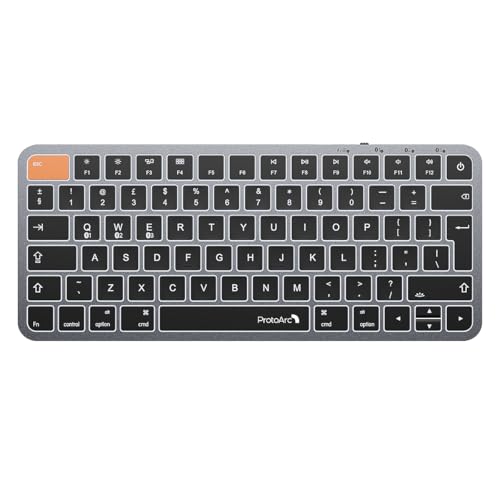
- Efficiently Compact: Our keyboard features a compact layout designed for precise functionality without compromising on portability. Compatible with MacBook Pro, MacBook Air, iPad, or iPhone. Compatible with Apple device gaming scenarios. Note: Device manufactured before 2013 or running macOS versions below 10.12 are not supported. Not compatible with Linux, Windows, or the Windows installed on Mac hardware
- Customizable Backlighting: Customize your typing experience with our ProtoArc backlit wireless keyboard for Mac, offering three soft white LED brightness levels for reduced eye strain in any environment
- Seamless Multi-Device Connectivity: Connect up to 3 devices effortlessly with our wireless bluetooth keyboard's 3 bluetooth channels. Conveniently switch between devices using the mode switch button, with connection established via Bluetooth (no USB dongle required)
- Sleek Design, Responsive Typing: Featuring a sleek design that seamlessly complements your mac setup, wireless keyboard provides a remarkable typing experience, thanks to its low-profile scissor mechanism keys offering tactile feedback for fast and accurate input
- Rechargeable and Eco-Friendly: Features a built-in 1200mAh rechargeable battery, entering sleep mode after 60 minutes of inactivity to conserve energy. Easily awaken the keyboard with any key press, with manual reactivation needed for backlighting.

Comparison at a glance
| Model | Style | Devices | Best for | Approx. price |
| Logitech Pebble Keys 2 | Slim, low-profile | 3 | Best all-rounder | £18–£23 |
| Arteck Multi-Device | Ultra-slim, USB-C | 3 | Tight budgets | £14–£19 |
| Zedo Foldable | Tri-fold with touchpad | 2 | Pocket portability | £22–£28 |
| ProtoArc K90-A | Compact, backlit | 3 | Long typing sessions | £32–£38 |
Which wireless keyboard type suits you?
A solid slim board such as the Logitech or the Arteck is the right answer for most people. It lies flat in a laptop sleeve, types well and costs little. Choose a folding keyboard only if your bag is genuinely too small for anything else, because you will pay for the portability with a more cramped typing feel.
If you spend a lot of the day on a tablet, a backlit board is worth considering. Lighting makes a real difference in a dim train carriage or a hotel room, and it lets you keep typing without looking at the keys.
Getting the best from a travel keyboard
Pair the keyboard to each of your devices once at home, so there are no surprises when you are in a hurry. Give each device its own pairing slot and note which number is which. After that, switching between a phone and a tablet is a single key press.
A tablet stand or a phone holder turns a keyboard into a complete mini workstation. Raising the screen to eye level helps your neck, and a stand also stops a thin tablet sliding off a café table. Carry the keyboard in a sleeve or a small pouch so the keys stay clean and the edges do not scratch your laptop screen.
Charge rechargeable keyboards at the same time as your phone, for instance on a Sunday evening, so the battery is never the reason you cannot work. If your keyboard uses replacement batteries, keep a spare pair in the bag.
Typing comfort away from a desk
A compact keyboard on a café table is only comfortable if the setup is right. Keep the keyboard close to the table edge so your forearms rest naturally, and raise the tablet or laptop screen so the top is roughly at eye level. Even a small fold-up stand makes a noticeable difference to your neck after an hour.
Take a short break every thirty minutes or so, roll your shoulders and shake out your wrists. Slim keyboards have little key travel, which is easy on the fingers but encourages you to press harder than you need to. A light touch and a relaxed grip protect your wrists over a long day.
If you find yourself writing long documents away from the desk most days, consider carrying a slightly larger keyboard with deeper keys instead of the smallest one you can find. The few extra grams are cheap insurance against sore hands.
Do you need a compact keyboard at all?
If your laptop is your only device, you may not. A compact keyboard earns its place when you regularly write on a tablet or a phone, when you want a better typing position than a laptop offers on a low café table, or when you share a desk with several devices. For a fixed home desk, a full-size ergonomic board is a better long-term choice, and our guide to ergonomic keyboards covers those.
Which compact wireless keyboard should you buy?
For most hybrid workers the Logitech Pebble Keys 2 is the best choice, combining reliable pairing, a comfortable slim design and a brand you can trust. If you want to spend as little as possible, the Arteck gives you three-device pairing and a long battery life for a very low price.
Pick the Zedo if you need something small enough for a pocket, and the ProtoArc if you want a backlit keyboard for long writing sessions. Whichever you choose, a good travel keyboard makes any tablet feel like a real work machine.