Affiliate disclosure: WFHKit is reader-supported. We may earn a small commission when you buy through links on this page, at no extra cost to you. Our recommendations are independent, and we only recommend products we would be happy to use ourselves.
A MacBook keyboard is fine for an hour at a café, but it is a poor fit for a full day at a desk. The keys are shallow, your hands are tucked in close to the screen, and the laptop sits too low for good posture. A separate keyboard fixes all of that, and for a Mac it makes sense to choose one that understands Mac shortcuts, the Command and Option keys and the media keys on the top row.
This guide picks four keyboards for Mac users at different prices. Each has a UK layout, so the Enter key, the pound sign and the at symbol are where they should be. We opened every product’s live Amazon UK page and checked the stock, reviews and layout before including it, and the prices are the UK listing prices when we looked.
Whichever you pick, raise your laptop on a stand so the screen sits at eye level, and use the external keyboard and a mouse for the actual typing. That one change does more for your neck and wrists than any keyboard.
How to choose a keyboard for your Mac
- Mac key layout. Look for Command and Option keys in the Mac order, and function keys that control brightness, volume and media. A keyboard made for Windows still works, but the shortcuts take some getting used to.
- UK layout. A UK keyboard has a large Enter key and a pound sign on the 3 key. Check the listing says British English or UK QWERTY, because many cheaper boards ship with a US layout.
- Multi-device pairing. If you use a Mac, an iPad and a phone, look for a keyboard that remembers several Bluetooth connections and switches with one key press.
- Full size or compact. A full-size board has a number pad, which is helpful for spreadsheets. A compact board leaves more room for your mouse and suits a small desk.
- Touch ID. Some Apple keyboards include a fingerprint reader that unlocks your Mac and approves purchases. It works only with Apple silicon Macs, so check yours before you pay extra.
- Charging. Most wireless keyboards are rechargeable now. A keyboard that charges over a standard cable is easier to live with than one that needs special batteries.
The best keyboards for Mac users
Best overall: Apple Magic Keyboard with Touch ID
If you use a Mac with Apple silicon, the Apple Magic Keyboard with Touch ID is the keyboard that fits it best. It is made for Mac models with Apple silicon, it has a British English layout, and the Touch ID key unlocks your Mac and approves purchases with a touch of your finger instead of typing a password.
The keys are low and quiet, the board is slim, and it pairs with your Mac without fuss. It costs about £130, and more than two hundred buyers have rated it at 4.6 stars. It is the pick if you want the most seamless Mac experience and a fingerprint reader on your desk.
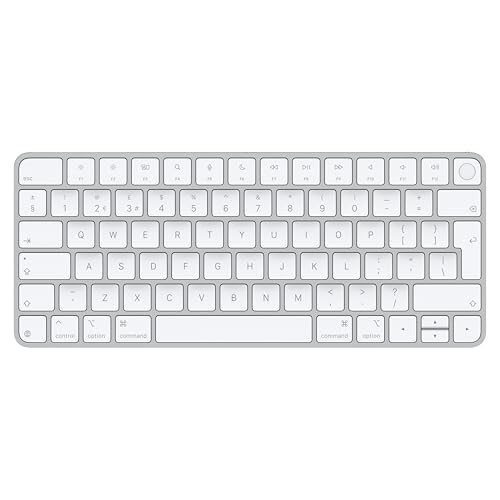
- Magic Keyboard is available with Touch ID, providing fast, easy and secure authentication for logins and to unlock your Mac.
- Magic Keyboard with Touch ID delivers a remarkably comfortable and precise typing experience.
- It’s also wireless and rechargeable, with an incredibly long-lasting internal battery that will power your keyboard for about a month or more between charges.
- It pairs automatically with your Mac, so you can get to work right away.
- It features a USB-C port and includes a woven USB-C Charge Cable that lets you pair and charge by connecting to a USB-C port on your Mac.

Best value Apple option: Apple Magic Keyboard
The standard Apple Magic Keyboard has the same slim, low-profile design and a British English layout, without the fingerprint reader. It pairs easily with a Mac, an iPad or an iPhone, and it works with the keyboard shortcuts you already know.
It costs about £97, and more than three hundred and sixty buyers have rated it at 4.6 stars. It is the right choice if you like the Apple feel and do not need Touch ID, or if your Mac is older than the Apple silicon models.

- Magic Keyboard delivers a remarkably comfortable and precise typing experience.
- It’s also wireless and rechargeable, with an incredibly long-lasting internal battery that’ll power your keyboard for about a month or more between charges.
- It pairs automatically with your Mac, so you can get to work straightaway.
- It features a USB-C port and includes a woven USB-C Charge Cable that lets you pair and charge by connecting to a USB-C port on your Mac.
Best for multiple devices: Logitech MX Keys S
The Logitech MX Keys S is a full-size wireless keyboard with a UK QWERTY layout and a Mac-friendly set of keys. The keys are low-profile and shaped to fit your fingertips, and the typing is quiet and fluid. The backlight comes on when your hands approach.
It connects over Bluetooth or a USB receiver, charges over USB-C, and can remember several devices, so you can switch from your Mac to an iPad or a phone with a key. The keys are programmable with Logitech’s software. It costs about £85, and more than eight hundred buyers have rated it at 4.6 stars. It is the best choice if you move between devices and want a comfortable full-size board.
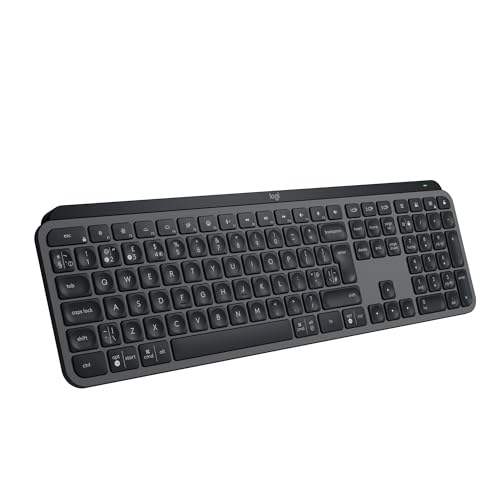
- Fluid Typing Experience: Laptop-like profile with spherically-dished keys shaped for your fingertips delivers a fast, fluid, precise and quieter typing experience
- Automate Repetitive Tasks: Easily create and share time-saving Smart Actions shortcuts to perform multiple actions with a single keystroke with the Logi Options+ app (1)
- Smarter Illumination: Backlit keyboard keys light up as your hands approach and adapt to the environment; Now with more lighting customisations on Logi Options+ (1)
- More Comfort, Deeper Focus: Work for longer with a solid build, low-profile design and an optimum keyboard angle that is better for your wrist posture
- Multi-Device, Multi OS Bluetooth Keyboard: Pair with up to 3 devices on nearly any operating system (Windows, macOS, Linux, Googlebook OS) via Bluetooth Low Energy or included Logi Bolt USB receiver (2)
Best budget buy: OMOTON Wireless Bluetooth Keyboard for Mac
The OMOTON is a slim, full-size keyboard designed for the Mac, with a UK QWERTY layout and a number pad. It is rechargeable, it has three Bluetooth channels so you can pair it with several devices, and its low-profile keys are designed to type quietly.
It costs about £32, and more than four thousand buyers have rated it at 4.5 stars, which is an excellent record for a budget board. It does not have the premium feel of the Apple or Logitech keyboards, but it is an easy upgrade over a laptop keyboard for very little money.
No products found.
Comparison at a glance
| Keyboard | Size | Special feature | Best for | Approx. price |
|---|---|---|---|---|
| Apple Magic Keyboard with Touch ID | Compact, slim | Fingerprint reader | The most seamless Mac fit | £125–£135 |
| Apple Magic Keyboard | Compact, slim | Mac shortcuts | Apple feel for less | £92–£102 |
| Logitech MX Keys S | Full size | Multi-device switching | Several devices | £80–£90 |
| OMOTON for Mac | Full size | Three Bluetooth channels | A low price | £28–£36 |
Setting up a keyboard with your Mac
Pairing is simple. Open System Settings on your Mac, choose Bluetooth, put the keyboard into pairing mode and select it from the list. Most keyboards then reconnect on their own each time you open the lid or wake the Mac.
If the Command and Option keys feel swapped, check the keyboard’s settings. Some boards made for both Windows and Mac let you pick the layout with a key combination, and macOS also has a setting to swap the modifier keys.
Making the most of a Mac keyboard
Learn a few shortcuts and you will feel the benefit straight away. Command and Space opens search, Command and Tab switches app, and Command and Shift and 4 takes a screenshot of the area you choose. A keyboard with a full set of function keys makes the brightness and volume controls easy to reach.
Put the keyboard at elbow height, with your wrists straight, and keep it close enough that your upper arms hang naturally. A slim keyboard like the Magic Keyboard sits low enough that most people do not need a wrist rest, while a thicker board benefits from one.
Do you need a mouse as well?
Most Mac users get on well with a trackpad for short jobs, but a mouse is easier on your hand across a full day. A separate mouse also lets you keep your laptop raised on a stand without reaching up to the trackpad.
Connecting more than one device
A good Mac keyboard saves you from unpairing and re-pairing every time you change device. Keyboards with several Bluetooth channels let you tap a key to jump between your Mac, an iPad and a phone. Give each channel a name you will remember, and keep the keyboard charged so it is always ready.
If you plan to share the keyboard with a work laptop that runs Windows, choose a board that supports both systems, such as the Logitech MX Keys S. The Apple keyboards work best with Apple devices.
Which Mac keyboard should you buy?
For most people with an Apple silicon Mac, the Apple Magic Keyboard with Touch ID is the best keyboard for Mac users, because it fits the Mac perfectly and the fingerprint reader saves time every day.
If you want the Apple feel for less, the standard Magic Keyboard is the one to buy. The Logitech MX Keys S is the better choice if you switch between several devices, and the OMOTON is an inexpensive way to leave the laptop keyboard behind. Whichever you choose, raise your laptop screen to eye level so your neck stays comfortable.