Affiliate disclosure: WFHKit is reader-supported. We may earn a small commission when you buy through links on this page, at no extra cost to you. Our recommendations are based on real home-office use. Prices reflect UK listings at the time of writing – always check the current product page before buying.
The hybrid working week has a hidden cost: the daily decision about what to carry. Pack too little and you spend the afternoon without a charger, a mouse or a way to plug into the meeting-room screen. Pack too much and you haul a heavy bag across London or Leeds for no reason. The answer is a small, well-chosen kit that lives in the bag permanently, so that the only things you add each morning are your laptop and your lunch.
This guide builds that kit piece by piece: a bag, a sleeve, a pouch, a power bank, a dock and a keyboard. Every product was checked live on Amazon UK for stock, price and review standing, and together they cost less than a single premium laptop bag.
The principle: a bag that is always ready
The point of a hybrid work bag is that it is never half-packed. Everything that does not change from day to day, such as spare cables, a dock, a power bank and a pair of earbuds, stays in the bag. Everything that does change, such as your laptop, notebook and lunch, goes in each morning. That one habit removes the most common source of hybrid-day stress: the forgotten charger.
What actually matters when building the kit
- Weight. Every item should earn its place. A hybrid bag that weighs more than a few kilos is not sustainable for a daily commute.
- Compatibility. Choose items that work with your laptop and phone, particularly the ports and chargers.
- Protection. Your laptop is the most expensive thing in the bag, so it deserves a padded sleeve and a sensible compartment.
- Organisation. A kit you cannot find is a kit you will not use. Pouches and compartments matter as much as the items.
- Redundancy where it counts. A spare charging cable or a power bank costs little and saves a lot of trouble.
The essentials for a hybrid work bag
The bag: Lenovo B210 Backpack
Start with the bag itself. The Lenovo B210 is a light, water-repellent backpack that fits laptops up to 15.6 inches, and it has been rated by tens of thousands of buyers. It costs little, weighs little and has a padded laptop compartment. For a full comparison of bags, see our guide to laptop backpacks, but this is the one we would put at the core of a budget kit.

- Casual backpack A stylish and streamlined design that is perfectly suited to modern day life, weighing just 440g so as the only weight you are carrying is from your valuables
- High quality, durable fabric Ideal for school, work and travel, the Lenovo Casual Backpack has a contemporary design that is spacious and water repellent to keep your belongings protected
- Large storage capacity Safely stores up to a 15.6” laptop in the main storage compartment with room for notebooks and cables and separate quick-access pockets for smaller items
- Comfortable design This laptop bag is made using high-quality fabric with protective cushioning and shoulder padding for comfort and support during longer journeys
- Dimensions The Lenovo Casual Backpack fits laptops up to H 362 x L 255 x D 22 mm – (Bag dimensions 445 x 310 x 120mm)

The protection: Amazon Basics 14 Inch Laptop Sleeve
A padded sleeve adds a second layer of protection to the laptop and keeps it clean inside the bag. The Amazon Basics sleeve has been rated by well over a hundred thousand buyers and costs about as much as a sandwich. It is listed in a 14-inch size, so choose the size that matches your laptop when you order.

- QUICK-LOADING DESIGN: Form-fitting sleeve with top-loading access for fast device insertion and removal
- PRECISE FIT: Designed for 14 inch laptops and ultrabooks with a 14.1 inch display
- SLIM AND PORTABLE: Lightweight design at 500 g allows you to carry the case standalone or slip it into a larger bag
- PROTECTIVE MATERIALS: Felt, knit fabric, webbing and foam construction provides shockproof protection
- INTERNAL DIMENSIONS: 35.3 x 26.3 x 1.5 cm (L x H x W) for secure fit; external 36.2 x 26.9 x 2.6 cm
The organiser: UGREEN Travel Tech Pouch
A tech pouch is the unsung hero of any bag. The UGREEN pouch holds cables, chargers, a mouse and a memory stick in separate pockets, so the contents of your bag stay tidy and easy to find. More than a thousand buyers rate it very highly, and it costs little.
Keep it packed permanently, and the loose cable at the bottom of the bag becomes a thing of the past.

- All-in-One, Great Capacity: Designed with a spacious interior to store all your electronic essentials—chargers, adapters, cables, SD cards, hard drives, power bank, etc. —all in one place!
- Organized Internal Zipper Layers: Features three dedicated compartments and a secure zippered pocket for small accessories, keeping everything tidy and preventing loss.
- Portable Dimensions: External Size: 22.50 x 12.00 x 6.50 cm (8.86 x 4.72 x 2.56 inches). Internal Size: 20.00 x 11.50 x 5.00 cm (7.87 x 4.53 x 1.97 inches). Perfectly sized for optimal storage and portability.
- Premium YKK Zippers: Equipped with top-tier YKK zippers, ensuring smooth operation and long-lasting durability.
- Water-Resistant Protection: Crafted from polyester material with excellent water-repellent properties, safe guard your devices against unexpected splashes.
The power: Anker 20,000mAh Power Bank with Built-in USB-C Cable
A power bank is insurance against flat batteries on the train and in the café. This Anker model has a built-in USB-C cable, so there is nothing extra to forget, and it has been rated by more than ten thousand buyers. It will keep a phone, earbuds and a tablet going for several days of normal use.
If you want to power a laptop from a bank, our guide to power banks for hybrid working covers the higher-output options.

- 87W Power to Share: Distribute 87W across three devices, with a single device receiving up to 65W, to rapidly charge iPhones, Samsung phones. Quickly charge a 14" MacBook Pro to 50% in under 40 minutes.
- Speedy Cable Charging: Utilize the built-in cable to elevate your iPhone 15 Pro to 58% or a MacBook Air to 52% in 30 minutes. You can also fully recharge this power bank in 1.5 hours with a 65W charger.
- 20,000mAh for Extended Use: Eliminate concerns about battery depletion with a 20,000mAh power bank that ensures consistent, reliable charging for all your devices, also approved for airline travel.
- Lasts Longer, Charges Faster: The integrated USB-C cable is designed to endure, withstanding over 10,000 bends for dependable charging and convenient storage.
- What You Get: Anker Power Bank (20K, 87W, Built-In USB-C Cable), 157.5 × 73.7 × 25.4 mm (439.4g), welcome guide, 18-month warranty, and friendly customer service.
The connections: Anker 5-in-1 USB-C Hub
Laptops are short on ports, and a small hub fixes that. The Anker 5-in-1 provides an HDMI output for meeting-room screens and extra USB ports, and it weighs next to nothing. It is rated by thousands of buyers and costs very little.

- 5-in-1 USB-C Hub: Experience comprehensive connectivity featuring a Power Delivery input, two USB-A 2.0 ports, a USB-A 3.0 port, and an HDMI port. (Note: The USB-C power delivery input port is only for connecting an external wall charger to power your laptop and cannot power peripheral devices.)
- 90W Pass-Through Charging: Achieve optimal charging with 90W pass-through power to your laptop, supported by a total input of 100W, with the hub reserving 10W for operational efficiency. (Note: Wall charger not included.)
- Quick Data Transfers: Accelerate your productivity with rapid data transfers using a high-speed 5Gbps USB 3.0 port and two 480Mbps USB 2.0 ports.
- 4K HDMI Display: Enhance your visual experience with a hub capable of delivering 4K resolution at 30Hz in both mirror and extend modes.
- What You Get: Anker USB-C Hub (5-in-1, 4K HDMI), welcome guide, 18-month warranty, and our friendly customer service.
The keyboard: TECKNET Wireless Bluetooth Keyboard
A compact keyboard is optional but surprisingly useful, particularly if you use a laptop stand at a desk or work with a tablet. The TECKNET connects to up to four devices over Bluetooth and recharges over USB, and it is rated by well over two thousand buyers. At its price it is a bargain.
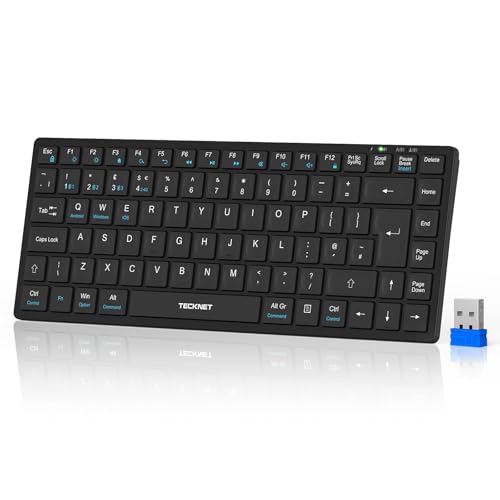
- 【4 Modes of Connection】Building on the traditional tri-mode keyboard, we’ve added a 2.4GHz wireless connection. This low profile keyboard offers 4 connection modes (3*BT 5.0 + 1*2.4GHz), allowing simultaneous connection to 4 different devices. One wireless keyboard can control 4 devices, eliminating the need for multiple keyboards and the hassle of switching connections
- 【500mAh Rechargeable Keyboard】The TECKNET ultra-slim wireless Bluetooth keyboard is equipped with a 500mAh high-capacity rechargeable battery, saving energy and eliminating the need for battery replacement. The auto-sleep mode wakes up instantly with any key press, with no delay. A 2-hour charge can last up to 180 days (based on 2 hours of daily use)
- 【Compact Wireless Keyboards】The TECKNET mini Bluetooth keyboard is designed to enhance your workflow, boosting both efficiency and productivity. Featuring 14 shortcut keys, it streamlines tasks for greater output. Its lightweight and compact design provides full functionality while saving space, making it perfect for use at home, in the office, or on the go
- 【Ergonomic Design & Silent Typing】The TECKNET Bluetooth wireless keyboard reduces noise by over 90% with its upgraded scissor design. The ergonomic, durable keys provide comfort during long typing sessions, while adjustable support buckles and 5 anti-slip pads ensure stability. Keycaps are built to last, with a lifespan of up to 10 million clicks
- 【Keyboard with Wide Compatibility】This wireless rechargeable keyboard is compatible with various devices and operating systems, including Windows, macOS, Android, and iOS (except iPhones). The USB connection works for devices without Bluetooth, while Bluetooth saves USB ports. It’s ideal for computers, laptops, tablets, iPads, smartphones, and more
Comparison at a glance
| Item | Product | Why it earns its place | Approx. price |
| Bag | Lenovo B210 | Light, water-repellent and padded | £18–£25 |
| Protection | Amazon Basics sleeve | Second layer of padding | £9–£14 |
| Organiser | UGREEN tech pouch | Keeps cables and accessories together | £11–£16 |
| Power | Anker 20,000mAh bank | Phones, tablets and earbuds topped up | £36–£42 |
| Connections | Anker 5-in-1 hub | HDMI and USB ports on demand | £9–£13 |
| Keyboard | TECKNET Bluetooth | Compact and works with four devices | £16–£21 |
What else belongs in the bag
Beyond the kit above, a few small items are worth adding. A reusable water bottle, a notebook and pen, a pair of earbuds for calls, and a small packet of tissues or a microfibre cloth for the laptop screen. A spare USB-C cable, a short HDMI lead and a travel adapter if you cross borders complete a set that handles nearly every situation.
Resist the urge to add more. Every item you carry daily has to justify its weight, and the best bag is the one you can lift easily at the end of a long day.
A sensible morning routine
Keep the bag by the door and use a short checklist: laptop, charger, phone, lunch. Because the rest of the kit never leaves the bag, that is all you need. At the end of the day, put the kit back where it belongs and charge anything that needs it, including the power bank.
Once a month, empty the bag completely and put back only what you need. Receipts, old cables and crumbs build up quickly, and a ten-minute tidy keeps the bag light.
What to do on office days versus home days
On home days, the bag can sit by the desk, ready for the next trip. On office days, take the laptop and your daily items and leave the rest. If your office has docking stations or spare monitors, you may not need the hub or keyboard at all, and you can leave them behind to save weight.
On days you work from a café or a client’s office, the full kit is what makes the day easy: power for the phone, a hub for the projector, a keyboard for comfort.
Travelling light: how to keep the kit small
The most common mistake is to treat a work bag as a general-purpose rucksack. Choose multi-purpose items wherever you can: a hub that handles HDMI and USB in one, a power bank with a built-in cable, a keyboard that pairs with a phone as well as a laptop. Each item that does two jobs is one fewer thing to carry.
Think about duplicates, too. If your office has chargers on every desk, a second laptop charger in the bag is dead weight, and if you work from home on the same days, you can leave the keyboard on the desk. Match the kit to the week you actually have, not the worst case you can imagine.
Keeping the kit safe
A bag full of electronics is a target for thieves, so keep it close in busy places and never leave it unattended on a train or in a café. Put the laptop in its compartment against your back, and keep the zips facing inwards on crowded transport. Label the pouch and the charger with your name and phone number, which gives an honest finder a way to return them.
Insurance is worth a thought. Many home contents policies cover items taken out of the house only as an add-on, so check whether your laptop and phone are protected when they travel.
Charging habits that stop the day going wrong
Charge the laptop, phone, earbuds and power bank every evening, and put them straight back in the bag. A bag that is full of dead batteries is worse than useless, because it gives false comfort. A simple routine, such as plugging everything into a multi-port charger by the door, takes a minute and prevents nearly every battery crisis.
If you only have one charger, label it and keep it in the pouch with the cable, so it never gets left behind in the home office. A spare short cable in the bag is the cheapest backup there is.
The verdict: what to buy first
If you are building the kit from scratch, start with the bag and the pouch, because they bring order immediately. Add the power bank next, then the hub, then the sleeve and keyboard as your needs become clear. The whole set costs well under the price of a premium laptop bag, and it is more useful on a typical hybrid day.
A well-built hybrid bag is not about owning more gadgets. It is about removing friction, so that wherever you work, you can sit down, plug in and start.