
If you have ever sat down at your desk, looked underneath, and physically winced at the spaghetti of cables hanging off the back of your monitor, you are in the right place. A messy desk is not just an aesthetic problem. It is a daily friction tax on your productivity, your cleaning routine, and the lifespan of your gear.
This is the home office cable management guide we wish we had when we first started working from home full-time. It walks you through the why, the what, and the how — from the £8 fix that solves 80% of the chaos, to the screw-in under-desk trays the professional installers use. Whether you have a single laptop and one monitor, or a full standing-desk setup with a dock, two displays, a webcam, a microphone, and a desk lamp, you will find a workable plan here.
Why cable management is worth doing properly
Cables are one of those areas where doing the job once, properly, pays you back every single working day. The most obvious benefit is that your desk simply looks better — you stop seeing the visual noise, and your home office starts to feel like a real workspace rather than a corner of a server room. But the practical benefits matter more.
First, dust. Cables that hang behind a desk turn into a vertical dust trap. Once a quarter you have to pull the desk out and vacuum behind it. With a tray and a few clips, that job becomes ten seconds with a microfibre cloth. Second, swapping gear. The day you decide to upgrade your monitor, replace your dock, or add a webcam, a tidy setup means you trace one cable, swap it, and you are done. A messy setup means an hour of detangling. Third, safety and lifespan. Cables draped across the floor get stood on, kicked, and rolled over by chairs. Most USB-C and HDMI cable failures we have seen are at the connector, where they have been bent at a sharp angle for months.
Lastly, video calls. The single biggest visual upgrade you can make to your background — bigger than a webcam, bigger than a ring light — is a desk that does not have cables snaking across it. Tidy desk equals professional impression.
The five categories of cable management gear
Before you buy anything, it helps to understand the toolbox. There are roughly five categories of product, and a complete setup typically uses three or four of them together.
1. Under-desk trays and raceways
These are the workhorse of any tidy desk. A cable tray bolts (or clamps) to the underside of your desk and gives you somewhere to put the power strip, the mess of wall warts, and the slack from every cable. Once it is fitted, anything that plugs into the wall lives up there, out of sight.
There are two main styles. Mesh trays (sometimes called J-channels) are the classic option — sturdy steel, cheap, and easy to drop a power strip into. Closed PVC raceways are sleeker and dust-proof but harder to access. For most people, a mesh tray is the right answer.
2. Cable sleeves and braided wraps
Where cables have to travel any visible distance — for example, from your monitor down to the tray — a sleeve bundles them into a single neat tube. Velcro sleeves are the most flexible because you can open them later to add or remove cables. Spiral wrap is cheaper but a pain to undo. Braided fabric sleeves look the most premium.
3. Clips, clamps, and pass-throughs
Small adhesive clips that stick to the underside or back edge of your desk are how you handle the last 30cm of any cable run. They route a charging cable from the back of the desk to where your phone sits, or hold a USB hub against the underside of the desk so it does not dangle.
Desk grommets — the round plastic discs that fit into a hole in your desktop — are the upgrade if you have a desk with no cable hole, or if you bought one and want a tidier finish.
4. Cable boxes and shrouds
If you have a power strip and a forest of plugs that you cannot route into a tray, a cable box is the next best thing. These are large plastic boxes that sit on the floor and conceal the power strip and the worst of the slack. Useful behind a sofa or under a desk where a tray will not fit.
5. Velcro ties and reusable straps
Forget the plastic zip ties you got with your last router. Reusable Velcro ties (sometimes branded as VELCRO ONE-WRAP) are the only kind worth buying. They are cheap, you can re-tie them every time you swap a cable, and they will not damage the wire by clamping too hard.
How to plan your setup before you buy
The single biggest cause of half-finished cable management is buying a tray, fitting it, and then realising the power strip does not fit, or the cables do not reach. Spend ten minutes planning before you order.
Step one: count your cables. Walk to your desk and count every single cable that ends up plugged into the wall. For most home office setups, that is the monitor, the laptop charger or dock, the desk lamp, possibly a phone charger, and possibly a webcam or speakers. Five to seven plugs is typical.
Step two: pick your power strip. The single most important purchase. You want a strip with at least two more outlets than you currently need, ideally with the plugs spaced widely enough to fit chunky wall warts. Surge protection is sensible. A flat-profile or angled-plug strip will fit better in a tray than a chunky one.
Step three: measure cable lengths. Once your power strip is mounted in a tray under the desk, the cables from your monitor and laptop have to reach it. If your existing cables are short, plan to replace one or two — a 2m DisplayPort cable is far easier to route tidily than the 1m one your monitor came with.
Step four: decide where the desk lives. If your desk sits flush against a wall, you can run cables straight down behind it. If it floats in the middle of the room — a common standing-desk layout — you will need a way to hide the cables that drop to the floor. A vertical cable spine (a flexible cable chain) is what you want here.
Our recommended cable management products
Below are the products we recommend for a typical UK home office. Each is available on Amazon UK, and we have linked through to the listings so you can check current pricing.
Best mesh under-desk cable tray: Allcam CT120
A no-fuss galvanised steel mesh tray, 120cm long, that screws into the underside of any wooden desk and comes with its own mounting bracket, cover and end cap. Long enough to hold a six-way power strip, two USB chargers, and the slack from your monitor and laptop cables. Around £18.
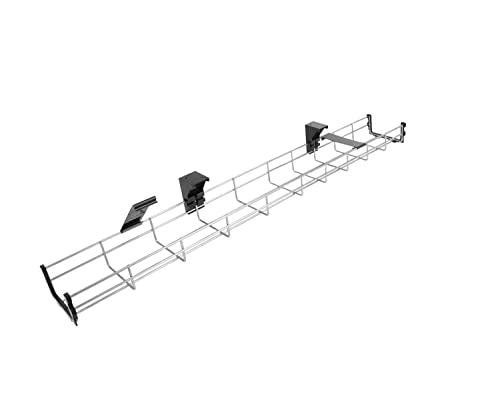
- Simple but sturdy under-desk cable management tool, mountable to the bottom of the desk/table, or a wall/vertical panel
- Unique cable covers to stop unsightly cables/wires from spilling out
- Heavy-duty ø5 steel wire and fire-resistant plastic mounting brackets support up to 5kg, extra mounting brackets are available if your load is more than 5kg
- Tray size: H 6cm x W 11.5cm x various Lengths: 80cm, 100cm, 120cm - (add 0.5cm for actual size), 140cm, 160cm, and 180cm (add 1.5cm for actual size)
- Modular design, join any number of 40cm, 60cm, and 100cm sections to form longer cable trays
Best no-drill cable tray: 25″/64cm clamp-mount cable tray
Clamps to the underside of the desk rather than screwing in, which is essential if you rent or have a desk you do not want to drill into. Slightly less sturdy than a screwed tray but holds a normal power strip without issue. Around £19.

- 【25'' Large Size】The 25'' cable management provides enough space for all your cables. The cable tidy is made of sturdy metal and holds about 15 lbs. Under desk cable management is suitable for your desk within 0.4" to 2" thick.
- 【Side Opening Design】Unique side opening design allows you to easily hide a large number of cable inside the desk cable management while also allowing you to move the wires without removing the cable tray. The design of the mesh cable management under desk is elegant and attractive.
- 【Non-slip Rubber Pads Protects Desk】Our under desk cable tray is equipped with scratch-resistant pads, effectively preventing any scratches on your desktop. The cable management tray can be installed on the inner or outer side of the desk according to your needs, making cable collection and organization more convenient.
- 【No Drill Mounted】Assembling desk cable tidy is a breeze and takes only 3 minutes or less. The side clamps easily grip the edge of your desk, passing through the side holes, and the cable tray under desk secures any excess cables.
- 【Safety Protection】The under desk cable management tray keeps plugs away from your children and pets, alleviating concerns about tripping hazards. Utilizing the desk cable tray saves valuable space and facilitates effortless cable management and wire protection. The mesh design prevents dust accumulation and effectively prevents safety incidents caused by tangled wires.

Best cable sleeve: JOTO Cord Cover
A 1.5m neoprene Velcro sleeve in black or white. Bundles up to a dozen cables into a single tube. Buy two — one for the run from your desk to the wall, and one for behind the monitor.
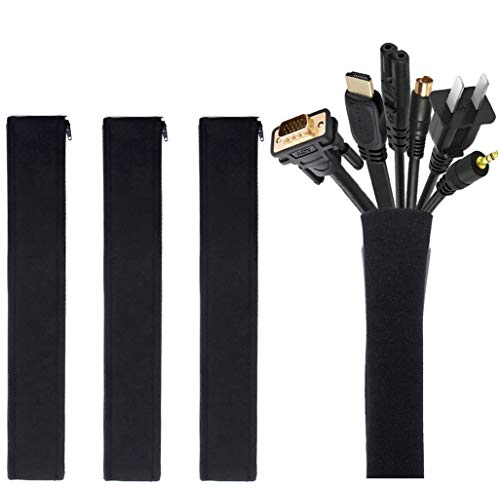
- Flexible neoprene cable sleeve with zip-up solution manages and conceals cables while providing easy access
- Form-fitting neoprene stretchy material allows for multiple cables and flexibility (each sleeve can hold up to 8-10 cables). Double the capacity by zipping two sleeves together
- Easy to use, just gather cables together, wrap the sleeve around and zip-up, perfect for home and office use
- Ideal for keeping cords organized behind the TV entertainment system, computer monitor, etc.
- Pack of 4, each 19-20" long (1.2" diameter when zip-up), meet your different organizing need in different situation
Best Velcro ties: VELCRO Brand ONE-WRAP
A pack of reusable Velcro straps. The only Velcro tie you should ever buy. Black blends in; multi-colour is useful if you want to colour-code.
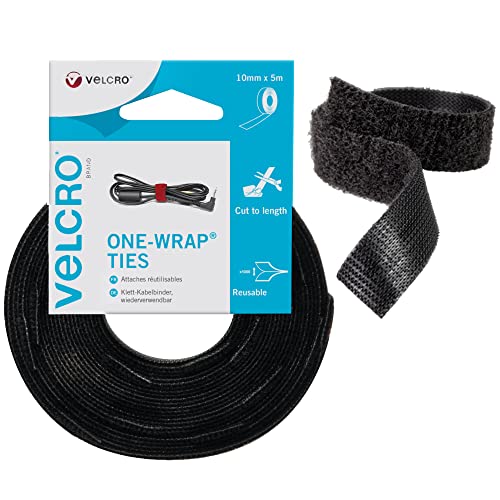
- FLEXIBLE AND VERSATILE – Perfect for wrapping up cables or bundling loose items together for storage or easy transportation.
- CUT TO LENGTH - Simply cut to the desired length, wrap strap around item to be secured and fasten by positioning over itself and pressing to engage fasteners. Wraps firmly onto itself for a snug and secure fit when fastened.
- MULTI-PURPOSE – Use to organise your “stuff” draw. Ideal for cable and wire management, keep cords organised and tidy in your office, home or workspace.
- REUSABLE – One-wrap ties can be opened and closed 1000s of times and are perfect to bundle cords, cables and all sorts of loose items. Add or remove wires or items from your bundle with ease.
- HEAVY DUTY MATERIAL - Made from a tough, durable nylon material to ensure a high life cycle. Utilises hook and loop technology along with a buckle for optimum tensioning.
Best adhesive clips: 50-pack self-adhesive cable clips
A 50-pack of self-adhesive cable clips that actually hold long-term, unlike flimsy no-name singles. Stick them everywhere — under the desk lip, behind the monitor, along the rear edge.
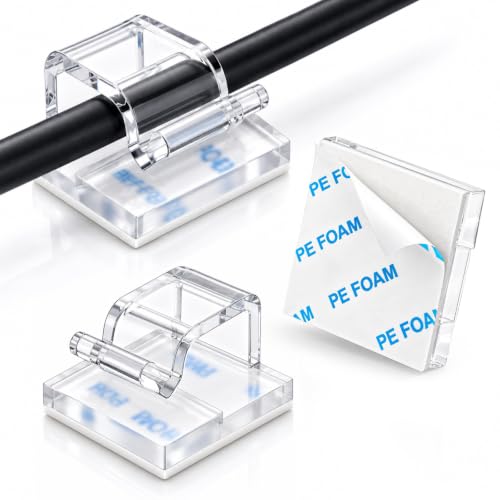
- 【50 Self Adhesive Cable Clips Per Box】: Keep your space neat with wall cable clips tidy. Each cable clamp helps manage cords for a cleaner setup. Includes clear sticky cable clips that work as reliable stick on cable clips for everyday organisation.
- 【SIZE】: Length 15mm/0.55inch, Width 15mm/0.55inch, Height 9mm/0.35inch; cable management clips suitable for cables with a diameter (maximum) of 5 mm/0.2 inches. This cable holder size fits most wires.
- 【SIZE】: Length 15mm/0.55inch, Width 15mm/0.55inch, Height 9mm/0.35inch; cable management clips suitable for cables with a diameter (maximum) of 5 mm/0.2 inches. This cable holder size fits most wires.
- 【Tidy Cords & Decor】: Use these cable organiser clips to hold Ethernet, USB, HDMI, router, and TV wires. Also great as cable hooks and wall cable tidy for fairy lights & outdoor string lights. Perfect car cable clips for keeping cords neat anywhere.
- 【Easy Installation】: Peel, stick, press—done. These desk cable clips work on walls, wood, plastic, glass, and metal. Great small cable clips, wire organiser clip, wall cable tidy, dash cam cable clips, and cable hooks for clean routing.
Best cable box: Bluelounge CableBox
The original and still the best. Sturdy plastic, ventilation slots, and large enough to swallow a six-way power strip with all its bricks. Available in a Mini size for smaller setups.

- Keeps excess cords hidden under desks, by the computer or next to the TV
- Made from high-density, flame retardant plastic
- Fits wide and long surge protectors with extra space for cord slack and adapters
- Available in Black, White, Moonlight Blue, and Light Sage
- 6.25" x 16" x 5.375"
Best vertical cable spine (for standing desks): Duronic CM1DM
If you have an electric standing desk, a flexible cable spine that bends as the desk moves is essential. The Duronic CM1DM is a four-channel cable snake that bolts to the underside of the desk and to the floor, holding 16+ leads and keeping the run to the wall tidy through every height position.
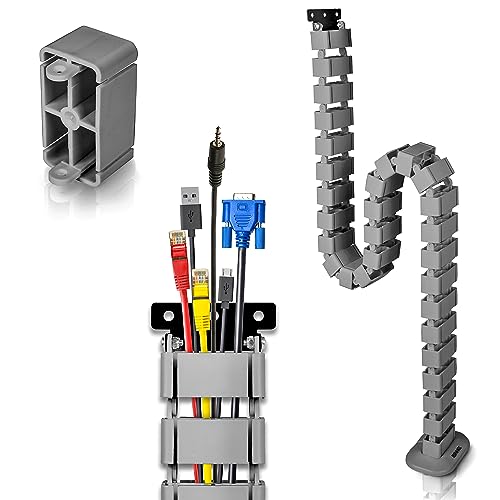
- CREATE A TIDY AND SAFE WORKSPACE: Especially designed to follow the up-down movement of sit-stand desks, the CM1DM cable tidy bends and curves to move with the flow of a height-adjusting table. The CM1DM provides protection for cables and wires that have to run from the desktop to the floor, as well as keeping them held together in one place to avoid the user’s feet getting caught in them under the desk or any longer wires hanging out unsafely.
- HOLDS AT LEAST 16 CABLES: This cable spine is divided into four different channels so you can easily separate and organise data and power cables into different sections. This division allows for easy maintenance should a particular wire need to be located and also makes it an easier task to remove or add any cables after the initial installation. Each channel can hold at least 4 cables in place.
- ADJUSTABLE LENGTH: The Duronic CM1DM is 130cm long and can be used straight from the box on all of our Duronic sit-stand desks. It is also possible to manually remove or add the interlocking blocks to adjust the spine to the length you need.
- EASY TO MOUNT: This cable snake has a steel L-shaped plate that screws onto the underside of the table ledge, and a steel base plate that anchors it to the ground. It is very easy to assemble from the box, with only 3 screws to fix into place, and the wires easily press through into the channels.
- FEATURES AND SPECIFICATIONS: Colour: silver. Spine consists of 30 removable links. Size of spine: 130x6.9x3.6cm / 51.2x2.7x1.4in. Compatible with most office desks and all Duronic Sit-Stand desks.
Three setups by budget
The £25 weekend fix
Velcro ties (£6), a cable sleeve (£16), and a small pack of adhesive clips (£7). No tray, no boxes — you bundle everything against the back of the desk and clip the slack to the underside. This solves 80% of the visual mess and takes about 30 minutes.
The £60 mid-tier setup
Add a no-drill cable tray (£19), a better power strip (£15), and a second cable sleeve (£16). The tray takes the power strip and chargers off the floor entirely; the second sleeve handles the run from desk to wall. Takes about an hour to fit.
The £120 full installation
Screw-in tray (£18), surge-protected power strip (£25), cable spine for a standing desk (£17), two sleeves (£32), Velcro ties (£6), and a starter pack of adhesive clips (£7). Plan on a Saturday afternoon. The result is a desk that looks like a showroom photo from any angle.
Common mistakes to avoid
Buying a tray that is too small. Measure your power strip first. The tray needs to be at least 2cm longer than the strip in every direction, with room for the chunky plugs at one end.
Using zip ties everywhere. The day you swap a cable you have to cut every tie and re-do the lot. Velcro lets you make changes in seconds.
Forgetting heat. A fully loaded power strip generates real warmth. Do not seal everything in a closed plastic box with no airflow — choose a box with vents, or use a mesh tray.
Routing cables across the chair zone. If the cable run crosses the area your office chair rolls over, it will be damaged within a year. Plan a route that stays behind or under the desk.
Putting it all together
A weekend spent on cable management is one of the highest-return projects in any home office. The cost is small, the benefits are daily, and once it is done, it stays done with almost no maintenance. Pick the budget tier that matches your setup, follow the four-step plan above, and you will join the small minority of remote workers whose video-call backgrounds genuinely look professional.
If you are starting your home office from scratch, check out our complete guide to setting up a home office for under £500 — it folds the cable management plan in alongside the desk, chair, and monitor recommendations.