Laser printers used to mean a hulking grey box that belonged in an office corridor. That has changed. Compact laser printers now fit on a bookshelf, connect over Wi-Fi, print double-sided as standard and cost less than a decent keyboard. For anyone who works from home and prints text documents, contracts and invoices, they are the best kind of printer by a wide margin: the toner lasts, the print is sharp and the machine does not clog if you leave it alone for a month.
This guide picks five compact lasers across the range, from a very cheap mono machine to a colour model for people who need it. All five were checked live on Amazon UK for stock, price and review standing before being included.
What actually matters when choosing a compact laser printer
- Footprint. Compact is relative, so check the width and depth against the shelf or desk you plan to use. Lasers are a little deeper than inkjets because of the paper path.
- Duplex printing. Automatic double-sided printing saves paper and handles long documents far better than flipping pages by hand.
- Wireless connectivity. Wi-Fi lets every device in the house print without cables, and a printer on a shelf is far tidier than one wired to a laptop.
- Toner cost and yield. A printer that is cheap to buy but hungry for toner is a false economy. High-yield cartridges lower the cost per page.
- Single function or multifunction. A print-only machine is smaller and simpler; a multifunction adds a scanner and copier at the cost of desk space.
- Mono or colour. Colour lasers cost more to buy and to feed. Most home offices genuinely only need black and white.
The best compact laser printers for working from home
Best overall: Brother HL-L2400DWE Mono Laser Printer
The Brother HL-L2400DWE is the compact laser we would recommend to almost anyone. It is a small, single-function mono printer with Wi-Fi and automatic duplex printing, it prints at a speed that never feels slow, and it has been rated by thousands of buyers. It is the printer that disappears into the background of a working week, which is exactly what you want.
It comes with Brother’s optional toner subscription scheme, and standard toner cartridges are widely available if you would rather buy them as you go.

- 4 month EcoPro trial: Choose your plan and sign up online with a free four month trial Plus you can change or cancel your subscription at any time
- Automatic delivery of Brother Genuine Supplies: so you never run out, plus free toner cartridge recycling
- LCD CONTROL PANEL: 1 line control panel for quick and easy navigation of the printer fuctions, at your fingertips
- Wireless and mobile connectivity: The Brother mobile connect app offers a range of options from printer function to managing your EcoPro subscription
- UP TO 30PPM PRINT SPEED: With fast print speeds, you can print your professional documents in no time at all without compromising on quality

Best budget pick: HP LaserJet M207dw
If you want a compact wireless laser at the lowest possible price, the HP LaserJet M207dw is hard to beat. It is a small mono printer with Wi-Fi and duplex printing, backed by several hundred buyers who rate it well, and it costs about as much as a couple of boxes of paper and a toner cartridge.
Toner for HP’s smaller lasers is more expensive per page than for the Brother, so it suits lighter use rather than printing every day.
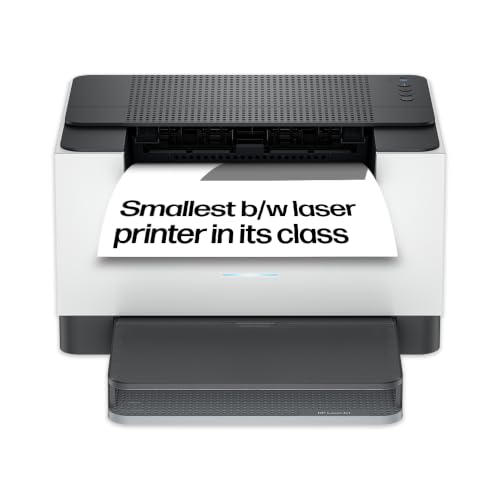
- FAST AND RELIABLE WIRELESS LASER PRINTING: The fastest two-sided printing in class. Blazing fast automatic two-sided black and white printing at up to 19/18 (Letter/A4) duplex pages per minute
- RELIABLE WI-FI: Performance you can count on page after page with reliable Wi-Fi that automatically reconnects to stay online
- SMALL SIZE. BIG PERFORMANCE: Save space without sacrificing performance with this ultra-compact laser printer that can fit almost anywhere in your workspace
- PRODUCTIVITY FROM YOUR PHONE: Save time with seamless setup using the easiest-to-use HP app plus organize documents for printing 50% faster with time-saving shortcuts
- ENERGY EFFICIENT DESIGN: Designed with Auto-On/Auto-Off Technology to reduce energy consumption
Best upgrade for double-sided printing: Brother HL-L2445DW
The Brother HL-L2445DW is a step up from the budget options, a single-function mono laser with automatic double-sided printing that is built for regular use. It is the sensible pick if you print a few dozen pages a week and want a printer that is quick, quiet enough for a shared house and straightforward to maintain.
It sits only slightly above the cheapest options in price, so it is worth the small extra if you rely on the printer.

- UP TO 32 PPM PRINT SPEED:With fast print speeds, print your professional documents in no time at all without compromising on quality.
- CONNECTIVITY:Make your day easier and your printing effortless, with simple set up and 5GHz WiFi or USB connection.
- LCD CONTROL PANEL: 1 line control panel for quick and easy navigation of the printer fuctions, at your fingertips.
- LARGE PAPER CAPACITY: With a paper input capacity of up to 250 sheets as standard.
- BROTHER GENUINE SUPPLIES: Comes with 1,200 page yield toner, 3,000 maximum yield available, so you can keep printing for longer without the need to replace your toner
Best all-in-one: HP LaserJet M234dw
When you also need to scan and copy, the HP LaserJet M234dw is a wireless mono multifunction laser that does all three. It has automatic double-sided printing, it is rated highly by hundreds of buyers, and it is a good option for anyone who scans receipts, contracts and tax paperwork regularly.
It is larger than the print-only machines, so make sure you have a shelf or low unit that can take it. For a home office that handles a lot of paperwork, the extra bulk is worth it.

- WORK FAST, WORK SMART - speed through multiple documents with the fastest in-class two-sided printing speed
- STAY PRODUCTIVE FROM ANYWHERE - get high-quality scanning, and share to Dropbox, Google Drive, email, or the cloud - from virtually anywhere - with HP Smart app
- FASTEST TWO-SIDED PRINTING IN ITS CLASS - black & white precision laser printing plus scan, copy and wireless connectivity
- ULTRA-FAST PRINT SPEEDS - print up to 30 pages per minute single-sided, up to 19 pages per minute two-sided
- STRONG SECURITY - built-in security features help protect your printer from potential attacks
Best for colour: Brother HL-L3220CWEE Colour LED Printer
Colour printing in a compact, wireless package is the job of the Brother HL-L3220CWE. It uses LED technology, which works much like a laser, so you get sharp text and good colour graphics, and it is a single-function machine so it stays small. It suits people who produce presentations, proposals and client-facing documents.
It costs more to buy than the mono printers and colour toner adds to the running costs, so only choose it if you genuinely need colour.

- 4 month EcoPro trial: Choose your plan and sign up online with a no charge four month trial Plus you can change or cancel your subscription at any time
- Automatic delivery of Brother Genuine Supplies: so you never run out, plus no charge toner cartridge recycling
- LCD CONTROL PANEL: 1 line control panel for quick and easy navigation of the printer fuctions, at your fingertips
- Wireless and mobile connectivity: The Brother mobile connect app offers a range of options from printer function to managing your EcoPro subscription
- UP TO 18 PPM PRINT SPEED: With fast print speeds, print your professional documents in no time at all without compromising on quality
Comparison at a glance
| Model | Type | Functions | Best for | Approx. price |
| Brother HL-L2400DWE | Mono laser | Print only | Best all-round compact laser | £97–£108 |
| HP LaserJet M207dw | Mono laser | Print only | Lowest price | £67–£76 |
| Brother HL-L2445DW | Mono laser | Print only | Regular double-sided printing | £105–£115 |
| HP LaserJet M234dw | Mono laser | Print, copy, scan | Paperwork and scanning | £148–£160 |
| Brother HL-L3220CWE | Colour LED | Print only | Compact colour printing | £185–£195 |
Why a laser suits a home office
The big advantage of a laser is that it does not dry out. An inkjet that sits unused for a few weeks can clog its nozzles and waste ink on cleaning cycles, which is exactly what a home office printer does when work gets busy elsewhere. Toner is a powder, so a laser starts printing just as well after a month as it did the day before.
The other advantage is cost per page. A laser’s toner cartridge prints far more pages than an inkjet cartridge and generally costs less per page, which matters if you print weekly. For text documents the print quality is sharper than most inkjets, and the ink does not smudge if a page gets damp.
Fitting a laser printer into a small space
Lasers need a little ventilation, so do not wedge them into a closed cupboard. A shelf beside the desk is ideal, with enough space above for the paper tray to open and a few centimetres behind for the cable. If desk space is tight, a printer stand or a small wall shelf is a better answer than putting the printer on the desk.
Keep the power lead tidy with a cable clip or tray, and remember that lasers draw a surge of power when they warm up, so plug them into a wall socket or a surge protector rather than a flimsy extension.
Keeping a laser printer running well
Lasers are low-maintenance, but a few habits help. Use good-quality paper, because cheap paper sheds dust and causes jams. Keep the paper stored flat and dry. When the toner runs low, shake the cartridge gently from side to side to get a little more life from it before replacing it.
Replace toner with the manufacturer’s cartridges if you can. Compatible cartridges can work well, but they are more likely to cause error messages on newer printers, and warranty terms are usually clearer when you use original supplies.
Compact laser or compact inkjet?
If you are choosing between the two, a compact laser wins for anyone who prints text on a weekly basis. A compact inkjet is smaller and cheaper to buy, but the cartridges are expensive and can dry out. A compact laser costs a little more up front, then repays you with far lower running costs and a machine that works every time you press print.
The only reason to choose an inkjet is if you print photographs or need a lot of colour, in which case an ink tank printer is the better answer. Our guide to the best home office printers covers all three types side by side.
Noise, warm-up and everyday habits
Lasers make a short burst of noise as they warm up and feed the first page, which can be noticeable in a quiet room. If you take calls at your desk, put the printer on a shelf a little way from you, or give the printer a moment to warm up before a meeting begins.
Most compact lasers have a sleep mode that keeps power use low when idle, and they wake in seconds when you send a job. Leaving the printer plugged in is fine, and it ensures that scheduled firmware updates arrive without you doing anything.
Finally, store spare toner somewhere cool and dry. Toner is stable, but heat and damp can cause clumping, and a spare cartridge in the cupboard means a deadline never depends on a delivery.
Which compact laser printer should you buy?
For most people, the Brother HL-L2400DWE is the right answer. It is compact, fast, wireless and cheap to run. If you want the lowest price, the HP LaserJet M207dw is a good light-use option, and the Brother HL-L2445DW is a small step up for regular printers.
Choose the HP LaserJet M234dw if you need a scanner and copier in the same box, and the Brother HL-L3220CWE only if you genuinely need colour. In every case, a laser is a printer you can buy once and forget about, which is what a home office needs.