
Affiliate disclosure: WFHKit is reader-supported. We may earn a small commission when you buy through links on this page, at no extra cost to you. Our recommendations are based on real home-office use. Prices reflect UK listings at the time of writing – always check the current product page before buying.
Modern laptops have given up ports. A thin, light machine might offer two USB-C sockets and nothing else, which is fine until you need to plug in an HDMI cable in a meeting room, an SD card from a camera, or a memory stick a client has handed you. A travel dock solves that problem in a pocket-sized package: one cable to the laptop, and a spread of ports at the other end.
This guide picks four compact docks for hybrid workers who move between home, the office and anywhere else. They are small enough to live in a laptop bag, and all were checked live on Amazon UK for stock, price and review standing.
What actually matters when choosing a travel dock
- The ports you actually use. HDMI for screens, USB-A for older accessories, an SD card reader for cameras, and Ethernet if you work in places with unreliable Wi-Fi. A dock with ports you never use is wasted weight.
- Power delivery pass-through. A dock that lets you plug in your laptop charger through it means one port does everything. Check the wattage matches your laptop.
- Video capability. 4K at 60Hz is the standard for modern docks. Some docks only manage 30Hz, which looks laggy for everyday use.
- Data speed. A USB-C data port at 10Gbps is useful for moving large files quickly, while a basic USB-A port is fine for a mouse or keyboard.
- Size and cable. A short built-in cable keeps things tidy and removes a loose part. A longer cable is easier to place on a desk but can tangle in a bag.
- Heat. Aluminium bodies shed heat better, which matters when a dock is running a screen for hours.
The best travel docks for hybrid working
Best budget pick: Anker 5-in-1 USB-C Hub
If you want the lowest-cost way to add ports, the Anker 5-in-1 is it. It is a tiny USB-C hub with a 4K HDMI output and a handful of extra ports, rated by thousands of buyers, and it costs about as much as a sandwich lunch. It slips into any bag and works well for plugging into a meeting-room screen.
It does the basics very well and is the sensible choice if you rarely need more than an HDMI port and a couple of USB sockets.

- 5-in-1 USB-C Hub: Experience comprehensive connectivity featuring a Power Delivery input, two USB-A 2.0 ports, a USB-A 3.0 port, and an HDMI port. (Note: The USB-C power delivery input port is only for connecting an external wall charger to power your laptop and cannot power peripheral devices.)
- 90W Pass-Through Charging: Achieve optimal charging with 90W pass-through power to your laptop, supported by a total input of 100W, with the hub reserving 10W for operational efficiency. (Note: Wall charger not included.)
- Quick Data Transfers: Accelerate your productivity with rapid data transfers using a high-speed 5Gbps USB 3.0 port and two 480Mbps USB 2.0 ports.
- 4K HDMI Display: Enhance your visual experience with a hub capable of delivering 4K resolution at 30Hz in both mirror and extend modes.
- What You Get: Anker USB-C Hub (5-in-1, 4K HDMI), welcome guide, 18-month warranty, and our friendly customer service.
Best overall: Anker 7-in-1 USB-C Hub with 4K at 60Hz and 85W Power Delivery
Anker’s seven-in-one is the one we would buy for most hybrid workers. It outputs 4K at 60Hz over HDMI, passes through up to 85W of power for charging the laptop, and adds extra USB ports so you can plug in a mouse and a memory stick at the same time. It is rated by more than five thousand buyers, and it costs a modest amount for what it does.
For a single dock that covers a screen, charging and accessories, this is the best balance of price and capability.

- Sleek 7-in-1 USB-C Hub: Features an HDMI port, two USB-A 3.0 ports, and a USB-C data port, each providing 5Gbps transfer speeds. It also includes a USB-C PD input port for charging up to 100W and dual SD and TF card slots, all in a compact design.
- Flawless 4K@60Hz Video with HDMI: Delivers exceptional clarity and smoothness with its 4K@60Hz HDMI port, making it ideal for high-definition presentations and entertainment. (Note: Only the HDMI port supports video projection; the USB-C port is for data transfer only.)
- Double Up on Efficiency: The two USB-A 3.0 ports and a USB-C port support a fast 5Gbps data rate, significantly boosting your transfer speeds and improving productivity.
- Fast and Reliable 85W Charging: Offers high-capacity, speedy charging for laptops up to 85W, so you spend less time tethered to an outlet and more time being productive.
- What You Get: Anker USB-C Hub (7-in-1), welcome guide, 18-month warranty, and our friendly customer service.
Best for fast data: UGREEN 5-in-1 USB-C Hub with 10Gbps Ports
UGREEN’s five-in-one hub is built for people who move large files around. Its USB-C data ports run at 10Gbps, it outputs 4K at 60Hz over HDMI, and it supports 100W power delivery, all in a compact shell at a low price. It is rated well by several hundred buyers.
It suits creatives, photographers and anyone who transfers big files from external drives and cameras.
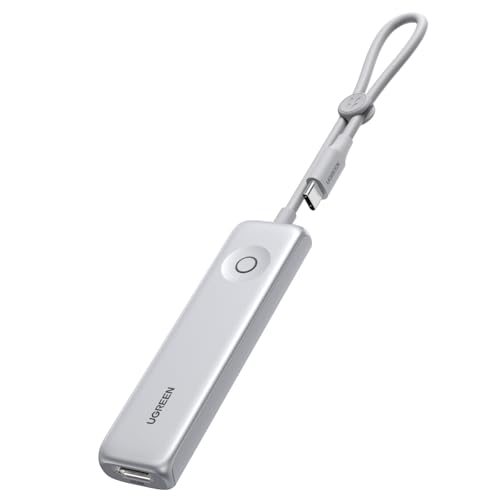
- 5-in-1 USB C Hub: Features USB-C to HDMI (4K@60Hz), USB-C 3.2, dual USB-A 2.0 ports, and PD 3.0 fast charging. One compact hub covers all your needs — video output, data transfer, device expansion, and power delivery
- Compact & Portable: Made of lightweight PC+ABS, featuring a clip-on design to wrap and secure the cord, preventing tangles and keeping your bag neat. As slim as an Apple Pencil — perfect for commuters and frequent travelers
- 4K@60Hz Ultra HD Video: The USB C Hub comes with an HDMI port capable of 4K@60Hz output, delivering exceptional clarity and fluid motion. The perfect solution for workplace presentations, home entertainment, and video conferences
- 10Gbps USB C Hub Fast Data Transfer: Features a USB-C 3.2 port with 10Gbps transfer speed for high-speed file transfers and backups. Whether you're working on large files or gaming, this USB-C hub handles it all with ease
- PD 100W Power Delivery Charging: Featuring a 100W USB-C PD port, the UGREEN USB C Hub delivers fast, efficient charging for your laptop at home, at work, or while traveling

Best for two screens: Anker 7-in-1 Dual HDMI USB-C Hub
Some hybrid workers want two external screens at the office desk. Anker’s dual-HDMI seven-in-one hub supports two monitors, offers 100W power delivery and 10Gbps data transfer, and is rated highly by several hundred buyers. It is a compact way to turn a laptop into a proper dual-screen workstation.
Check that your laptop supports multiple displays over USB-C before buying, because some do not, and this dock cannot work around that.
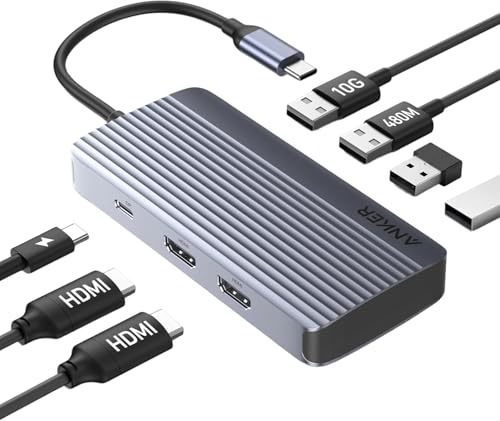
- Powerful 7-in-1 Hub: Designed for the multitasker, this 7-in-1 USB-C hub features everything from ultra-fast data transfer to high-definition video output.
- See More, Do More: Easily extend your workspace across two screens with 1080p@60Hz resolution, ideal for enhancing productivity and multitasking capabilities.
- Blazing-Fast 10Gbps Data Transfer: Dramatically reduce transfer times with a 10Gbps port that quickly moves large files and boosts work productivity.
- 100W Fast Charging: Cut down on charging time with the powerful 100W input and 85W output, suitable for all your high-demand technology. (Note: Wall charger not included.)
- Compatibility: Supports USB-C, USB4, and Thunderbolt connections. Compatible with MacBook (macOS 12 and newer), Windows 10 and 11, ChromeOS, and laptops equipped with DP Alt Mode and Power Delivery. Note: This device is not compatible with Linux.
Comparison at a glance
| Model | Ports | Video | Best for | Approx. price |
| Anker 5-in-1 | 5 | 4K HDMI | Lowest cost | £9–£13 |
| Anker 7-in-1 (85W) | 7 | 4K at 60Hz HDMI | All-round travel use | £16–£21 |
| UGREEN 5-in-1 | 5 | 4K at 60Hz HDMI | Fast file transfers | £10–£14 |
| Anker 7-in-1 Dual HDMI | 7 | Two HDMI outputs | Dual-monitor setups | £23–£29 |
Travel dock or full docking station?
A travel dock is designed to be portable and cheap, while a full docking station sits permanently on a desk and offers more ports, more power and better support for multiple screens. If you plug into a different setup each day, a travel dock is the right tool. If you have a fixed desk at home or the office, a docking station is more capable and usually more comfortable.
Many hybrid workers use both: a full dock at the main desk and a small travel dock in the bag. Our guide to USB hubs and docking stations covers the desktop options.
Getting reliable performance from a small dock
Small docks can run warm, especially when they drive a 4K screen and charge a laptop at the same time. Do not bury them in a bag while they are running, and give them room to breathe on a desk. A hub that is too hot to touch is working hard and may drop its connection.
Use the cable the dock came with, and plug the dock directly into the laptop rather than through another adapter. Most connection problems come from a stack of adapters rather than the dock itself.
Using a dock in a meeting room or café
In a meeting room, plug the dock into your laptop, connect the HDMI cable to the screen and choose to duplicate or extend the display. If the room has a wired network point, a dock with Ethernet gives a much more reliable connection than guest Wi-Fi. In a café, a dock that charges the laptop while you work means you only need one socket.
Checking compatibility before you buy
Not every USB-C port is the same. Some carry video, some carry power, and a few do neither. Look for a small icon beside the port on your laptop: a lightning bolt means Thunderbolt, which supports everything, and a D-shaped symbol means DisplayPort video. If your port carries video, any dock above will output to a screen; if it does not, only the data and charging ports will work.
Apple laptops with the M-series processors have a specific limit on external screens, and some base models only support one external display regardless of the dock you buy. This is a restriction of the laptop, not the dock, so check your model’s specification if you want two screens.
Cables that make a dock work properly
A dock only passes on as much power and data as the cable allows. Use a good USB-C cable rated for the wattage of your charger, and keep a short one in your bag with the dock. A cheap, thin cable can quietly limit charging speed and cause screens to flicker, which is often blamed on the dock when the cable is at fault.
Keeping a travel kit together
The best way to make a travel dock useful is to keep it permanently in the bag with its cable and a spare HDMI lead. A small pouch holds it all, so you are never caught short in a meeting room. If you carry a power bank, store it in the same pouch, so the whole connectivity kit lives in one place.
Check the kit once a month. Cables fray, adapters go astray and a dock that has been left in a coat pocket for weeks may not be where you expect. A short routine keeps the bag ready, and means that when a client’s screen has only one input, you are the person who can plug in.
Do you need Ethernet on the road?
A dock with an Ethernet port is worth considering if you often work from places with poor Wi-Fi, such as hotels, coworking spaces and older buildings. A wired connection is faster and steadier than a busy wireless network, and it is far better for video calls. The docks above do not all include Ethernet, so if it matters to you, look for a model that does or carry a small USB-C Ethernet adapter alongside.
Which travel dock should you buy?
For most hybrid workers, the Anker 7-in-1 with 4K at 60Hz and 85W power delivery is the best choice, because it covers the screen, the charger and a couple of accessories. If you want to spend as little as possible, the Anker 5-in-1 is excellent value, and the UGREEN 5-in-1 is the pick for fast file transfers.
If you regularly work with two screens, the dual-HDMI Anker is the one to buy. Whichever you choose, a good travel dock means the ports a laptop lacks are never a reason to be unprepared.