Affiliate disclosure: WFHKit is reader-supported. We may earn a small commission when you buy through links on this page, at no extra cost to you. Our recommendations are independent, and we only recommend products we would be happy to use ourselves.
A laptop that runs hot gets slow and noisy at exactly the wrong moment, usually halfway through a video call or a big spreadsheet. The fix is often simple. Lift the laptop off the desk, give it a stream of air from underneath, and the fans inside it stop working so hard. The best laptop cooling pad does that quietly, raises your screen to a more comfortable height and costs less than a takeaway.
This guide picks five cooling pads from about £13 to about £22. We opened each product’s live Amazon UK page and chose only models that are in stock, rated 4.2 stars or better by hundreds or thousands of buyers. All of them are USB powered, so there is nothing to charge and no batteries to replace.
One honest note before you buy: a cooling pad helps, but it is not magic. It moves air past the underside of your laptop, which lowers the temperature a little and often lets the internal fans slow down. It will not fix a blocked vent or a laptop that is struggling with heavy software.
How to choose a laptop cooling pad
- Size. Check the maximum screen size on the listing. A pad made for 17 inch laptops will hold a 14 inch model, but a small pad will not support a large laptop safely.
- Fans. More fans spread air over a wider area. One big, slow fan can be just as effective and is often quieter. For office work, quiet matters more than raw airflow.
- Height settings. Adjustable angles lift the screen towards eye level and tilt the keyboard to a more natural typing position. Look for at least two settings.
- Ports. A pad with a pass-through USB port gives back the socket it uses. That matters on a slim laptop with only two or three ports.
- Intake position. Your laptop pulls in air from underneath. Check where your model’s vents are, then choose a pad that blows air there.
- Noise. Fans on full speed are audible in a quiet room. A pad with a speed control lets you turn them down for calls.
The best laptop cooling pads
Best overall: havit Laptop Cooling Pad
The havit Laptop Cooling Pad is the sensible all-rounder, and the numbers back it up. More than forty thousand buyers have rated it at 4.4 stars, which is far more feedback than most rivals can show. It fits laptops from 15.6 to 17 inches and uses three USB-powered fans to push air under the laptop. Two height settings let you raise the screen a little or a lot.
It costs about £20. It is a plain, sturdy design without lights or gimmicks, which suits a home office. If you want one cooling pad that does the job and has a long track record, this is it.
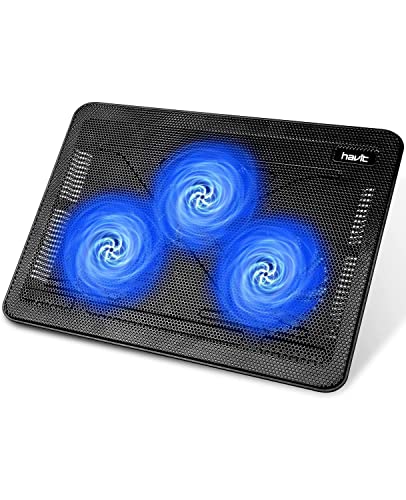
- [Ultra-Portable]: Slim, portable, and light weight allowing you to protect your investment wherever you go
- [Ergonomic Comfort]: Doubles as an ergonomic stand with two adjustable height settings
- [Optimized for Laptop Carrying]: The metal mesh provides your laptop with a stable laptop carrying surface.
- [Ultra-Quiet Fans]: Three ultra-quiet fans create a noise-free environment for you
- [Extra Usb Ports]: Extra USB port and power switch design allows for connecting more USB devices.Warm Tips: The packaged cable is USB to USB connection. Type C connection devices need to prepare an Type C to USB adapter .

Best for ports and phone use: Amazon Basics Laptop Cooling Pad
The Amazon Basics pad has six quiet fans, fits laptops from 12 to 17 inches and has both USB-A and USB-C ports. The height is adjustable, so you can find an angle that suits your desk and chair. It is Amazon’s own brand, which means the listing and returns are handled by a company you already know.
It costs about £19 and holds 4.3 stars from more than four hundred buyers. The six fans spread air widely, and the USB-C connection is handy if your laptop has that port free. It is a strong pick if you want a modern-looking pad from a brand you recognise.
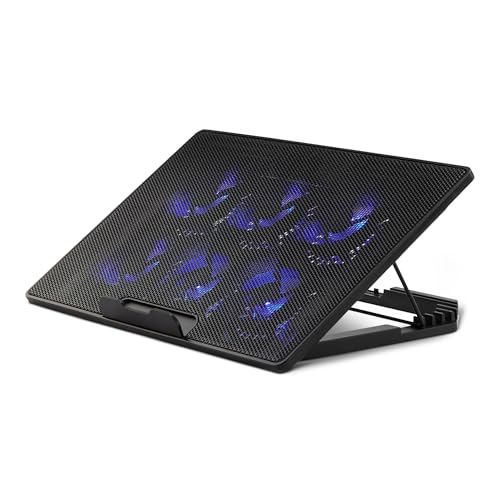
- COOLING PERFORMANCE: 6 built-in, ultra-quiet fans dissipate laptop heat from multiple angles for optimal cooling efficiency
- FAN CONTROL: Adjustable fan speed with easy turn knob control; blue LED indicator shows when the fans are running
- ERGONOMIC DESIGN: 6 adjustable-height settings offer various tilts for added heat release and ergonomic comfort while typing, gaming, watching films or working
- VERSATILE COMPATIBILITY: Fits laptops up to 17 inches (43.2cm), including Macbook, Dell, HP, ASUS and more
- DUAL USB CONNECTIVITY: Built-in USB-A and USB-C hubs enable peripheral connections (e.g. mouse, keyboard etc.); Includes a USB-A to USB-C cable (stored in cable slot). Note: Not Designed for charging phones or other devices—use dedicated chargers instead
Best for the office: ACT Laptop Cooling Pad AC8110
The ACT AC8110 is built for work rather than gaming. It has a single quiet fan, a sturdy stand and five ergonomic height positions, and it takes laptops up to 17 inches. The single fan keeps noise down, which makes it a good fit for a shared room or a call-heavy day.
It costs about £13, and more than three hundred buyers have rated it at 4.4 stars. It is the cheapest pad here, and the five angles make it the most useful of the group as a laptop stand. Choose it if you want gentle cooling and a better typing posture rather than maximum airflow.

- PREVENT OVERHEATING: The laptop riser with fan is equipped with a USB-powered, quiet fan for optimal airflow. ON/OFF button to activate the fan.
- ERGONOMIC SUPPORT: Avoid back or neck pain with the Laptop Cooler, which has 5 adjustable ergonomic level. Help straighten your back and prevent muscle fatigue during working hours.
- ADDITIONAL USB: The Laptop Cooling Pad has a built-in USB hub with USB 2.0 ports for your convenience. Power the laptop cooler with the included USB cable.
- UNIVERSAL USE: Suitable for laptops up to 17.3". Use as laptop fan cooling pad and desk riser or even for tablets or smartphones.
- GUARANTEED QUALITY: ACT excels in reliable connectivity solutions. All ACT products match international standards and EU legislation and offer 2-5 year manufacturer warranty.
Best for a large, solid build: TECKNET Cooling Pad
The TECKNET pad has three ultra-quiet fans, a large metal mesh surface and two USB ports. It fits laptops from 12 to 17 inches. The metal mesh lets air through while keeping the laptop firmly in place, and the light-weight frame is easy to move between desk and sofa.
It costs about £22, and more than ten thousand buyers have rated it at 4.5 stars, the highest rating in this guide. The two USB ports mean it does not cost you a socket. It is the one to buy if you want a well-reviewed pad with a premium feel.
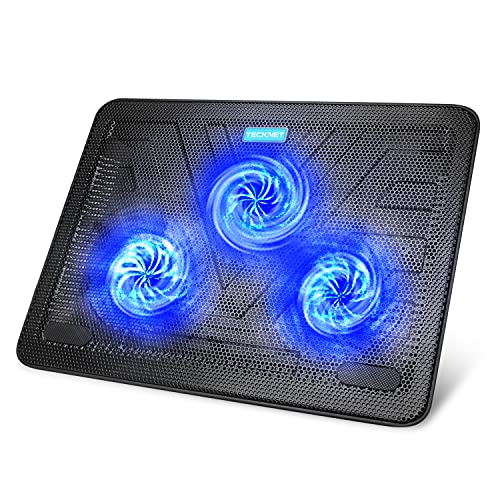
- 3 Ultra-Quiet Fans Design: Our TECKNET laptop cooler with 3 ultra-quiet fans up to 1200 rotations per minute, which can quickly cool down your laptop and keep your laptop running efficiently while playing games, while keeping the built-in cooling fan is quiet, excellent mute experience
- Laptop Fans With 2 USB Ports: One USB port can power the laptop cooler, the other one can be connected to external devices, such as keyboard, mouse, audio, etc. The blue LED indicators are helps to confirm the laptop fan is running. Warm Tips: The packaged cable is USB to USB connection
- Ergonomic Design & Large Metal Mesh: The notebook cooling pad is made of plastic and metal mesh, which is lightweight and durable; provides great heat dissipation performance. Doubles as an ergonomic stand with two adjustable height settings, the anti-skid pad at the bottom keep your laptop stable
- Sleek & Portable Design: Designed to be slim, lightweight, and portable, our TECKNET laptop cooling pad is easy to carry and fits conveniently in laptop backpacks, providing reliable protection for your device at home or on the go, ensuring hassle-free portability for users who frequently travel or commute with their laptops
- Wide Compatibility & Support: The laptop cooling mat fits laptops, MacBooks, notebooks, Chromebooks and Pixelbooks from 12" to 17" - including Dell, Toshiba, Samsung, HP, Lenovo, MacBook, MacBook Pro, Acer, Asus plus many more. Support available for 36 months (Registration Required)
Best for smaller laptops: AIMIUZI Laptop Cooling Pad
The AIMIUZI pad is made for 12 to 15.6 inch laptops, so it suits thin and light models that larger pads overwhelm. It has five quiet fans, five height settings, two USB ports and a built-in phone stand that keeps your phone upright beside the screen.
It costs about £21, and more than three thousand buyers have rated it at 4.4 stars. The phone stand is a small extra that proves useful for video calls and two-factor codes. Choose it if you have a 13 or 14 inch laptop and want cooling that is sized to match.

- AIMIUZI laptop fan cooling pad is specially designed to cool down up to 15.6 inch laptops. Honeycomb style metal mesh, 1 small fan 4 big fans, flip-up anti-slip pad, 5 adjustable stand height settings, 2 USB ports, adjustable speeds, and USB powered
- The cooling pad for computer laptop is set with a small central fan with two big fans on each side (5 total low noise fans), providing more airflow to keep laptop cool down. At the back of the laptop fan cooling pad, there is a switch wheel that turns fans on and off
- The laptop cooling fan has a metal bar for ergonomic design at the bottom, providing an elevation mechanism, and 5 adjustable stand heights adjustments add more room for laptop and desk, good for laptop heat dissipation and then lowering the temperature
- Compatible with various laptop sizes from 12 up to 15.6 inches, such as Apple MacBook Pro Air, HP, Alienware, Dell, Lenovo, ASUS, etc (USB cable included). The laptop fan can also accurately dissipate heat for your tablet, router, game console
- AIMIUZI provides each customer with a 12-month warranty . If there is any problem with the product you purchased, please feel free to contact us. Package Contents - 1 x Gaming Laptop Cooling Pad, 1 x USB Cable, 1 x User Manual, and lifetime friendly customer service
Comparison at a glance
| Cooling pad | Fans | Fits up to | Best for | Approx. price |
|---|---|---|---|---|
| havit Laptop Cooling Pad | 3 | 17 inch | Best overall | £18–£22 |
| Amazon Basics | 6 | 17 inch | USB-C and a trusted brand | £17–£21 |
| ACT AC8110 | 1 | 17 inch | Quiet office use | £11–£15 |
| TECKNET 3 fan | 3 | 17 inch | Solid build | £20–£24 |
| AIMIUZI 5 fan | 5 | 15.6 inch | Smaller laptops | £19–£23 |
Do laptop cooling pads actually work?
Yes, within limits. A pad lifts the laptop so air can reach the underside, and the fans add a steady flow past the vents. Most people see a modest drop in temperature and a quieter laptop under load. The effect is largest on thin laptops that cook themselves in their own heat and on older machines with clogged fans.
A pad cannot cure a poor cooling design. If your laptop shuts down or slows sharply, clean the vents with a soft brush or compressed air first. Check that no software is running flat out in the background. Then add a pad as a second line of defence.
Other ways to keep a laptop cool
Keep the laptop on a hard, flat surface. Soft surfaces such as a duvet or a sofa cushion block the vents and trap heat. Raising the laptop on a stand helps even without fans, because air can move freely beneath it.
Close tabs and apps you are not using, since a busy processor creates most of the heat. Keep the room cool, and leave a gap behind the laptop so hot air can escape. If you use an external monitor, closing the laptop lid can run cooler in some setups, but only if the vents stay clear.
Which laptop cooling pad should you buy?
For most people the havit Laptop Cooling Pad is the best laptop cooling pad, thanks to its long record and simple design. The Amazon Basics pad is the pick for USB-C and a familiar brand. If your priority is quiet working, the ACT AC8110 is the cheapest and calmest choice. The TECKNET pad has the highest rating and the sturdiest feel, and the AIMIUZI suits smaller laptops best.
Whichever you choose, put the pad on a firm desk, plug it into a spare USB port and turn the fans down when you are on a call. Your laptop will run cooler and your screen will sit at a kinder angle.