
It is easy to assume that if a video call is stuttering, the answer is more Wi-Fi – a better router, a mesh system, more bars on the signal icon. Often the actual fix is simpler and older: plug in a cable. Wi-Fi vs Ethernet for working from home is not really a question of which is faster on paper, since modern Wi-Fi is plenty fast enough for almost anything a desk job needs. It is a question of consistency, and that is where the two genuinely differ.
Where Wi-Fi and Ethernet actually differ
Headline speed is the wrong thing to compare. A modern Wi-Fi 6 connection is easily capable of several hundred megabits per second, and even a video call with screen sharing needs only a few megabits – both technologies have more bandwidth than a home office actually consumes. The real difference is in three areas that matter far more to a working day than top speed does.
- Latency and jitter. Ethernet delivers data with very consistent timing; Wi-Fi’s timing varies slightly as it shares airtime with every other device in range, which is what shows up as a call that is fine for twenty minutes and then briefly glitches for no obvious reason.
- Interference. Wi-Fi shares the airwaves with your neighbours’ networks, Bluetooth devices, microwaves and baby monitors, none of which a cable is affected by at all.
- Reliability of the connection itself. A cable either works or it does not, and it is immediately obvious which; Wi-Fi can silently degrade – still connected, still showing bars, just quietly worse – in a way that is much harder to diagnose mid-call.
- Security. A wired connection cannot be intercepted from outside your house the way an improperly secured Wi-Fi network in theory could be, though this matters far less than it once did now that virtually all home Wi-Fi uses strong encryption by default.
Wi-Fi vs Ethernet at a glance
| Factor | Wi-Fi | Ethernet |
| Typical speed for a home office | More than enough | More than enough |
| Latency consistency | Variable | Very consistent |
| Affected by interference | Yes | No |
| Setup effort | None, already there | Cable run or powerline needed |
| Best for | Laptops, phones, general use | The one desk that must not drop |
When Wi-Fi is genuinely fine
For most people, most of the time, Wi-Fi is entirely adequate. If your desk is in the same room as the router or close to it, if calls are not currently a problem, and if you are not doing anything unusually bandwidth-heavy like large file transfers to a NAS drive, there is no real-world benefit to running a cable. The improvement Ethernet offers is most valuable specifically at the margins – the room furthest from the router, the flat with dozens of neighbouring Wi-Fi networks visible, the desk where calls occasionally glitch for no clear reason. If none of that describes your setup, upgrading to wired is solving a problem you do not have.
When it is worth the effort
The clearest signal that Ethernet is worth pursuing is a specific, repeatable problem: calls that glitch at the same time of day, a laptop that shows full signal bars but still feels unreliable, or a video call that is fine everywhere in the house except your office. These point to a local issue – distance, interference, or contention with other devices – that a wired connection sidesteps entirely rather than one that better Wi-Fi hardware alone might not fully fix. It is also worth it simply as insurance for anything genuinely important: a client pitch, a live presentation, an interview – wiring in for the one call that cannot afford to drop, even if you are on Wi-Fi the rest of the week.
The case that gets overstated: gaming and streaming advice applied to work
Most online advice about Wi-Fi versus Ethernet is written for gaming, where every millisecond of latency is argued over and cited as decisive. It is worth being honest that a video call is a far less demanding use case than competitive gaming, and the latency difference that matters enormously in one context is barely perceptible in the other. Do not feel obliged to chase the same wired setup a gaming forum recommends purely because the general principle sounds sensible – a home office needs consistency for calls and reliable file access, not the sub-20-millisecond latency targets a gamer cares about. Apply the advice at the level your actual work needs, not the level the loudest source online insists on.
Getting wired without rewiring the house
The good news is that getting an Ethernet connection to your desk rarely means chasing cable through walls. A few practical routes, roughly in order of effort:
- A single cable run along skirting boards with cable clips, if your office is on the same floor as the router and the distance is modest – the cheapest and most reliable option if it is physically feasible.
- A powerline adapter, which sends the network signal through your home’s existing electrical wiring rather than needing a new cable at all – usually the easiest fix for a room some distance from the router.
- A mesh Wi-Fi system with an Ethernet port on the node nearest your desk, which gives you a wired connection for your desk while still improving Wi-Fi for the rest of the house.
- A professional cable install through the loft or under floors, worth it only if you are already having other building work done or plan to stay in the property for years.
Whichever route you take, you only need to wire the one device that matters most – your work laptop or desktop – and leave everything else in the house on Wi-Fi. There is no need to wire an entire home to get the reliability benefit where it counts.
The cable itself is not worth overthinking
Once you have a wired point at your desk, the actual Ethernet cable connecting your laptop to it is one of the least complicated purchases in a home office. A Cat 6 cable comfortably supports Gigabit speeds, which is more bandwidth than a home internet connection or a video call will ever use, and a flat cable is easier to route under a desk mat or along a skirting board without it becoming a trip hazard. There is no meaningful benefit to paying more for Cat 7 or Cat 8 for a typical home office desk – that headroom is aimed at data centres and server rooms, not a laptop and a router.
Our pick: a 10-metre flat Cat 6 cable, long enough to reach from most wall points to a desk without a tight pull, and inexpensive enough that buying the wrong length twice still costs less than overthinking it once.
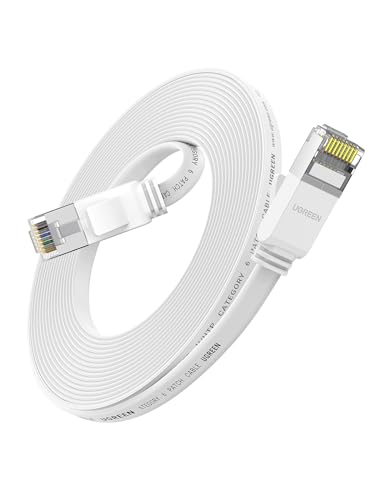
- Gigabit Ethernet Cable: UGREEN Cat 6 ethernet cable supports bandwidth up to 250MHz and 5000Mbps data transmission speed, ensuring stable network speed for online gaming, web surfing, HD video streaming, upload, download, and more.
- Slim and Flat Design: The Flat Cat 6 LAN Cable with ultra-thin technology avoids tangled cords and runs flexibly along walls, around edges and corners, or slides under a carpet easily and seamlessly. Easy to hide and saves space. It is a professional network cable suitable for home furniture.
- Stable & Reliable: RJ45 patch cable is made of 4 twisted pairs of copper wires with one RJ45 connector at each end with lower impedance and less loss with high performance. 8 gold-plated contacts fit snugly with the ethernet cable, to provide a faster and more stable internet connection.
- More Durable with High Quality: UGREEN Ethernet Cord is made of 100% pure copper wire with gold-plated connectors, which is highly effective at reducing signal loss and keeps the cable performing at its best at all times, and greatly extends the lifespan of the LAN cable.
- Universal Compatibility: This high-speed RJ45 LAN cable is not only backward compatible with Cat5, and Cat5e cables but also works well with all RJ45 connector devices such as iMac Pro, PS5, PS4, PS4 Pro, PS3, WiFi extender, Switch, Smart TV, Xbox series, Sky Q box, video game consoles, TV decoder, BT Smart Hub, Virgin modem, Patch Panel, Router, PCs, Network printers, media players, NAS, etc.

A quick way to test which one is actually the problem
Before spending money on a cable run or a powerline kit, it is worth confirming Wi-Fi is really the cause. Run a speed test over Wi-Fi at your desk, then run the same test with your laptop connected by a temporary cable straight to the router if that is physically reachable even briefly. A large gap between the two results – Wi-Fi noticeably slower, or the connection visibly less stable – confirms the local wireless link is the weak point worth fixing. If the two results are close, the problem more likely sits further upstream, with your broadband connection itself or the service at the other end of your call, and no amount of wiring your desk will improve that.
It is also worth testing at different times of day. A connection that is fine at 7am and struggles at 8pm points to contention – your own household’s devices, or your neighbours’, all competing for the same airwaves and the same broadband capacity at peak hours – which wiring one desk partially solves by removing your own devices from that contention, even though it cannot fix a genuinely congested broadband line.
So, does it actually matter?
For calls that already work fine, no – Wi-Fi is not something to fix pre-emptively. For a desk with a specific, repeatable reliability problem, or for the handful of calls each month that genuinely cannot afford to glitch, a wired connection is a small, one-off effort that removes an entire category of intermittent problem rather than just reducing it. The sensible approach is not choosing one over the other for the whole house – it is keeping Wi-Fi for everything that does not need better than it already has, and wiring in the one desk and the one device where reliability actually matters.