
Modern ultrabooks sacrifice ports for thinness, and a USB hub or docking station gets them back through a single cable. This guide separates hubs from docks, and covers the models we recommend, with Amazon UK prices checked in September 2026. Anker 575, UGREEN Revodok, Anker 568 and Satechi Slim Dock models we used to list are not on Amazon UK under those names, so each pick is a verified alternative.
Hub vs docking station
- USB-C hub: compact, bus-powered, basic connectivity, suits single-monitor and travel use.
- Docking station: larger, mains-powered, more ports and higher charging, with multi-monitor support over one cable.
- Thunderbolt dock: premium, needed for dual 4K at 60Hz, and requires a compatible laptop.
What to look for
- Power delivery: check the wattage after hub overhead; a 100W dock typically gives the laptop about 85W.
- Display output: demand 4K at 60Hz; 4K at 30Hz causes laggy mouse movement.
- Ethernet and USB-A: gigabit Ethernet steadies video calls and USB-A is still needed for keyboards and dongles.
- Build: aluminium dissipates heat better; avoid the cheapest unbranded units.
1. Anker Nano 13-in-1 docking station: best overall
£94.99, rated 4.4 stars from 134 ratings. A 13-in-1 dock with a detachable 6-in-1 hub from an established brand. Check the listing for display and charging specifications against your laptop.


2. UGREEN 9-in-1 USB-C hub: best budget
£24.67, rated 4.5 stars from more than 11,000 ratings. A 4K@60Hz HDMI hub with Ethernet at a very low price, ideal for budget setups and travel.

3. CalDigit TS4: best premium Thunderbolt dock
£369.99, rated 4.3 stars from 261 ratings. An 18-port Thunderbolt 4 dock with 98W charging and dual 4K/60Hz support (or single 8K), heavy aluminium build and 2.5GbE. Expensive, and it needs a Thunderbolt laptop.

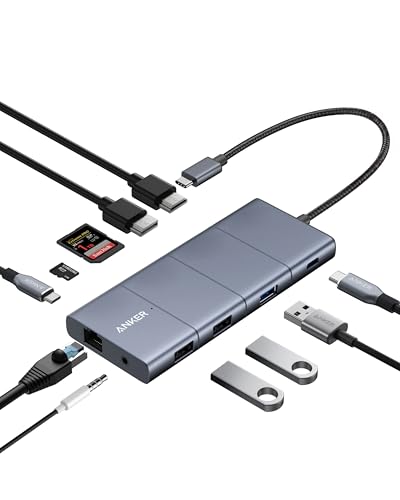
4. Anker 11-in-1 dual monitor dock: best value dual-monitor
£39.99, rated 4.5 stars from more than 37,000 ratings. An 11-in-1 dual-monitor dock with 4K HDMI and DisplayPort. Multi-display over standard USB-C often relies on software drivers such as DisplayLink or on your laptop’s graphics support, so check compatibility before buying.
5. Dell WD22TB4: best for Windows fleets
£156.95, rated 4.0 stars from 830 ratings (limited stock). A Thunderbolt 4 dock for dual 4K, a natural fit for Dell laptops and business fleets.

6. Baseus 11-in-1 Spacemate: best connectivity per pound
£76.99, rated 4.4 stars from 48 ratings (limited stock). Listed with support for three monitors, plus a large port selection. Build is below premium docks, and multi-display on non-Thunderbolt laptops may depend on drivers.

Selection guide
- Monitor count: one screen needs a hub; two or more need a dock; dual 4K at 60Hz points to Thunderbolt.
- Laptop: Thunderbolt 4 enables the best docks; standard USB-C is more limited.
- Essential ports: decide whether you need Ethernet, USB-A or an SD reader.
- Budget: about £25 covers essentials, about £95 gives a reliable single-monitor dock, and £150+ opens up proper dual-monitor docking.
Final verdict
For most home workers, the Anker Nano 13-in-1 is a reliable, well-built all-rounder. For dual 4K with a Thunderbolt laptop, the CalDigit TS4 is the no-compromise choice; for dual monitors on a budget, check the Anker 11-in-1 against your laptop. Buy from established brands to avoid unreliable units.