A power cut is an inconvenience for most of the house. For a home office mid-call, mid-save, or mid-upload, it can mean a lost client meeting, a corrupted file or an unsaved hour of work. A UPS – an uninterruptible power supply – sits between the wall socket and your kit, and switches to battery in the few milliseconds it takes to notice the power has gone, long before your computer even registers a blip. It will not keep you working through a three-hour outage, but it buys you the two to twenty minutes you actually need: enough to save everything, close down properly, and keep the router alive so you are not also offline the moment power comes back.
What a home-office UPS is actually for
It is worth being clear about what a UPS does and does not do. It is not a generator, and it is not there to let you keep working indefinitely through a long outage. Its job is threefold: to bridge genuinely brief drops so your kit never blinks off in the first place, to give you a safe, unhurried window to save your work and shut down properly during a longer cut, and – often the most valuable part for a home office – to keep your router and modem running for a few extra minutes so a short outage does not also cost you your internet connection for the ten minutes it takes your ISP’s equipment to resync afterwards.
It also protects against the more common problem in most of the UK: not outright blackouts, but brownouts and voltage spikes, particularly around storms or when heavy appliances like an oven or an electric shower switch on nearby. A UPS with automatic voltage regulation smooths those out before they ever reach your computer.
What to look for
- Capacity (VA/W) matched to what you are actually protecting. A UPS sized for a desktop PC, monitor, router and a desk lamp needs far less capacity than one asked to also hold up a printer or a second monitor.
- Enough outlets, and the right number of them battery-backed rather than just surge-protected. Cheaper units often only battery-back two of six sockets – check this rather than assuming every socket is protected.
- Automatic Voltage Regulation (AVR), which corrects brownouts and minor surges without switching to battery at all, saving battery cycles for when you genuinely need them.
- A genuine runtime figure for your load, not just the headline VA rating – a 700VA unit might give a monitor and router 20 minutes but a desktop PC under five.
- UK BS1363 sockets, unless you specifically want IEC (kettle-lead) outlets for rack or server-style equipment – check which your kit needs before buying.
- A genuinely audible alarm and companion software, so you get a clear warning on-screen when it switches to battery rather than discovering it only once the battery has run out.
Best UPS battery backups for home offices
All three units below were checked live on Amazon UK for stock, price and review standing before being included.
Best overall: APC Back-UPS ES BE850G2-UK
APC is the name most IT professionals reach for, and the BE850G2 is the sensible default for a home office: 850VA of capacity, eight UK three-pin outlets, and two USB charging ports for a phone or tablet. It comfortably runs a desktop PC, a monitor, a router and a desk lamp through a real power cut, and its Automatic Voltage Regulation quietly corrects the brownouts and small surges that are far more common than full outages. APC’s companion software gives you a clear warning and a graceful automatic shutdown if you are away from your desk when the power goes.
It is bulkier than a simple surge-protected extension lead, expect roughly the footprint of a shoebox under the desk, but that size is what buys the runtime.
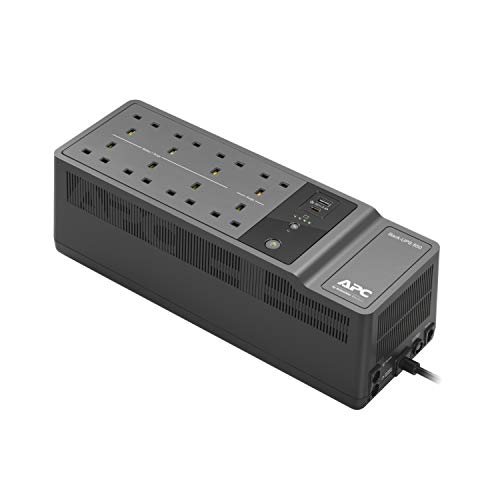
- Apc Back-UPS essential series provides battery backup and surge Protection ideal for your home and home office
- 8 total outlets: 6 battery backup with surge protection and 2 Surge Protection only
- 2 x USB Charging ports: fast speed charging, type A and C for smartphones and tablets
- Dataline Surge Protection Safeguards your equipment and valuable files from “back door” surges traveling along data lines
- Content of delivery: back UPS BE850G2-UK, user manual

Best for more kit or longer runtime: APC Back-UPS Pro BR900MI
Step up to the Back-UPS Pro range if your setup includes a second monitor, a NAS drive, or anything else that draws meaningfully more power, or if you simply want more than the ten-or-so minutes a smaller unit gives you. The BR900MI adds an LCD display showing load and remaining runtime at a glance, and dataline protection for your router’s broadband connection alongside the mains protection. Note that this model uses IEC (kettle-lead style) outlets rather than UK three-pin sockets, which suits server-style or rack equipment well but means desktop peripherals with standard UK plugs will need an adaptor or a short IEC-to-UK-socket cable – worth checking your own kit’s plugs before buying.
It costs meaningfully more than the ES range above, which is the right trade if the extra runtime and monitoring genuinely matter to your setup.

- The APC Back-UPS Pro Series offers Guaranteed battery backup and surge Protection for high performance computer systems, networks, external storage devices, game consoles and other electronics
- Lcd interface - Quick and easy to read, provides information about the utility and UPS conditions
- Automatic voltage regulation (AVR) instantly corrects voltage fluctuations so you can work indefinitely through brownouts and overvoltage
- 6 battery backup outlets (IEC) with surge protection
- Includes: APC back UPS Pro, user manual, shutdown-software
Best for just the router: Tecnoware Mini UPS
If your priority is narrower – keeping the internet connection alive through a brief cut rather than protecting a whole desktop setup – a compact router-specific UPS like this is a cheaper and tidier answer. It runs on a built-in power bank rather than a lead-acid battery, so it is small enough to sit on a shelf beside the router rather than needing floor space, and its DC outputs cover the voltages most home routers, modems and mesh nodes actually use. Up to four hours of autonomy for a low-draw router is genuinely useful during a storm-related outage, when the broadband going down alongside the mains is the more common failure than losing the desktop itself.
It will not run a desktop PC or a monitor – it is a router and modem specialist, not a general-purpose UPS, so pair it with one of the two units above if you want your whole desk covered.
No products found.
Comparison at a glance
| Model | Capacity | Outlets | Best for | Approx. price |
| APC Back-UPS ES BE850G2-UK | 850VA | 8x UK 3-pin, 2x USB | Desktop + monitor + router | £115–£135 |
| APC Back-UPS Pro BR900MI | 900VA | 6x IEC | Heavier setups, longer runtime | £220–£240 |
| Tecnoware Mini UPS | 8,800mAh power bank | DC outputs (router/modem) | Router and modem only | £30–£40 |
Simulated sine wave vs pure sine wave
One spec worth understanding before you buy: what shape of power the UPS produces once it switches to battery. Cheaper units, including the entry-level model in this guide, produce a “simulated” or “stepped” sine wave – an approximation of mains power that is perfectly safe for a standard desktop PC, monitor, router or laptop charger, all of which have power supplies designed to tolerate it. It becomes a problem only with a small category of equipment: some older or higher-end audio amplifiers, certain laser printers, and a handful of specialist devices with active power-factor-correction supplies, which can run hot, sound audibly different, or refuse to run cleanly on a simulated wave. Pure sine wave units, which reproduce mains power exactly, cost more and are worth the premium only if you know you own one of those specific device types. For a typical home-office desk – PC, monitor, router, phone charger – a simulated sine wave UPS is not a compromise; it is simply what the vast majority of desks actually need.
Sizing it correctly
Add up the wattage of what you actually want protected – a desktop PC typically draws 60–150W under normal office use, a monitor 20–40W, and a router a few watts, so a full desk setup is usually well under 300W even before you factor in the UPS derating you should apply for safety margin. Every UPS in this guide comfortably covers that combination; the difference between them is how many minutes of runtime you get once the power actually goes; the higher-capacity Pro model buys meaningfully more time if you want the option to keep working rather than simply saving and shutting down.
Do not be tempted to plug a laser printer or a space heater into a UPS – both draw far more power than these units are designed for, and a printer in particular can trip a UPS’s overload protection the moment it starts a print job. Keep those on ordinary surge-protected sockets instead.
Living with a UPS day to day
Install the manufacturer’s companion software so your computer saves your work and shuts down gracefully if you are away from your desk when a cut happens – without it, the UPS will simply run until the battery is exhausted and then cut out exactly as unhelpfully as no UPS at all. Test it occasionally by switching the wall socket off for a few seconds while nothing important is running, just to confirm the alarm sounds and the battery picks up the load. And expect to replace the internal battery every three to five years – all the units above use user-replaceable batteries, so this is a cheap part swap rather than buying a whole new unit.
Noise, heat and where to actually put it
A UPS under load hums faintly and its cooling fan, where fitted, spins up briefly during the self-test it runs every few weeks – both are normal and neither is loud enough to matter on a call, but it is still worth siting the unit under the desk rather than directly beside your head at ear height. All three units above run cool in normal use; genuine heat only becomes a concern if you overload one, which the outlet count and wattage guidance above should keep you well clear of. Leave a few centimetres of clearance around the vents on any unit with a fan, and avoid standing it directly on carpet, which can trap the warm air a battery gives off during a long charge cycle.
Which UPS should you buy?
For most home offices, the APC Back-UPS ES BE850G2-UK is the right starting point: enough capacity for a desktop, monitor and router, genuine UK sockets, and the brand every IT department already trusts. If your setup is heavier, or you want meaningfully longer runtime and a clear at-a-glance display, step up to the Back-UPS Pro BR900MI and budget for an IEC cable adaptor if your peripherals use UK plugs. And if all you actually care about is not losing the internet connection during a brief outage, the Tecnoware Mini UPS does that one job cheaply and neatly, without the bulk of a full desktop unit.
Whichever you choose, install the shutdown software on day one – the battery only helps if your computer knows to use the extra minutes wisely.