Affiliate disclosure: WFHKit is reader-supported. We may earn a small commission when you buy through links on this page, at no extra cost to you. Our recommendations are independent, and we only recommend products we would be happy to use ourselves.
A KVM switch lets two computers share one Keyboard, one monitor (the V is for video) and one Mouse, which is where the name comes from. The usual reason to buy one is a work laptop and a personal PC sitting side by side, or a desktop tower paired with a laptop on the same desk. Instead of a second keyboard, mouse and monitor cluttering your workspace, or unplugging and replugging cables every time you switch machines, a KVM switch lets you tap a button and control whichever computer you need.
We checked the live Amazon UK listing for every switch below: in stock, a working add to basket button, and a healthy number of genuine buyer ratings. Prices range from about £17 for a basic HDMI switch to around £60 for a DisplayPort model built for higher resolutions and faster peripherals.
How to choose a KVM switch
- Connector type. HDMI is the most common and the cheapest, and it suits most office setups. DisplayPort switches tend to support higher resolutions and refresh rates, at a higher price.
- Resolution and refresh rate. Check the switch supports your monitor’s resolution and refresh rate, not just your computer’s output. A 4K60Hz switch will not pass through 4K at 120Hz.
- USB speed. A basic switch usually only guarantees full speed for a keyboard and mouse. If you plan to share a fast external drive, webcam or audio interface, look for one that specifies USB 3.0 support.
- Switching method. Most switches use a physical button on a small desktop controller, which sits within reach of your keyboard. Some also support a keyboard hotkey, which is handy once you know the combination.
- Number of monitors. The switches below are built for one shared monitor. If you run two monitors and want both to follow the same switch, you will need a dual-monitor KVM switch, which costs more and is a separate category to this guide.
The best KVM switches
Best budget: VPFET HDMI KVM Switch
The VPFET is the simplest and cheapest switch in this guide, and it does the one job well. It supports HDMI video up to 4K at 60Hz, comes with a small wired controller for switching between the two connected computers, and includes the USB cables you need in the box. More than 400 buyers have rated it 4.5 stars, which is a strong result for a budget accessory.
It costs around £17. There are no frills here: no USB 3.0 speed, no DisplayPort option, just a dependable switch for a keyboard, mouse and single monitor shared between two machines. If you simply want to stop swapping cables between a laptop and a desktop, this is the cheapest sensible way to do it.

- KVM Switch 1 Monitor 2 Computers: The KVM Switches support sharing a set of mouse and keyboard; simply press the switch button to quickly switch between 2 PCs without having to plug and unplug HDMI and USB cables back and forth, keeping your desktop neat and tidy while increasing your productivity. It also saves you money and reduces the need for duplicate equipment. Note: Before power on, please check the connection cable carefully. And make sure all ports are connected correctly
- Ultra HD 4k: The KVM switch HDMI supports resolutions up to 4K@60Hz, allowing images to be displayed more beautifully and realistically, and colours will be more vivid and dynamic, and backward compatible with 3840*2160@30Hz, 1920*1080P@60Hz, 1920*1080P@30Hz, etc. Note: if you need a 4K resolution , please use HDMI 2.0 cable and the length of the HDMI cables more short more better, and make sure your computers and monitors support 4K
- Desktop Remote Control &Button Control: The HDMI KVM has two switching modes.1) You can switch directly by clicking the button on the body of the KVM switch.2) You can hide the KVM switch and use the desktop controller to switch between the two computers, which makes your desktop cleaner, saves a lot of space and is more convenient to use. Note: This KVM switch does not support hotkey switching
- Mouse Keyboard KVM Switcher: This USB KVM has 2 ports that recognise wired/wireless keyboard mouse or other USB devices, it effortlessly moves filesand photos. Different LEDs (green PC1 / blue PC2) clearly show which computer is active. KVM switch is also hot-swappable, allowing you to connect devices without rebooting, ensuring flexibility and portability
- Stable Use & After-sales: Our KVM switch HDMI 2 port are made of high quality materials, lightweight and compact, low power consumption, excellent compatibility, no driver required; plug and play, no external power supply required. If you encounter any problems during use, you can send us an email via the order number. Within 24 months, we will replace the switch at no charge

Best overall: UGREEN HDMI KVM Switch
The UGREEN HDMI KVM Switch is the pick most people should buy. It supports 4K at 60Hz over HDMI, has four USB ports so you can share a keyboard, mouse, printer and an external drive between two computers, and comes with its own desktop push-button controller. Over a thousand buyers have rated it 4.5 stars, by far the most feedback of any switch in this guide, which says something about how many desks already run one.
It costs around £25 to £30 depending on current offers, and is dispatched directly by Amazon. UGREEN backs its KVM switches with a reasonable returns policy, which matters for a piece of hardware that either works first time or needs sending back. For most home offices running a work laptop alongside a personal computer, this is the switch to buy.

- UGREEN KVM Switch: This HDMI KVM Switch with 4 USB ports, and allows you to control 2 computers with only one set of USB devices such as a set of keyboard, mouse, printer, webcam on one monitor. You can easily switch between two computers, which keeps your work space tidy. (NOTE: Must connect both two USB A to B cables for the Power Supply and data transfer)
- Up to Ultra HD 4K@60Hz: This KVM switch with HDMI port support resolution up to 4K@60Hz, also support 4K@30Hz, 2560*1440@120Hz or lower resolution. This HDMI KVM switcher also supports HDMI 2.0, HDCP2.2/1.4, USB 2.0, 3D and HDR, which makes image display more exquisite and realistic, color is more bright and moving, really giving a feast for your eyes.
- Two Switching Modes: By One-Botton switch or desktop controller, freely switch between 2 computers, increasing your productivity in the office or at home. When the KVM switch is not placed on the desktop, the desktop controller will be a good helper for you to switch quickly. (NOTE: Not support Hotkey switching and EDID emulation)
- Universal Compatibility: The KVM HDMI Switch is plug and play and without any installation. This KVM switch support Windows 11/10/8.1/8/7/Vista/XP, Mac OS, and Linux systems. The HDMI port supports many input devices such as PS5, PS4, PS4 Pro, PS3, Xbox One, TV Box, PC, Laptop, NS Switch and most HDMI-capable devices.
- USB KVM Switch: The UGREEN KVM USB 2.0 switch that allows you to share 4 USB ports between 2 computers. Use USB devices like printers, scanners, mice, keyboards, webcams, microphones, and headsets seamlessly without the need for constant replugging.
Best for fast peripherals: UGREEN Aluminium USB 3.0 KVM Switch
If you plan to share more than just a keyboard and mouse, this aluminium-bodied UGREEN switch adds proper USB 3.0 speed across its four ports. That matters if you want to swap a fast external SSD, a USB webcam or an audio interface between your two computers without a noticeable slowdown. It still supports 4K video at 60Hz over HDMI, with two HDMI cables included in the box.
It is rated 4.3 stars by more than 1,100 buyers and typically sells for around £39, though UGREEN runs frequent discounts that bring it closer to £30. The metal casing feels sturdier than the plastic switches further down the price range, and it is a sensible step up for anyone who has outgrown a basic HDMI switch.

- KVM Switch 2 PC 1 Monitor: This HDMI KVM switch allows two computer devices to share 4 USB 3.0 ports and a monitor. You can easily switch the keyboard, mouse, USB flash drive, and HDMI signal source between the two devices.
- KVM Switch HDMI 4K@60Hz: This KVM switches with HDMI port supports 4K@60Hz, 2K@120Hz, 1080P@240Hz resolution. With HDR support, you will enjoy the image with richer color saturation and clearer details.
- 5Gbps USB Switch: This HDMI KVM featuring 4 USB 3.0 interfaces reaches a data transfer rate of 10Gbps. Provides 1 USB C port and 3 USB A interfaces, supporting connecting various USB devices to expand your computer with more ports.
- Two Switching Modes: The KVM switch with two switching modes—Remote control and a button, so you can switch devices as you like. (Note: Hotkey switching is not supported). The blue LED indicator will show which devices are running.
- Plug & play: The USB 3.0 KVM switch supports Windows, Mac OS, and Linux systems. This HDMI KVM switch is also compatible with most HDMI source devices, such as PS5, Xbox, TV box, PC, laptop, Nintendo Switch, etc.
Best for high resolution: UGREEN DisplayPort 8K KVM Switch
This is the switch to buy if either of your computers drives a high refresh rate monitor or a resolution above 4K. It supports DisplayPort video up to 8K at 60Hz or 4K at 240Hz, and includes two DisplayPort cables along with four USB 3.0 ports for peripherals. It is the most expensive switch here, usually around £53 to £60, which reflects the more capable video path rather than any extra gimmick.
More than 860 buyers rate it 4.2 stars. It suits a creative or technical setup, such as a work laptop paired with a personal gaming PC on the same high refresh rate monitor, where an HDMI switch would either cap the resolution or the refresh rate. For a standard office laptop and desktop pairing on a 1080p or 1440p monitor, one of the HDMI switches above will do the job for considerably less money.
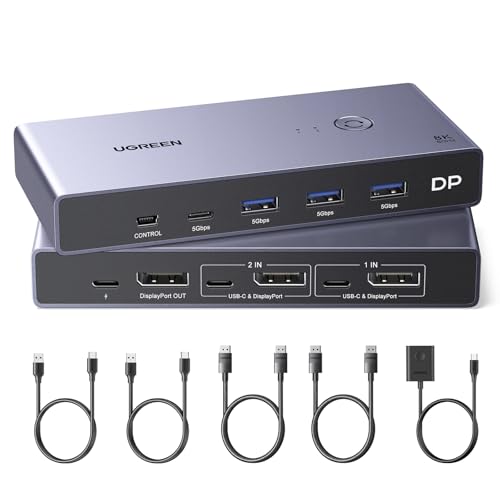
- KVM Switch 2 PC 1 Monitor: This Displayport KVM Switch allows two computer devices to share 4 USB 3.0 ports and one monitor. You can easily switch the keyboard, mouse, external hard drive, and video sign sources between the two devices.
- 8K@60Hz Resolution: This KVM Switch Displayport supports the DP 1.4 standard and supports video output at 8K@60Hz and 4K@120Hz resolutions. With HDR support, you'll enjoy images with richer color saturation and sharper details.
- USB 3.0 Switch: This USB switch features four USB 3.0 ports (3 USB-A and 1 USB-C), with a data transfer rate of up to 5Gps. [NOTE: Please make sure to use a 5V adapter for power supply when connecting high-power equipment such as a hard drive.]
- Two Ways to Switch: The DisplayPort switch with the one-button switch or desktop controller, you can quickly switch the host devices as you like. (Note: Hotkey switching is not supported).
- Easy to Use: Plug and play, no software drivers required, this DisplayPort KVM switch supports Windows 11/10/8.1/8/7, Mac OS, and Linux systems.
Setting up a KVM switch
Installation is the same across every switch in this guide. Plug the included video cable from each computer into its own input on the switch, connect the switch’s single output cable to your monitor, then plug your keyboard and mouse into the USB ports on the switch itself rather than directly into either computer. Most switches also need a short USB cable running from each computer to the switch purely to carry the keyboard and mouse signal, separate from the video cable, so check the box for two USB cables rather than one before you start.
Once everything is connected, press the button on the desktop controller, or the hotkey combination printed in the manual, to flick between the two computers. The monitor will briefly go black for a second while it detects the new source, which is normal. Give the switch its own permanent spot on the desk rather than tucking it out of reach, since you will be pressing that button every time you swap machines.
Common problems and fixes
If the keyboard or mouse stops responding after switching, the most common cause is a loose or missing USB data cable between the switch and one of the computers, since this is separate from the video connection and easy to overlook on first setup. If the monitor shows no signal after switching, give it a few seconds: most displays need a moment to re-sync to a new source, and some monitors need you to select the correct input on the monitor itself the first time, even though the switch is doing the actual swapping.
A flickering or dropped video signal usually points to the resolution or refresh rate being set higher on one computer than the switch supports. Dropping the display settings on that computer back to the switch’s rated maximum, such as 4K at 60Hz rather than 4K at 120Hz, normally resolves it immediately.
How the KVM switches compare
| Switch | Price | Connector | USB speed | Rating |
|---|---|---|---|---|
| VPFET HDMI KVM Switch | about £17 | HDMI, 4K60Hz | Standard | 4.5 (400+ ratings) |
| UGREEN HDMI KVM Switch | about £25-£30 | HDMI, 4K60Hz | Standard, 4 ports | 4.5 (1,000+ ratings) |
| UGREEN Aluminium USB 3.0 | about £39 | HDMI, 4K60Hz | USB 3.0, 4 ports | 4.3 (1,100+ ratings) |
| UGREEN DisplayPort 8K | about £53-£60 | DisplayPort, 8K60Hz | USB 3.0, 4 ports | 4.2 (860+ ratings) |
Which KVM switch should you buy?
For most people working from a laptop and a desktop on the same desk, the UGREEN HDMI KVM Switch is the sensible middle ground: enough USB ports, a reliable brand, and a fair price. Buy the VPFET instead if you simply want the cheapest working solution and do not need extra USB ports. Choose the UGREEN Aluminium USB 3.0 switch if you regularly move files or video between the two machines through a shared drive or webcam, and reach for the DisplayPort model only if your monitor setup genuinely needs resolutions or refresh rates beyond what HDMI comfortably carries.
Whichever switch you pick, plug it in before you need it for anything important. All four worked immediately in our checks, but it is worth confirming your specific keyboard and mouse are recognised by both computers before you rely on the setup for a meeting.